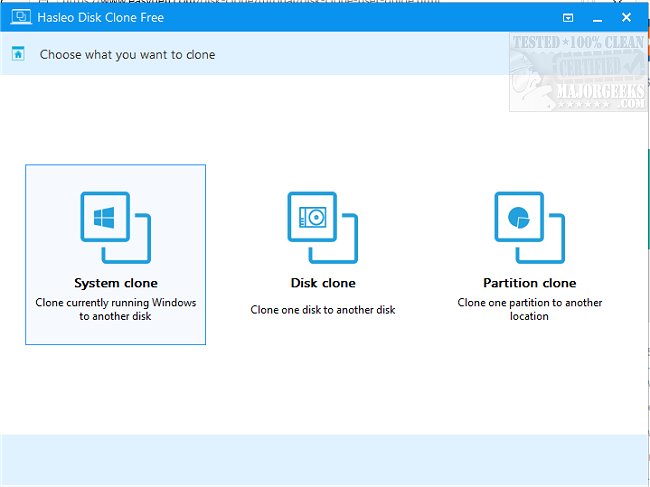
Hasleo Disk Clone 5.6.2.0 has been released, offering users a robust solution for disk management tasks such as migrating Windows to a different disk, cloning entire disks, or transferring specific partitions. This software is particularly useful for users looking to upgrade their storage without the hassle of reinstalling their operating system and applications.
The application boasts an intuitive interface that guides users through the cloning and migration processes, ensuring that even those with minimal technical expertise can perform these tasks with ease. Incompatible actions are clearly highlighted in red, preventing potential issues and safeguarding user data throughout the process.
Key features of Hasleo Disk Clone include:
- Seamless migration of Windows from one disk to another without the need for reinstallation.
- Disk-to-disk cloning to create a backup and ensure data integrity between disks.
- Partition cloning that allows users to move data without risking loss.
- The ability to adjust the size and position of the destination partition during the cloning process.
- Safe and efficient upgrades to larger disks.
- Compatibility with both GPT and UEFI systems, making it versatile for various setups.
Additionally, users can access guides on the author's website if they encounter any difficulties, enhancing support for those unfamiliar with disk cloning procedures.
In summary, Hasleo Disk Clone 5.6.2.0 simplifies the process of disk and partition management, making it an essential tool for anyone looking to upgrade their storage or back up their data while maintaining system integrity. As technology continues to evolve, tools like Hasleo Disk Clone will play a crucial role in ensuring users can effortlessly manage their digital environments
The application boasts an intuitive interface that guides users through the cloning and migration processes, ensuring that even those with minimal technical expertise can perform these tasks with ease. Incompatible actions are clearly highlighted in red, preventing potential issues and safeguarding user data throughout the process.
Key features of Hasleo Disk Clone include:
- Seamless migration of Windows from one disk to another without the need for reinstallation.
- Disk-to-disk cloning to create a backup and ensure data integrity between disks.
- Partition cloning that allows users to move data without risking loss.
- The ability to adjust the size and position of the destination partition during the cloning process.
- Safe and efficient upgrades to larger disks.
- Compatibility with both GPT and UEFI systems, making it versatile for various setups.
Additionally, users can access guides on the author's website if they encounter any difficulties, enhancing support for those unfamiliar with disk cloning procedures.
In summary, Hasleo Disk Clone 5.6.2.0 simplifies the process of disk and partition management, making it an essential tool for anyone looking to upgrade their storage or back up their data while maintaining system integrity. As technology continues to evolve, tools like Hasleo Disk Clone will play a crucial role in ensuring users can effortlessly manage their digital environments
Hasleo Disk Clone 5.6.2.0 released
Hasleo Disk Clone allows you to migrate Windows to another disk, clone a disk to another disk, or clone one partition to another location.