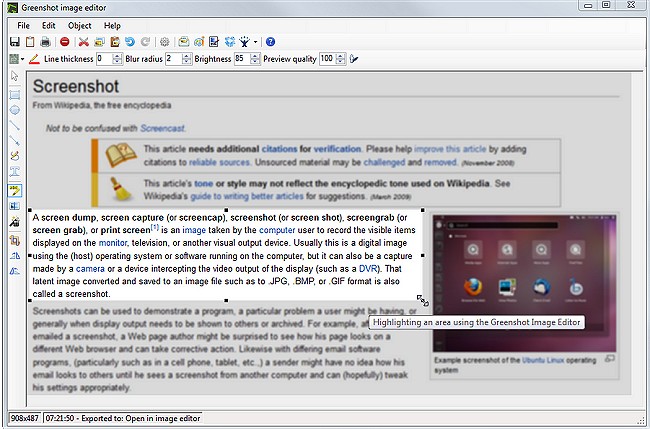
Greenshot 1.3.311 has been released, enhancing its reputation as a lightweight and efficient screenshot software tool for Windows users. This application allows users to capture exactly what they need from their screens, whether it's a specific section, an entire window, or the whole desktop. A standout feature is its ability to capture scrolling web pages, eliminating the need for multiple screenshots and making the process of obtaining information seamless and efficient.
Once a screenshot is taken, users can easily make adjustments using the built-in editor. This includes options to add text, draw arrows for emphasis, or pixelate areas to protect sensitive information. The editor also supports quick edits such as resizing and cropping, ensuring that users have all the necessary tools at their fingertips without overwhelming them with complicated features.
Sharing screenshots is straightforward, with options to save locally, print, email, or send directly to applications like Word or PowerPoint. The integration with cloud services such as Dropbox further enhances its functionality.
What sets Greenshot apart is its high level of customization. Users can configure settings to determine where screenshots are saved, set up hotkeys for rapid access, and even activate an "Expert Mode" for advanced editing options. Additionally, Greenshot is designed to be lightweight, running quietly in the system tray without consuming significant resources or displaying intrusive pop-ups.
In conclusion, Greenshot is an invaluable tool that many users may not realize they need until they try it. Its speed, power, and absence of unnecessary features make it a strong choice for anyone needing efficient screenshot capabilities. Best of all, it is free to use, making it accessible for anyone looking to improve their screenshot experience.
Looking ahead, future updates could further streamline the user experience by enhancing cloud service integrations or adding more advanced editing features. As the demand for efficient digital communication continues to rise, tools like Greenshot will likely become essential for both personal and professional use, reinforcing its place in the digital toolbox of users everywhere
Once a screenshot is taken, users can easily make adjustments using the built-in editor. This includes options to add text, draw arrows for emphasis, or pixelate areas to protect sensitive information. The editor also supports quick edits such as resizing and cropping, ensuring that users have all the necessary tools at their fingertips without overwhelming them with complicated features.
Sharing screenshots is straightforward, with options to save locally, print, email, or send directly to applications like Word or PowerPoint. The integration with cloud services such as Dropbox further enhances its functionality.
What sets Greenshot apart is its high level of customization. Users can configure settings to determine where screenshots are saved, set up hotkeys for rapid access, and even activate an "Expert Mode" for advanced editing options. Additionally, Greenshot is designed to be lightweight, running quietly in the system tray without consuming significant resources or displaying intrusive pop-ups.
In conclusion, Greenshot is an invaluable tool that many users may not realize they need until they try it. Its speed, power, and absence of unnecessary features make it a strong choice for anyone needing efficient screenshot capabilities. Best of all, it is free to use, making it accessible for anyone looking to improve their screenshot experience.
Looking ahead, future updates could further streamline the user experience by enhancing cloud service integrations or adding more advanced editing features. As the demand for efficient digital communication continues to rise, tools like Greenshot will likely become essential for both personal and professional use, reinforcing its place in the digital toolbox of users everywhere
Greenshot 1.3.311 released
Greenshot is a light-weight screenshot software tool for Windows.