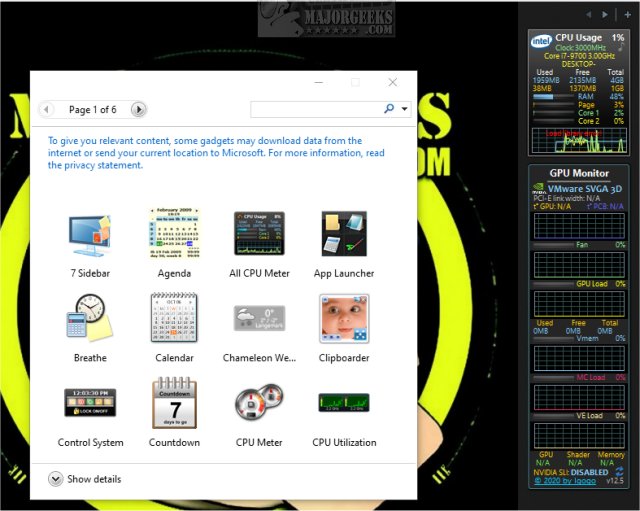
GPU Monitor 13.7 has been released, providing a Windows gadget that allows users to monitor the performance of their NVIDIA or Radeon graphics cards. It's essential to note that Microsoft previously removed gadgets from Windows due to security concerns. To use GPU Monitor, users must install either 8GadgetPack or Desktop Gadgets Revived, which offer a selection of vetted gadgets. While the risk of using third-party gadgets has diminished over time, caution is still advised when adding new ones.
Once installed, GPU Monitor displays various performance metrics, including GPU temperature, fan speed, GPU load, virtual memory usage, memory controller load, video engine load, and SLI status. Although Microsoft discontinued native gadget support, users can easily install GPU Monitor by double-clicking the GPUMonitor.gadget file, assuming they have enabled the necessary functionality or installed a third-party tool. The gadget is efficient, utilizing around 5% of CPU resources and 50MB of memory, which should not significantly impact overall system performance.
In addition to monitoring graphics cards, users may also find value in learning how to download the latest drivers for Windows, understanding Windows DCH drivers, and familiarizing themselves with the Windows Hardware Quality Labs (WHQL). Furthermore, users can explore options to show or hide the NVIDIA Control Panel and the GPU activity icon in the system tray, enhancing their overall experience with GPU management on Windows systems.
Extended Summary:
The release of GPU Monitor 13.7 brings an essential tool for gamers and professionals who rely on NVIDIA or Radeon graphics cards. As the landscape of Windows gadgets has evolved, this tool stands out as a reliable choice for monitoring GPU performance metrics. Users should remain aware of the security implications associated with gadgets and take the necessary precautions when installing them.
With the rise of high-performance gaming and graphic-intensive applications, tools like GPU Monitor become increasingly important for maintaining optimal system performance. Users are encouraged to leverage GPU Monitor's capabilities to keep an eye on their graphics card's health and performance, ensuring that they can make informed decisions when it comes to system upgrades or troubleshooting. As technology continues to advance, staying updated with drivers and understanding the nuances of Windows functionalities will further empower users in optimizing their computing experience
Once installed, GPU Monitor displays various performance metrics, including GPU temperature, fan speed, GPU load, virtual memory usage, memory controller load, video engine load, and SLI status. Although Microsoft discontinued native gadget support, users can easily install GPU Monitor by double-clicking the GPUMonitor.gadget file, assuming they have enabled the necessary functionality or installed a third-party tool. The gadget is efficient, utilizing around 5% of CPU resources and 50MB of memory, which should not significantly impact overall system performance.
In addition to monitoring graphics cards, users may also find value in learning how to download the latest drivers for Windows, understanding Windows DCH drivers, and familiarizing themselves with the Windows Hardware Quality Labs (WHQL). Furthermore, users can explore options to show or hide the NVIDIA Control Panel and the GPU activity icon in the system tray, enhancing their overall experience with GPU management on Windows systems.
Extended Summary:
The release of GPU Monitor 13.7 brings an essential tool for gamers and professionals who rely on NVIDIA or Radeon graphics cards. As the landscape of Windows gadgets has evolved, this tool stands out as a reliable choice for monitoring GPU performance metrics. Users should remain aware of the security implications associated with gadgets and take the necessary precautions when installing them.
With the rise of high-performance gaming and graphic-intensive applications, tools like GPU Monitor become increasingly important for maintaining optimal system performance. Users are encouraged to leverage GPU Monitor's capabilities to keep an eye on their graphics card's health and performance, ensuring that they can make informed decisions when it comes to system upgrades or troubleshooting. As technology continues to advance, staying updated with drivers and understanding the nuances of Windows functionalities will further empower users in optimizing their computing experience
GPU Monitor 13.7 released
GPU Monitor is a Windows gadget that monitors your NVIDIA or Radeon graphics cards.