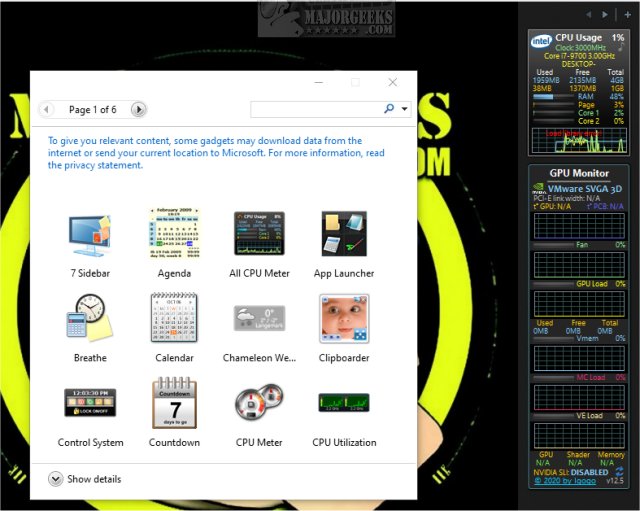
GPU Monitor 13.3 has been released as a Windows gadget designed to monitor NVIDIA and Radeon graphics cards. Before diving into its features, it's important to note that Windows previously removed gadgets due to security concerns. Users wishing to utilize gadgets must install third-party applications like 8GadgetPack or Desktop Gadgets Revived, which provide a collection of safe and tested gadgets. While the risks of using third-party gadgets have decreased, caution is still advised when adding any new ones beyond the provided options.
The GPU Monitor is recognized as a reliable and safe tool that offers a comprehensive overview of your graphics card's performance. Once installed, it displays detailed metrics such as GPU temperature, fan speed, GPU load, virtual memory usage, memory controller (MC) load, video engine (VE) load, and SLI status.
To install the GPU Monitor, users can simply double-click the GPUMonitor.gadget file, although they may need a third-party tool to enable gadget functionality. Importantly, the GPU Monitor is designed to have a minimal impact on system performance, utilizing approximately 5% of CPU resources and 50MB of memory.
In addition to the GPU Monitor, the text alludes to related topics such as downloading the latest drivers for Windows, understanding Windows DCH drivers, and managing the NVIDIA Control Panel settings, which can further enhance the user's experience with their graphics hardware.
To extend this information, users interested in optimizing their gaming or graphic-intensive applications should consider not only using GPU Monitor but also regularly updating their drivers for optimal performance. They might also explore additional monitoring tools that provide even more detailed analytics, such as real-time performance graphs or integration with overclocking software, to further enhance their graphics card management. Furthermore, staying informed about system updates and security measures related to gadgets can ensure a smooth and secure user experience
The GPU Monitor is recognized as a reliable and safe tool that offers a comprehensive overview of your graphics card's performance. Once installed, it displays detailed metrics such as GPU temperature, fan speed, GPU load, virtual memory usage, memory controller (MC) load, video engine (VE) load, and SLI status.
To install the GPU Monitor, users can simply double-click the GPUMonitor.gadget file, although they may need a third-party tool to enable gadget functionality. Importantly, the GPU Monitor is designed to have a minimal impact on system performance, utilizing approximately 5% of CPU resources and 50MB of memory.
In addition to the GPU Monitor, the text alludes to related topics such as downloading the latest drivers for Windows, understanding Windows DCH drivers, and managing the NVIDIA Control Panel settings, which can further enhance the user's experience with their graphics hardware.
To extend this information, users interested in optimizing their gaming or graphic-intensive applications should consider not only using GPU Monitor but also regularly updating their drivers for optimal performance. They might also explore additional monitoring tools that provide even more detailed analytics, such as real-time performance graphs or integration with overclocking software, to further enhance their graphics card management. Furthermore, staying informed about system updates and security measures related to gadgets can ensure a smooth and secure user experience
GPU Monitor 13.3 released
GPU Monitor is a Windows gadget that monitors your NVIDIA or Radeon graphics cards.