Gopeed 1.9.2 has been released, enhancing the functionality of this versatile file download utility designed for high-speed downloads across various platforms. Known as Go Speed, it supports multiple protocols, including HTTP, BitTorrent, and Magnet, ensuring users experience efficient and seamless downloading.
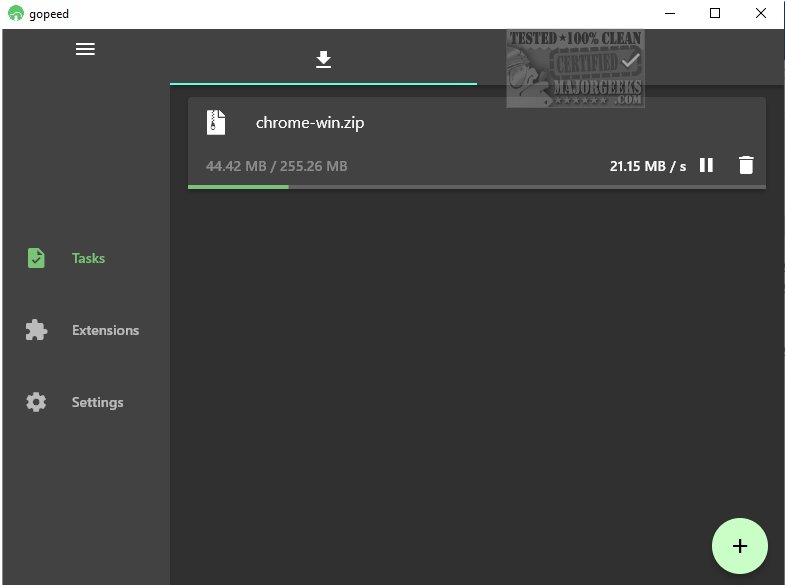
One of Gopeed's standout features is its high level of customization. Users can integrate additional functionalities through APIs or develop extensions, making it more than just a traditional download manager. The interface is user-friendly and organized, featuring two tabs: one for active downloads and another for completed tasks. Active downloads display essential information such as total file size, amount downloaded, and current speed.
Before initiating downloads, users are encouraged to review and configure settings to ensure files download to their preferred locations. Advanced options are also available for customization, allowing users to specify details like user agents, cookies, and referrers when using the HTTP protocol. This functionality is particularly useful for accessing files that may be geo-restricted.
Gopeed serves as an ideal solution for regular web file downloads, particularly for those seeking a lightweight and minimalist downloader. Its simple interface is complemented by advanced features that cater to a variety of downloading needs.
In addition to its core functionalities, Gopeed users might also benefit from resources on improving wireless network performance, troubleshooting slow internet on Windows, monitoring internet usage, checking Wi-Fi security settings, and understanding Windows Auto-Tuning. This makes Gopeed not just a download manager but part of a broader toolkit for optimizing online experiences
One of Gopeed's standout features is its high level of customization. Users can integrate additional functionalities through APIs or develop extensions, making it more than just a traditional download manager. The interface is user-friendly and organized, featuring two tabs: one for active downloads and another for completed tasks. Active downloads display essential information such as total file size, amount downloaded, and current speed.
Before initiating downloads, users are encouraged to review and configure settings to ensure files download to their preferred locations. Advanced options are also available for customization, allowing users to specify details like user agents, cookies, and referrers when using the HTTP protocol. This functionality is particularly useful for accessing files that may be geo-restricted.
Gopeed serves as an ideal solution for regular web file downloads, particularly for those seeking a lightweight and minimalist downloader. Its simple interface is complemented by advanced features that cater to a variety of downloading needs.
In addition to its core functionalities, Gopeed users might also benefit from resources on improving wireless network performance, troubleshooting slow internet on Windows, monitoring internet usage, checking Wi-Fi security settings, and understanding Windows Auto-Tuning. This makes Gopeed not just a download manager but part of a broader toolkit for optimizing online experiences
Gopeed 1.9.2 released
Gopeed (aka Go Speed) is a versatile file download utility for high-speed downloads across multiple platforms.