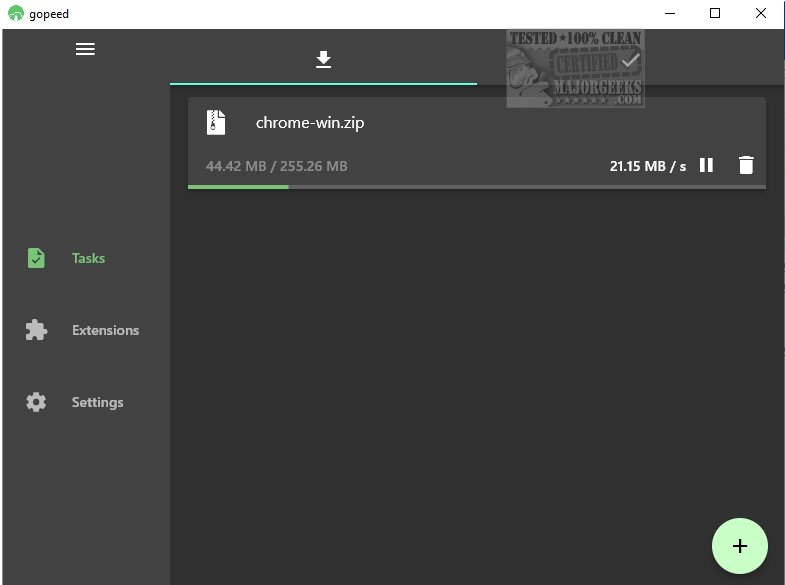
Gopeed, also known as Go Speed, is an advanced file download utility that facilitates high-speed downloads across various platforms. This tool supports multiple protocols including HTTP, BitTorrent, and Magnet, providing users with an efficient and seamless downloading experience.
Customizability and Integration
What sets Gopeed apart from traditional download managers is its high level of customizability. Users can integrate additional features through APIs or develop extensions, tailoring the utility to their specific needs.
User-Friendly Interface
Gopeed boasts an intuitive interface that is clean and easy to navigate. It features two main tabs: one for active downloads and another for completed tasks. Users can easily monitor ongoing downloads with essential information like the total file size, amount downloaded, and download speed.
Configurable Settings for Enhanced Performance
Before initiating downloads, users are encouraged to review and adjust settings to ensure files are saved in their preferred locations. Additionally, before creating a download task, users can access advanced options to customize requests by specifying details such as user agents, cookies, and referrers, which can be particularly useful for accessing geographically restricted files.
Ideal for Lightweight Downloading Needs
Gopeed is an excellent choice for users seeking a lightweight and minimalist downloader. Its simple interface is complemented by advanced features, making it versatile enough to meet diverse downloading requirements.
Related Topics for Further Exploration
- How to Improve Your Wireless Network Performance
- How to Fix Slow Internet on Windows 10 & 11
- How to Show Your Internet Upload, Download, and Usage on the Taskbar
- How to See Your Network Adapter Speed in Windows 10 & 11
- What is Windows Auto-Tuning?
- How to Check Wi-Fi Security Settings in Windows
Extension of Features and Future Updates
As Gopeed evolves, future updates are expected to introduce even more functionalities, such as enhanced support for additional file types, improved user interface options, and optimizations for even faster download speeds. Users can look forward to updates that may include integration with cloud services, allowing for direct downloads to cloud storage, and further enhancements in security features to protect user data during downloads. Overall, Gopeed aims to remain at the forefront of download management solutions by continuously adapting to user needs and technological advancements
Customizability and Integration
What sets Gopeed apart from traditional download managers is its high level of customizability. Users can integrate additional features through APIs or develop extensions, tailoring the utility to their specific needs.
User-Friendly Interface
Gopeed boasts an intuitive interface that is clean and easy to navigate. It features two main tabs: one for active downloads and another for completed tasks. Users can easily monitor ongoing downloads with essential information like the total file size, amount downloaded, and download speed.
Configurable Settings for Enhanced Performance
Before initiating downloads, users are encouraged to review and adjust settings to ensure files are saved in their preferred locations. Additionally, before creating a download task, users can access advanced options to customize requests by specifying details such as user agents, cookies, and referrers, which can be particularly useful for accessing geographically restricted files.
Ideal for Lightweight Downloading Needs
Gopeed is an excellent choice for users seeking a lightweight and minimalist downloader. Its simple interface is complemented by advanced features, making it versatile enough to meet diverse downloading requirements.
Related Topics for Further Exploration
- How to Improve Your Wireless Network Performance
- How to Fix Slow Internet on Windows 10 & 11
- How to Show Your Internet Upload, Download, and Usage on the Taskbar
- How to See Your Network Adapter Speed in Windows 10 & 11
- What is Windows Auto-Tuning?
- How to Check Wi-Fi Security Settings in Windows
Extension of Features and Future Updates
As Gopeed evolves, future updates are expected to introduce even more functionalities, such as enhanced support for additional file types, improved user interface options, and optimizations for even faster download speeds. Users can look forward to updates that may include integration with cloud services, allowing for direct downloads to cloud storage, and further enhancements in security features to protect user data during downloads. Overall, Gopeed aims to remain at the forefront of download management solutions by continuously adapting to user needs and technological advancements
Gopeed 1.9.1 released
Gopeed (aka Go Speed) is a versatile file download utility for high-speed downloads across multiple platforms.