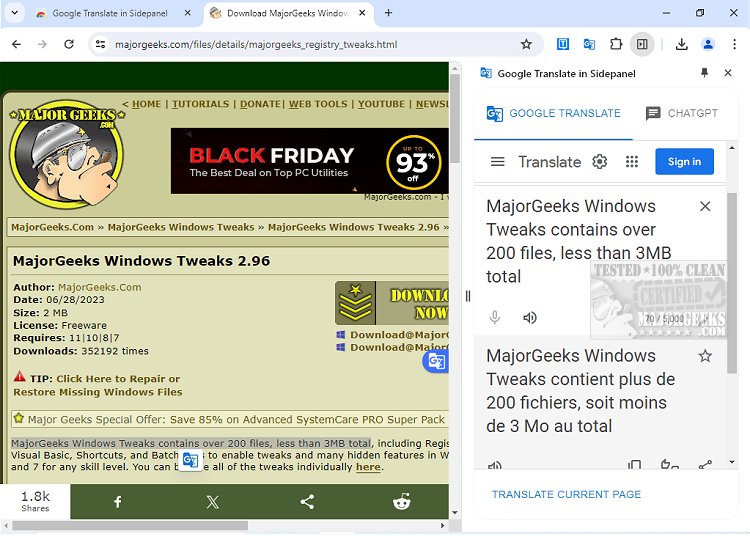
The Google Translate - Side Panel Chrome extension, recently updated to version 5.1.8, enhances web browsing by allowing users to easily translate text. This extension is particularly useful for translating various types of content on a webpage, such as articles, comments, and captions. To translate a specific section, users can highlight or right-click the desired text and click the Translate icon, which opens a window displaying the translation in the user's preferred language. For those looking to translate an entire webpage, a simple click of the translate icon on the browser toolbar accomplishes this task.
In addition to text translation, the extension supports translating images and documents. Users can drag and drop these files into the translate window for instant translation. Furthermore, the extension includes a chat feature with GPT, enabling real-time assistance with questions or translation needs.
Overall, the Google Translate - Side Panel is a versatile tool designed to help users navigate language barriers while online, making information more accessible.
To extend this, it could be beneficial to highlight potential use cases for the extension, such as aiding students in understanding foreign language articles, assisting travelers in navigating foreign websites, or helping professionals who engage in international business communication. Additionally, the integration with GPT can facilitate language learning by providing instant feedback and explanations. Future updates could focus on enhancing the user interface, improving translation accuracy, and expanding language support to further enrich the user experience
In addition to text translation, the extension supports translating images and documents. Users can drag and drop these files into the translate window for instant translation. Furthermore, the extension includes a chat feature with GPT, enabling real-time assistance with questions or translation needs.
Overall, the Google Translate - Side Panel is a versatile tool designed to help users navigate language barriers while online, making information more accessible.
To extend this, it could be beneficial to highlight potential use cases for the extension, such as aiding students in understanding foreign language articles, assisting travelers in navigating foreign websites, or helping professionals who engage in international business communication. Additionally, the integration with GPT can facilitate language learning by providing instant feedback and explanations. Future updates could focus on enhancing the user interface, improving translation accuracy, and expanding language support to further enrich the user experience
Google Translate - Side Panel 5.1.8 released
Google Translate - Side Panel Chrome extension allows you to translate text easily while browsing the web.