Glarysoft has released version 6.0.1.18 of its free startup management tool, Quick Startup. This software is designed to help users manage programs that automatically start when their computer boots up, enabling them to disable or delay these applications to enhance system boot times.
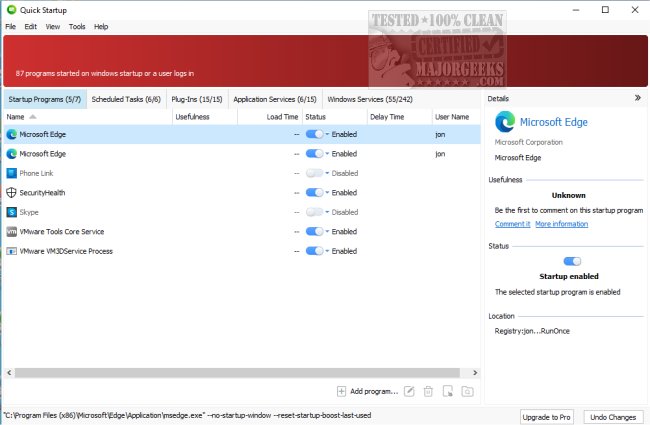
Managing startup programs can often be confusing for users who may not know which applications are necessary or beneficial. Quick Startup simplifies this process by providing a comprehensive overview of startup entries, scheduled tasks, plug-ins, application services, and Windows services. Users can easily enable or disable these entries, read detailed information about them, and even add comments for future reference. The interface is user-friendly, making it accessible for individuals with varying levels of computer expertise.
Key features of Glarysoft Quick Startup include:
- An elegant list view for browsing all startup entries.
- A security risk rating for each startup entry, helping users assess potential threats.
- Detailed information for individual startup items.
- Options to add, edit, or delete startup entries as needed.
- The ability to comment on specific program entries for better organization and understanding.
In addition to its primary functionality, users can explore similar guides on managing startup apps in Windows 10 and 11, modifying shut down options, and understanding different boot modes.
As technology continues to evolve, keeping startup programs in check is essential for maintaining optimal system performance. Tools like Glarysoft Quick Startup not only streamline this process but also enhance user knowledge about their system's functionality, contributing to a smoother computing experience
Managing startup programs can often be confusing for users who may not know which applications are necessary or beneficial. Quick Startup simplifies this process by providing a comprehensive overview of startup entries, scheduled tasks, plug-ins, application services, and Windows services. Users can easily enable or disable these entries, read detailed information about them, and even add comments for future reference. The interface is user-friendly, making it accessible for individuals with varying levels of computer expertise.
Key features of Glarysoft Quick Startup include:
- An elegant list view for browsing all startup entries.
- A security risk rating for each startup entry, helping users assess potential threats.
- Detailed information for individual startup items.
- Options to add, edit, or delete startup entries as needed.
- The ability to comment on specific program entries for better organization and understanding.
In addition to its primary functionality, users can explore similar guides on managing startup apps in Windows 10 and 11, modifying shut down options, and understanding different boot modes.
As technology continues to evolve, keeping startup programs in check is essential for maintaining optimal system performance. Tools like Glarysoft Quick Startup not only streamline this process but also enhance user knowledge about their system's functionality, contributing to a smoother computing experience
Glarysoft Quick Startup 6.0.1.18 released
Glarysoft Quick Startup is a free startup manager designed to disable or delay auto-start programs to speed up system boot times.