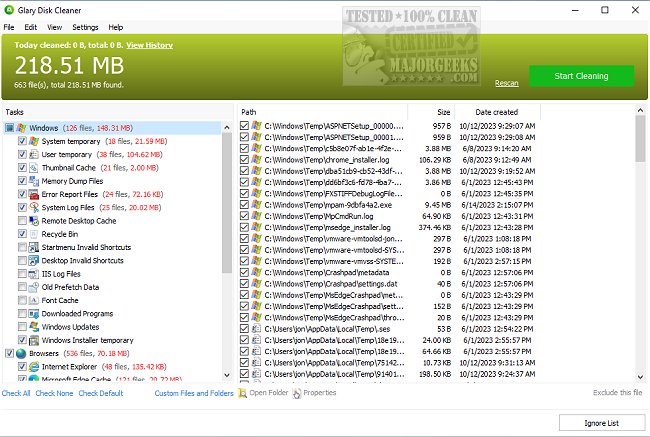
Glary Disk Cleaner version 6.0.1.39 has been released, offering users a powerful tool to enhance their system's performance, safeguard their privacy, and free up significant disk space at no cost. This software boasts an intuitive and user-friendly interface, making it accessible for users of all skill levels. Key features include an Ignore List that allows users to exclude specific files from deletion, a rapid scanning kernel for efficient file detection, the ability for custom cleaning of temporary files, and a comprehensive view of history cleanup.
In addition to Glary Disk Cleaner, users can explore alternatives like CCleaner, Wise Disk Cleaner, and PrivaZer to find the best drive cleaning solution that fits their needs. Furthermore, tips for using Windows 10 and 11 features such as Storage Sense for automatic junk file deletion, methods for removing the Windows.old folder, and instructions for securely deleting files using PowerShell and Cipher are also available.
To extend the discussion, it is important to consider the growing need for privacy protection and system optimization in an increasingly digital world. Users should regularly maintain their systems to prevent slowdowns and potential security breaches. Tools like Glary Disk Cleaner can be part of a broader strategy that includes regular updates, careful management of installed applications, and awareness of privacy settings. As technology continues to evolve, staying informed about the best practices for system maintenance and data security will be crucial for all users
In addition to Glary Disk Cleaner, users can explore alternatives like CCleaner, Wise Disk Cleaner, and PrivaZer to find the best drive cleaning solution that fits their needs. Furthermore, tips for using Windows 10 and 11 features such as Storage Sense for automatic junk file deletion, methods for removing the Windows.old folder, and instructions for securely deleting files using PowerShell and Cipher are also available.
To extend the discussion, it is important to consider the growing need for privacy protection and system optimization in an increasingly digital world. Users should regularly maintain their systems to prevent slowdowns and potential security breaches. Tools like Glary Disk Cleaner can be part of a broader strategy that includes regular updates, careful management of installed applications, and awareness of privacy settings. As technology continues to evolve, staying informed about the best practices for system maintenance and data security will be crucial for all users
Glary Disk Cleaner 6.0.1.39 released
Glary Disk Cleaner protects your privacy, optimizes system performance, and releases considerable disk space for free.