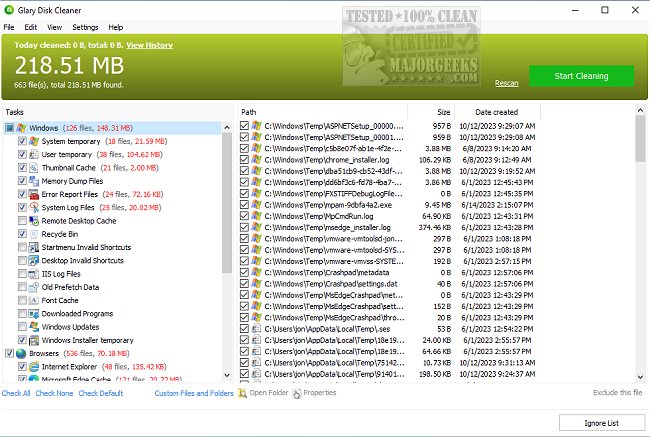
Glary Disk Cleaner version 6.0.1.38 has been released, offering users a free solution to enhance their system's performance while safeguarding their privacy and freeing up significant disk space. Key features of Glary Disk Cleaner include:
- An intuitive and easy-to-navigate interface, making it accessible for users of all experience levels.
- An Ignore List feature that allows users to exclude specific files from deletion, ensuring important data remains intact.
- A professional-grade rapid scanning kernel that quickly identifies unnecessary files.
- Customizable options for cleaning temporary files, giving users control over what is removed.
- A comprehensive overview of history cleanup, enabling users to manage their data effectively.
In comparison to other tools, Glary Disk Cleaner stands out alongside competitors like CCleaner, Wise Disk Cleaner, and PrivaZer. For Windows users, there are additional methods available for managing disk space, such as utilizing Storage Sense for automatic junk file deletion and securely removing files through PowerShell and Cipher commands.
As technology continues to evolve, the importance of maintaining a clean and optimized system becomes increasingly vital. Users can benefit from regular maintenance using tools like Glary Disk Cleaner to ensure their devices run smoothly and efficiently. Future updates may include enhanced features such as cloud storage management, deeper system integration for better privacy control, and advanced scheduling options for automatic cleanups, offering even more robust solutions for digital housekeeping
- An intuitive and easy-to-navigate interface, making it accessible for users of all experience levels.
- An Ignore List feature that allows users to exclude specific files from deletion, ensuring important data remains intact.
- A professional-grade rapid scanning kernel that quickly identifies unnecessary files.
- Customizable options for cleaning temporary files, giving users control over what is removed.
- A comprehensive overview of history cleanup, enabling users to manage their data effectively.
In comparison to other tools, Glary Disk Cleaner stands out alongside competitors like CCleaner, Wise Disk Cleaner, and PrivaZer. For Windows users, there are additional methods available for managing disk space, such as utilizing Storage Sense for automatic junk file deletion and securely removing files through PowerShell and Cipher commands.
As technology continues to evolve, the importance of maintaining a clean and optimized system becomes increasingly vital. Users can benefit from regular maintenance using tools like Glary Disk Cleaner to ensure their devices run smoothly and efficiently. Future updates may include enhanced features such as cloud storage management, deeper system integration for better privacy control, and advanced scheduling options for automatic cleanups, offering even more robust solutions for digital housekeeping
Glary Disk Cleaner 6.0.1.38 released
Glary Disk Cleaner protects your privacy, optimizes system performance, and releases considerable disk space for free.