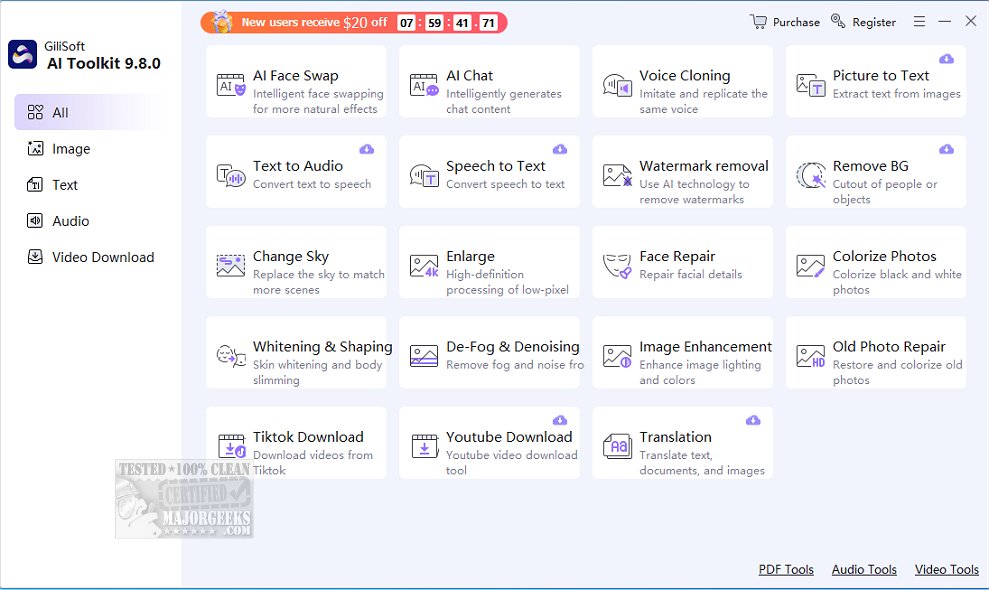
The newly released GiliSoft AI Toolkit 10.7.0 is designed to integrate artificial intelligence seamlessly into everyday tasks, offering users a powerful suite of tools without the need for coding, browser plugins, or subscriptions. This desktop-based utility simplifies various functions, allowing users to handle media editing, content translation, and document management efficiently.
Key Features of GiliSoft AI Toolkit:
GiliSoft AI Toolkit is far more than just a chatbot; it combines multiple tools into a single, user-friendly interface. Its features include:
- AI Chatbot: Functions for Q&A, brainstorming, writing assistance, and translation.
- Prompt Templates: Built-in suggestions that streamline chatbot usage.
- OCR (Optical Character Recognition): Extracts text from scanned images and PDFs.
- Text-to-Speech: Converts written text into natural-sounding audio.
- Speech-to-Text: Transcribes spoken content into editable text.
- Document & Image Translation: Translates text and images across various languages.
- Watermark Remover: Cleans up images and screenshots.
- Text-to-Video and Custom AI Presenters: Transforms written content into engaging videos.
- Photo Enhancements: Includes old photo repair, face editing, and sky replacement.
- Background and Sky Replacement Tools: Offers quick visual improvements.
- Video Background Editor: Allows background changes or blurring without a green screen setup.
All tools operate locally on Windows, ensuring high speed, security, and offline functionality.
Target Audience:
The toolkit caters to a broad audience, including:
- Content Creators: Benefit from video tools and enhancements.
- Educators and Trainers: Can digitize materials and create engaging presentations.
- Office Professionals and Remote Workers: Save time with document automation and AI support.
- Students and Researchers: Utilize OCR, translation, and writing assistance.
User Experience:
The GiliSoft AI Toolkit is designed for everyday users who want practical AI solutions. Users have appreciated the helpfulness of the AI chatbot, the effectiveness of OCR and translation tools, the clarity of text-to-speech voices, and the quality of photo and video tools.
Areas for Improvement:
While the toolkit offers a trial version, it comes with limitations. Users can test most features but must pay to save their work. A limited-use export option could enhance the trial experience. Additionally, while some photo enhancement tools are useful, they may not justify the purchase on their own.
Conclusion:
Overall, the GiliSoft AI Toolkit exemplifies effective desktop AI software—clean, powerful, and user-centric. It is an excellent choice for those seeking practical AI applications without the complications of cloud dependency or high subscription costs. Users looking to enhance productivity and streamline their workflows will find significant value in this toolkit, though they should be ready to unlock the full version for continued access beyond the trial period.
As AI technology continues to evolve, GiliSoft AI Toolkit positions itself as a reliable companion for anyone looking to integrate these advancements into their daily operations with ease
Key Features of GiliSoft AI Toolkit:
GiliSoft AI Toolkit is far more than just a chatbot; it combines multiple tools into a single, user-friendly interface. Its features include:
- AI Chatbot: Functions for Q&A, brainstorming, writing assistance, and translation.
- Prompt Templates: Built-in suggestions that streamline chatbot usage.
- OCR (Optical Character Recognition): Extracts text from scanned images and PDFs.
- Text-to-Speech: Converts written text into natural-sounding audio.
- Speech-to-Text: Transcribes spoken content into editable text.
- Document & Image Translation: Translates text and images across various languages.
- Watermark Remover: Cleans up images and screenshots.
- Text-to-Video and Custom AI Presenters: Transforms written content into engaging videos.
- Photo Enhancements: Includes old photo repair, face editing, and sky replacement.
- Background and Sky Replacement Tools: Offers quick visual improvements.
- Video Background Editor: Allows background changes or blurring without a green screen setup.
All tools operate locally on Windows, ensuring high speed, security, and offline functionality.
Target Audience:
The toolkit caters to a broad audience, including:
- Content Creators: Benefit from video tools and enhancements.
- Educators and Trainers: Can digitize materials and create engaging presentations.
- Office Professionals and Remote Workers: Save time with document automation and AI support.
- Students and Researchers: Utilize OCR, translation, and writing assistance.
User Experience:
The GiliSoft AI Toolkit is designed for everyday users who want practical AI solutions. Users have appreciated the helpfulness of the AI chatbot, the effectiveness of OCR and translation tools, the clarity of text-to-speech voices, and the quality of photo and video tools.
Areas for Improvement:
While the toolkit offers a trial version, it comes with limitations. Users can test most features but must pay to save their work. A limited-use export option could enhance the trial experience. Additionally, while some photo enhancement tools are useful, they may not justify the purchase on their own.
Conclusion:
Overall, the GiliSoft AI Toolkit exemplifies effective desktop AI software—clean, powerful, and user-centric. It is an excellent choice for those seeking practical AI applications without the complications of cloud dependency or high subscription costs. Users looking to enhance productivity and streamline their workflows will find significant value in this toolkit, though they should be ready to unlock the full version for continued access beyond the trial period.
As AI technology continues to evolve, GiliSoft AI Toolkit positions itself as a reliable companion for anyone looking to integrate these advancements into their daily operations with ease
GiliSoft AI Toolkit 10.7.0 released
Gilisoft AI Toolkit empowers you to incorporate artificial intelligence into your daily tasks seamlessly.