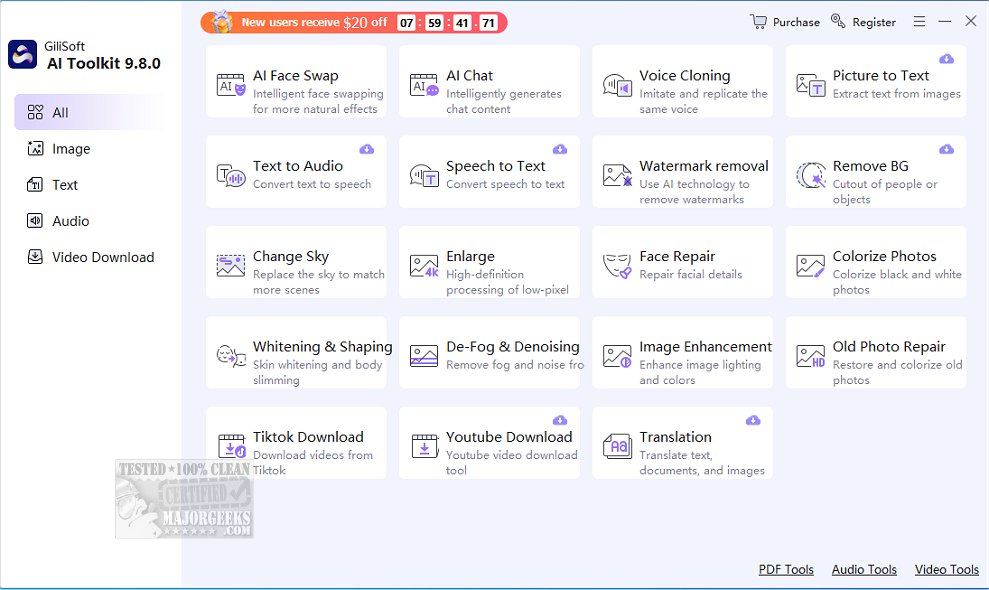
The recently released GiliSoft AI Toolkit version 10.6.0 is designed to seamlessly integrate artificial intelligence into everyday tasks for users seeking efficiency and simplicity. This desktop-based suite combines a variety of AI tools into one cohesive interface, eliminating the need for multiple applications and complex coding. The toolkit is particularly appealing for individuals involved in media editing, content translation, or document management, as it provides a wealth of AI capabilities without requiring subscriptions or browser plugins.
Core Features of GiliSoft AI Toolkit
GiliSoft AI Toolkit stands out by offering a range of practical tools that cater to different user needs:
- AI Chatbot: This feature provides assistance with Q&A, brainstorming, content writing, and translation.
- Prompt Templates: Built-in suggestions streamline the chatbot's usability.
- Optical Character Recognition (OCR): This tool extracts text from scanned images and PDF files.
- Text-to-Speech: Converts written content into natural audio.
- Speech-to-Text: Transcribes spoken words into editable text.
- Document & Image Translation: Facilitates translation across various media types.
- Watermark Remover: Enhances image quality by removing unwanted watermarks.
- Text-to-Video & Custom AI Presenters: Transforms written materials into engaging video presentations.
- Photo Enhancements and Editing: Offers tools for repairing old photos, skin smoothing, sky replacement, and more.
- Video Background Editing: Allows users to modify or blur backgrounds effortlessly.
All tools operate locally on Windows, ensuring speed, security, and reduced reliance on internet connectivity.
Target Audience
The GiliSoft AI Toolkit is tailored for a wide range of users, including:
- Content Creators: Benefit from video and photo enhancement tools.
- Educators and Trainers: Can digitize materials and create engaging presentations.
- Office Professionals and Remote Workers: Save time through document automation and AI assistance.
- Students and Researchers: Utilize OCR and translation features for academic tasks.
The toolkit is designed for everyday users who seek practical AI applications without the complexity of extensive software or coding requirements.
Pros and Cons
What We Like:
- The AI chatbot is genuinely helpful, especially with pre-made prompts.
- OCR and translation tools are efficient and support various file formats.
- Text-to-speech functionality delivers clear and natural voices.
- Photo and video editing tools are surprisingly effective for non-professional software.
- An organized interface eliminates any learning curve.
What We'd Like to See:
- The trial version has limitations; while users can explore features, saving work requires payment. A limited-use export option could enhance user experience.
- Some tools, like photo enhancers, while decent, may not be compelling enough alone to justify purchasing the software.
Conclusion: A Product Worth Exploring
The GiliSoft AI Toolkit exemplifies what desktop AI software should embody: a clean, powerful, and user-friendly experience. It is ideal for those looking to enhance productivity, refine content, or simplify tasks with practical AI tools without the clutter of cloud-based solutions or high subscription costs. For users interested in maximizing their efficiency, this toolkit is certainly worth a closer look, with the understanding that unlocking its full potential requires a purchase after the trial period.
Future Prospects
As AI technology continues to evolve, future updates to the GiliSoft AI Toolkit could expand its features, enhance user experience, and address current limitations, further solidifying its position as an essential tool for diverse user needs in an increasingly digital world
Core Features of GiliSoft AI Toolkit
GiliSoft AI Toolkit stands out by offering a range of practical tools that cater to different user needs:
- AI Chatbot: This feature provides assistance with Q&A, brainstorming, content writing, and translation.
- Prompt Templates: Built-in suggestions streamline the chatbot's usability.
- Optical Character Recognition (OCR): This tool extracts text from scanned images and PDF files.
- Text-to-Speech: Converts written content into natural audio.
- Speech-to-Text: Transcribes spoken words into editable text.
- Document & Image Translation: Facilitates translation across various media types.
- Watermark Remover: Enhances image quality by removing unwanted watermarks.
- Text-to-Video & Custom AI Presenters: Transforms written materials into engaging video presentations.
- Photo Enhancements and Editing: Offers tools for repairing old photos, skin smoothing, sky replacement, and more.
- Video Background Editing: Allows users to modify or blur backgrounds effortlessly.
All tools operate locally on Windows, ensuring speed, security, and reduced reliance on internet connectivity.
Target Audience
The GiliSoft AI Toolkit is tailored for a wide range of users, including:
- Content Creators: Benefit from video and photo enhancement tools.
- Educators and Trainers: Can digitize materials and create engaging presentations.
- Office Professionals and Remote Workers: Save time through document automation and AI assistance.
- Students and Researchers: Utilize OCR and translation features for academic tasks.
The toolkit is designed for everyday users who seek practical AI applications without the complexity of extensive software or coding requirements.
Pros and Cons
What We Like:
- The AI chatbot is genuinely helpful, especially with pre-made prompts.
- OCR and translation tools are efficient and support various file formats.
- Text-to-speech functionality delivers clear and natural voices.
- Photo and video editing tools are surprisingly effective for non-professional software.
- An organized interface eliminates any learning curve.
What We'd Like to See:
- The trial version has limitations; while users can explore features, saving work requires payment. A limited-use export option could enhance user experience.
- Some tools, like photo enhancers, while decent, may not be compelling enough alone to justify purchasing the software.
Conclusion: A Product Worth Exploring
The GiliSoft AI Toolkit exemplifies what desktop AI software should embody: a clean, powerful, and user-friendly experience. It is ideal for those looking to enhance productivity, refine content, or simplify tasks with practical AI tools without the clutter of cloud-based solutions or high subscription costs. For users interested in maximizing their efficiency, this toolkit is certainly worth a closer look, with the understanding that unlocking its full potential requires a purchase after the trial period.
Future Prospects
As AI technology continues to evolve, future updates to the GiliSoft AI Toolkit could expand its features, enhance user experience, and address current limitations, further solidifying its position as an essential tool for diverse user needs in an increasingly digital world
GiliSoft AI Toolkit 10.6.0 released
Gilisoft AI Toolkit empowers you to incorporate artificial intelligence into your daily tasks seamlessly.