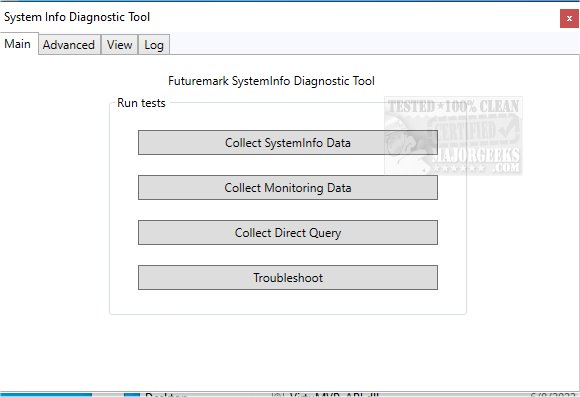
Futuremark has released version 5.90.1458 of its SystemInfo utility, a free tool designed to identify and analyze the hardware components of your computer, which is essential for running many of Futuremark's benchmarks. While updates to SystemInfo do not influence benchmark scores directly, having the latest version is crucial for obtaining valid scores.
SystemInfo is fundamentally an informational tool that does not detect errors, trigger alarms, or perform system maintenance. Instead, it provides a comprehensive overview of the system's current status. It scans the computer to collect detailed data about services, processes, and hardware performance metrics, which can be exported as XML files. Users can access vital information such as the operating system version, user profile, storage capacity, memory specifications, and motherboard details, alongside statistics related to Windows Management Instrumentation (WMI), power supplies, DirectX, and multi-threaded performance.
The installation process is straightforward, and the interface is user-friendly, featuring various tabs for easy navigation. The Log tab tracks tasks being executed, while results are stored in XML format for later review. For advanced users, the Advanced tab allows for filtering specific categories, enabling users to delve into detailed insights about CPU, GPU, and other hardware components, which can assist in diagnosing performance bottlenecks.
Overall, Futuremark SystemInfo is highly regarded for its accuracy and efficiency, making it an invaluable tool for hardware evaluation and benchmarking, particularly for users looking to enhance their system's performance. It is also notable for its commitment to user privacy, as it does not collect any personally identifiable information.
In conclusion, Futuremark SystemInfo stands out as a reliable diagnostic tool for anyone wanting to gain in-depth insights into their system's hardware and software configurations. Whether you are a casual user or a tech enthusiast, this utility can aid in optimizing system performance and ensuring that your setup is running at its best
SystemInfo is fundamentally an informational tool that does not detect errors, trigger alarms, or perform system maintenance. Instead, it provides a comprehensive overview of the system's current status. It scans the computer to collect detailed data about services, processes, and hardware performance metrics, which can be exported as XML files. Users can access vital information such as the operating system version, user profile, storage capacity, memory specifications, and motherboard details, alongside statistics related to Windows Management Instrumentation (WMI), power supplies, DirectX, and multi-threaded performance.
The installation process is straightforward, and the interface is user-friendly, featuring various tabs for easy navigation. The Log tab tracks tasks being executed, while results are stored in XML format for later review. For advanced users, the Advanced tab allows for filtering specific categories, enabling users to delve into detailed insights about CPU, GPU, and other hardware components, which can assist in diagnosing performance bottlenecks.
Overall, Futuremark SystemInfo is highly regarded for its accuracy and efficiency, making it an invaluable tool for hardware evaluation and benchmarking, particularly for users looking to enhance their system's performance. It is also notable for its commitment to user privacy, as it does not collect any personally identifiable information.
In conclusion, Futuremark SystemInfo stands out as a reliable diagnostic tool for anyone wanting to gain in-depth insights into their system's hardware and software configurations. Whether you are a casual user or a tech enthusiast, this utility can aid in optimizing system performance and ensuring that your setup is running at its best
Futuremark SystemInfo 5.90.1458 released
Futuremark SystemInfo is a freeware utility used to identify the hardware in your system and is used for many of Futuremark's benchmarks.