FreeFileSync is a powerful open-source software designed for file and folder comparison and synchronization. The latest release, version 14.8, continues to enhance the user experience by offering fast and efficient solutions for backing up and syncing files without the clutter of ads or unnecessary features.
Key Features of FreeFileSync:
- Fast & Smart Syncing: The tool ensures accurate synchronization by comparing files based on size, date, and content.
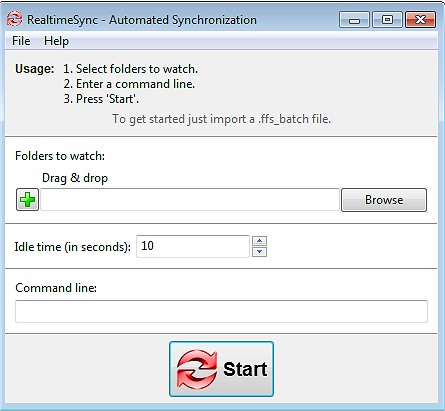
- Real-Time Syncing: Automatically updates files as changes occur, ensuring that data is always current.
- Flexible Sync Options: Users can choose from Mirror, Two-Way, and Custom Sync settings to manage data according to their needs.
- Automation & Batch Jobs: Schedule sync tasks for hands-free operation, reducing manual work.
- Cross-Platform Compatibility: Works seamlessly on Windows, macOS, and Linux.
- Versioning & Conflict Detection: Retains previous versions of files to prevent accidental data loss.
- No Bloat or Ads: A straightforward and powerful tool without the typical distractions.
Who Can Benefit from FreeFileSync?
This tool caters to a diverse range of users, including:
- Everyday Users: Perfect for backing up personal files and photos.
- Professionals & Businesses: Ideal for syncing work projects across multiple locations.
- Photographers & Videographers: Safeguards media libraries on external drives.
- Gamers: Allows for syncing saved games across different PCs.
- IT Administrators: Facilitates automation of data backups and server synchronization.
- Cloud Storage Users: Efficiently manages backups for services like Google Drive and Dropbox.
Additional Features:
FreeFileSync includes several enhancements that improve usability and performance:
- Drag & Drop Support: Simplifies task setup without navigating complex menus.
- Portable Version: Users can run the software from a USB drive without installation.
- Support for External & Network Drives: Syncing with NAS devices, FTP servers, and cloud storage is seamless.
- Customization Options: Filters and exclusions allow users to fine-tune which files to sync.
- Multi-Threaded Performance: Optimizes synchronization speed by using all available CPU cores.
- Detailed Sync Reports: Provides comprehensive logs for transparency and tracking of changes.
Best Practices for Safe & Efficient Syncing:
- Mirror Syncing Caution: Be mindful that deleted files on one side will be removed from the other in Mirror Mode; consider Two-Way Sync for mutual updates without accidental deletions.
- Setup Automation Properly: Ensure batch jobs are configured correctly for effective hands-free backups.
- Manage Permissions: Some files may require administrator permissions for proper synchronization.
Conclusion:
FreeFileSync is a versatile and efficient tool for anyone seeking a reliable solution for file synchronization and backup. Its lightweight design, powerful features, and ad-free experience make it an excellent choice for individuals and businesses alike. Download FreeFileSync today to take control of your file management and safeguard your data effectively!
Related Resources:
- Explore methods to open File Explorer in Windows 10 & 11.
- Learn how to customize File Explorer settings for optimal usage.
- Discover tips for quickly locating files in Windows environments
Key Features of FreeFileSync:
- Fast & Smart Syncing: The tool ensures accurate synchronization by comparing files based on size, date, and content.
- Real-Time Syncing: Automatically updates files as changes occur, ensuring that data is always current.
- Flexible Sync Options: Users can choose from Mirror, Two-Way, and Custom Sync settings to manage data according to their needs.
- Automation & Batch Jobs: Schedule sync tasks for hands-free operation, reducing manual work.
- Cross-Platform Compatibility: Works seamlessly on Windows, macOS, and Linux.
- Versioning & Conflict Detection: Retains previous versions of files to prevent accidental data loss.
- No Bloat or Ads: A straightforward and powerful tool without the typical distractions.
Who Can Benefit from FreeFileSync?
This tool caters to a diverse range of users, including:
- Everyday Users: Perfect for backing up personal files and photos.
- Professionals & Businesses: Ideal for syncing work projects across multiple locations.
- Photographers & Videographers: Safeguards media libraries on external drives.
- Gamers: Allows for syncing saved games across different PCs.
- IT Administrators: Facilitates automation of data backups and server synchronization.
- Cloud Storage Users: Efficiently manages backups for services like Google Drive and Dropbox.
Additional Features:
FreeFileSync includes several enhancements that improve usability and performance:
- Drag & Drop Support: Simplifies task setup without navigating complex menus.
- Portable Version: Users can run the software from a USB drive without installation.
- Support for External & Network Drives: Syncing with NAS devices, FTP servers, and cloud storage is seamless.
- Customization Options: Filters and exclusions allow users to fine-tune which files to sync.
- Multi-Threaded Performance: Optimizes synchronization speed by using all available CPU cores.
- Detailed Sync Reports: Provides comprehensive logs for transparency and tracking of changes.
Best Practices for Safe & Efficient Syncing:
- Mirror Syncing Caution: Be mindful that deleted files on one side will be removed from the other in Mirror Mode; consider Two-Way Sync for mutual updates without accidental deletions.
- Setup Automation Properly: Ensure batch jobs are configured correctly for effective hands-free backups.
- Manage Permissions: Some files may require administrator permissions for proper synchronization.
Conclusion:
FreeFileSync is a versatile and efficient tool for anyone seeking a reliable solution for file synchronization and backup. Its lightweight design, powerful features, and ad-free experience make it an excellent choice for individuals and businesses alike. Download FreeFileSync today to take control of your file management and safeguard your data effectively!
Related Resources:
- Explore methods to open File Explorer in Windows 10 & 11.
- Learn how to customize File Explorer settings for optimal usage.
- Discover tips for quickly locating files in Windows environments
FreeFileSync 14.8 released
FreeFileSync is a file/folder comparison and synchronization tool.