FreeFileSync is a powerful open-source tool for file and folder comparison and synchronization, designed to streamline the process of backing up and syncing files efficiently. Whether you're looking to keep your folders consistent across various devices, safeguard important data, or handle significant file transfers, FreeFileSync provides a user-friendly solution devoid of bloatware or ads.
Key Features of FreeFileSync:
- Fast & Smart Syncing: Compares files based on size, date, and content for precise synchronization.
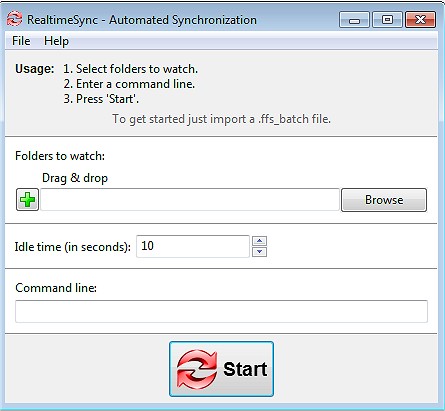
- Real-Time Syncing: Automatically updates files whenever changes occur.
- Flexible Sync Options: Offers mirror, two-way, and custom syncing modes to tailor data management.
- Batch Jobs & Automation: Allows scheduling of sync tasks for seamless operations.
- Cross-Platform Compatibility: Functions on Windows, macOS, and Linux.
- Versioning & Conflict Detection: Retains previous file versions to prevent accidental loss.
- User-Friendly Interface: Clean design with no unnecessary complexities.
Who Can Benefit?
FreeFileSync caters to a wide range of users, including:
- Everyday individuals looking to back up personal files.
- Professionals and businesses needing to synchronize projects.
- Photographers and videographers managing media libraries.
- Gamers wanting to keep saved games consistent across systems.
- IT administrators automating server data backups.
- Cloud storage users managing backups from services like Google Drive and Dropbox.
Additional Features:
The tool includes drag and drop support for ease of use, a portable version for USB execution, and capabilities for syncing with external and network drives. Users can employ filters and exclusions to refine synchronization and benefit from multi-threaded performance for faster processing. Detailed sync reports help keep track of changes and ensure transparency.
Best Practices:
- Use caution with mirror syncing to prevent accidental deletions; opt for two-way sync for more balanced updates.
- Properly configure automation tasks for effective scheduled backups.
- Ensure the necessary permissions and file locks are in place for syncing system files.
Geek Verdict:
FreeFileSync is an ideal solution for anyone in need of efficient backup and synchronization tools. It is lightweight, powerful, and free from ads, making it a reliable choice for maintaining data integrity. Download FreeFileSync today to take control of your file management and safeguard your data.
Similar Articles:
- 12 Ways to Open File Explorer in Windows 10 & 11
- 5 Ways to Open File Explorer Folder Options
- How to Open File Explorer to This PC Instead of Quick Access
- How to View Recent Files in Windows 10 & 11
- How to Find Files Quickly in Windows 10 & 11 With Star Ratings
Extension:
In addition to its current features, future updates to FreeFileSync could consider incorporating enhanced cloud integration options, support for more file formats, and improved user tutorials for new users. With the rise of remote work and digital file management, features like AI-driven data recommendations and smarter conflict resolution could further elevate FreeFileSync's functionality. Additionally, a community forum for users could foster collaboration and support among FreeFileSync enthusiasts, enhancing the overall user experience
Key Features of FreeFileSync:
- Fast & Smart Syncing: Compares files based on size, date, and content for precise synchronization.
- Real-Time Syncing: Automatically updates files whenever changes occur.
- Flexible Sync Options: Offers mirror, two-way, and custom syncing modes to tailor data management.
- Batch Jobs & Automation: Allows scheduling of sync tasks for seamless operations.
- Cross-Platform Compatibility: Functions on Windows, macOS, and Linux.
- Versioning & Conflict Detection: Retains previous file versions to prevent accidental loss.
- User-Friendly Interface: Clean design with no unnecessary complexities.
Who Can Benefit?
FreeFileSync caters to a wide range of users, including:
- Everyday individuals looking to back up personal files.
- Professionals and businesses needing to synchronize projects.
- Photographers and videographers managing media libraries.
- Gamers wanting to keep saved games consistent across systems.
- IT administrators automating server data backups.
- Cloud storage users managing backups from services like Google Drive and Dropbox.
Additional Features:
The tool includes drag and drop support for ease of use, a portable version for USB execution, and capabilities for syncing with external and network drives. Users can employ filters and exclusions to refine synchronization and benefit from multi-threaded performance for faster processing. Detailed sync reports help keep track of changes and ensure transparency.
Best Practices:
- Use caution with mirror syncing to prevent accidental deletions; opt for two-way sync for more balanced updates.
- Properly configure automation tasks for effective scheduled backups.
- Ensure the necessary permissions and file locks are in place for syncing system files.
Geek Verdict:
FreeFileSync is an ideal solution for anyone in need of efficient backup and synchronization tools. It is lightweight, powerful, and free from ads, making it a reliable choice for maintaining data integrity. Download FreeFileSync today to take control of your file management and safeguard your data.
Similar Articles:
- 12 Ways to Open File Explorer in Windows 10 & 11
- 5 Ways to Open File Explorer Folder Options
- How to Open File Explorer to This PC Instead of Quick Access
- How to View Recent Files in Windows 10 & 11
- How to Find Files Quickly in Windows 10 & 11 With Star Ratings
Extension:
In addition to its current features, future updates to FreeFileSync could consider incorporating enhanced cloud integration options, support for more file formats, and improved user tutorials for new users. With the rise of remote work and digital file management, features like AI-driven data recommendations and smarter conflict resolution could further elevate FreeFileSync's functionality. Additionally, a community forum for users could foster collaboration and support among FreeFileSync enthusiasts, enhancing the overall user experience
FreeFileSync 14.7 released
FreeFileSync is a file/folder comparison and synchronization tool.