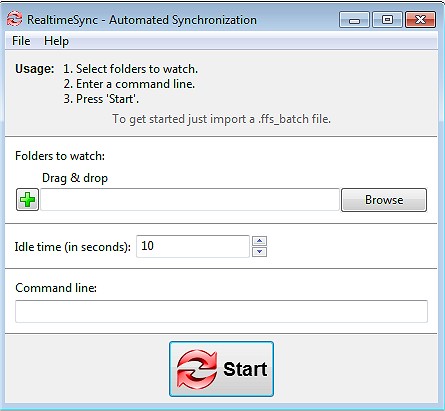
FreeFileSync, a tool for file and folder comparison and synchronization, has recently released version 14.6. This open-source software simplifies the processes of file synchronization and backup, making them efficient and user-friendly. Whether you need to maintain identical folders across multiple devices, back up essential data, or handle extensive file transfers, FreeFileSync is designed to operate without the clutter of ads or unnecessary complexity.
Key Features of FreeFileSync
1. Fast and Efficient Syncing: FreeFileSync automatically detects discrepancies between folders, providing a quicker and more reliable alternative to manual file copying, which can be time-consuming and error-prone.
2. Real-Time Syncing: The software updates files automatically as changes occur, ensuring that all data remains current.
3. Customization Options: Users have the flexibility of choosing between mirror, two-way, and custom synchronization settings to manage data precisely according to their needs.
4. Automation Capabilities: Batch jobs can be scheduled for automatic sync tasks, minimizing the need for manual intervention.
5. Cross-Platform Functionality: FreeFileSync is compatible with Windows, macOS, and Linux.
6. Versioning and Conflict Detection: The tool retains older versions of files to prevent accidental data loss.
7. User-Friendly Interface: With no bloatware or ads, FreeFileSync focuses solely on providing a powerful file synchronization experience.
Who Can Benefit?
FreeFileSync is versatile and can be advantageous for a range of users:
- Everyday Users: Easily back up personal files, documents, and photos.
- Professionals & Businesses: Synchronize work projects across different locations or among team members.
- Photographers & Videographers: Safeguard media libraries by mirroring them to external drives.
- Gamers: Sync saved games across multiple PCs without losing progress.
- IT Administrators: Automate backups and synchronize servers efficiently.
- Cloud Storage Users: Manage backups for services like Google Drive, OneDrive, or Dropbox.
Additional Features and Usability Enhancements
FreeFileSync includes several additional features:
- Drag & Drop Support: Simplifies the setup of sync tasks.
- Portable Version: Allows operation directly from a USB drive without installation.
- Support for External & Network Drives: Facilitates syncing with NAS devices, FTP servers, and cloud storage.
- Filtering Options: Users can customize synchronization to include only necessary files.
- Multi-Threaded Performance: Utilizes all available CPU cores to enhance speed.
- Detailed Sync Reports: Provides logs and summaries for complete transparency in synchronization tasks.
Best Practices for Effective Use
1. Caution with Mirror Syncing: Use the Two-Way Sync option to avoid accidental deletions when using Mirror Mode.
2. Proper Setup for Automation: Ensure batch jobs are configured correctly for effective hands-free backups.
3. Handling Permissions: Be mindful that some files may need admin permissions for proper synchronization.
Conclusion
FreeFileSync is an ideal solution for anyone seeking a straightforward yet powerful file synchronization and backup tool. It is lightweight, feature-rich, and completely free from intrusive ads or locked functionalities. By downloading FreeFileSync, users can take charge of their file management, ensuring data safety and consistency.
Related Resources
- Explore various ways to open File Explorer in Windows 10 & 11.
- Discover methods to access recent files and file options efficiently
Key Features of FreeFileSync
1. Fast and Efficient Syncing: FreeFileSync automatically detects discrepancies between folders, providing a quicker and more reliable alternative to manual file copying, which can be time-consuming and error-prone.
2. Real-Time Syncing: The software updates files automatically as changes occur, ensuring that all data remains current.
3. Customization Options: Users have the flexibility of choosing between mirror, two-way, and custom synchronization settings to manage data precisely according to their needs.
4. Automation Capabilities: Batch jobs can be scheduled for automatic sync tasks, minimizing the need for manual intervention.
5. Cross-Platform Functionality: FreeFileSync is compatible with Windows, macOS, and Linux.
6. Versioning and Conflict Detection: The tool retains older versions of files to prevent accidental data loss.
7. User-Friendly Interface: With no bloatware or ads, FreeFileSync focuses solely on providing a powerful file synchronization experience.
Who Can Benefit?
FreeFileSync is versatile and can be advantageous for a range of users:
- Everyday Users: Easily back up personal files, documents, and photos.
- Professionals & Businesses: Synchronize work projects across different locations or among team members.
- Photographers & Videographers: Safeguard media libraries by mirroring them to external drives.
- Gamers: Sync saved games across multiple PCs without losing progress.
- IT Administrators: Automate backups and synchronize servers efficiently.
- Cloud Storage Users: Manage backups for services like Google Drive, OneDrive, or Dropbox.
Additional Features and Usability Enhancements
FreeFileSync includes several additional features:
- Drag & Drop Support: Simplifies the setup of sync tasks.
- Portable Version: Allows operation directly from a USB drive without installation.
- Support for External & Network Drives: Facilitates syncing with NAS devices, FTP servers, and cloud storage.
- Filtering Options: Users can customize synchronization to include only necessary files.
- Multi-Threaded Performance: Utilizes all available CPU cores to enhance speed.
- Detailed Sync Reports: Provides logs and summaries for complete transparency in synchronization tasks.
Best Practices for Effective Use
1. Caution with Mirror Syncing: Use the Two-Way Sync option to avoid accidental deletions when using Mirror Mode.
2. Proper Setup for Automation: Ensure batch jobs are configured correctly for effective hands-free backups.
3. Handling Permissions: Be mindful that some files may need admin permissions for proper synchronization.
Conclusion
FreeFileSync is an ideal solution for anyone seeking a straightforward yet powerful file synchronization and backup tool. It is lightweight, feature-rich, and completely free from intrusive ads or locked functionalities. By downloading FreeFileSync, users can take charge of their file management, ensuring data safety and consistency.
Related Resources
- Explore various ways to open File Explorer in Windows 10 & 11.
- Discover methods to access recent files and file options efficiently
FreeFileSync 14.6 released
FreeFileSync is a file/folder comparison and synchronization tool.