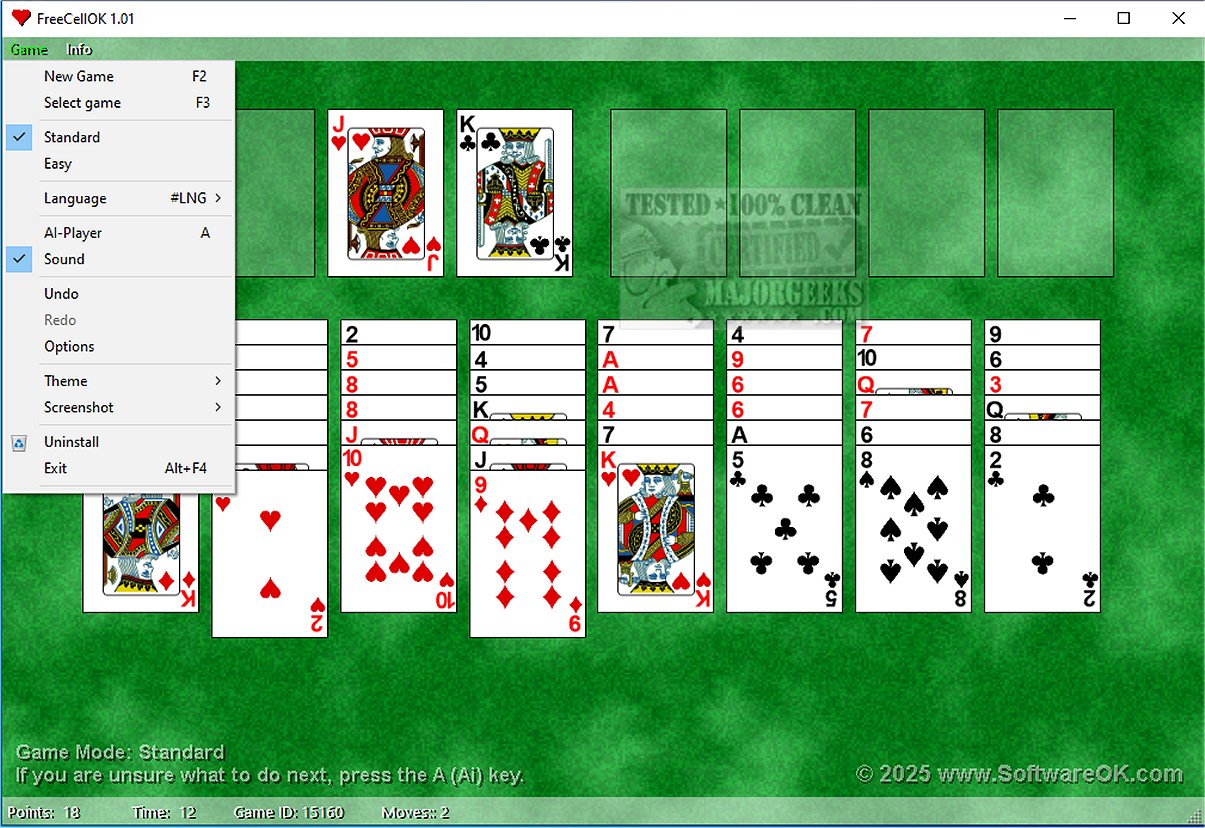
FreeCellOK 1.01 has been released, bringing the classic FreeCell card game back to Windows desktops with an enhanced and efficient gaming experience. This new version features an intelligent AI Player that provides strategic advice tailored to the player's moves, setting itself apart from generic tips typically found in other games.
Unlike Solitaire, FreeCell focuses heavily on strategy since all cards are revealed from the start, allowing players to plan their moves thoughtfully. The game is designed to be challenging yet rewarding, as nearly every game is solvable, encouraging players to engage in strategic puzzles. For those who enjoy Solitaire, the same developer offers SolitaireOK as an alternative.
The primary objective in FreeCellOK is to transfer all cards to four foundation piles while utilizing four free cells as strategic buffers. Players must move cards in descending order while alternating colors, emphasizing that success in the game is determined solely by strategy rather than luck.
Key features of FreeCellOK include:
- Strategic Gameplay: All cards are face-up, enhancing strategic planning.
- Smart Assist Features: Automatic hints and alerts for crucial moves.
- Total Control: Each game can be won through strategic card movement.
- Multiple Themes: Options range from a classic green felt table to a modern dark mode.
- Performance Tracking: Players can monitor their best times and statistics to track progress.
- AI Player: Assists players in recognizing strategies, helping them improve gradually.
- Beginner-Friendly Mode: An easy mode is available to help new players learn the rules without frequent mistakes.
- Efficient Resource Usage: The game runs well on older computers with low CPU usage.
- Multi-language Support: Includes optional translation features.
- Resolution Adjustment: Offers graphics up to 4K+ with automatic quality adjustments.
In summary, FreeCellOK is not just a card game; it is a strategic puzzle that enhances logical thinking. Whether you have a few minutes to spare or an extended gaming session, it provides an opportunity to enjoy challenging gameplay without the pressure of time constraints. With a guarantee that every game is solvable, it promises a fulfilling experience for anyone looking for mental stimulation and relaxation. Dive into FreeCellOK for an engaging blend of fun and intellect.
For those interested in exploring more gaming options, consider checking out hidden Google games or indie game guides, as well as learning how to effectively use the Windows 10 & 11 Gaming Task Manager
Unlike Solitaire, FreeCell focuses heavily on strategy since all cards are revealed from the start, allowing players to plan their moves thoughtfully. The game is designed to be challenging yet rewarding, as nearly every game is solvable, encouraging players to engage in strategic puzzles. For those who enjoy Solitaire, the same developer offers SolitaireOK as an alternative.
The primary objective in FreeCellOK is to transfer all cards to four foundation piles while utilizing four free cells as strategic buffers. Players must move cards in descending order while alternating colors, emphasizing that success in the game is determined solely by strategy rather than luck.
Key features of FreeCellOK include:
- Strategic Gameplay: All cards are face-up, enhancing strategic planning.
- Smart Assist Features: Automatic hints and alerts for crucial moves.
- Total Control: Each game can be won through strategic card movement.
- Multiple Themes: Options range from a classic green felt table to a modern dark mode.
- Performance Tracking: Players can monitor their best times and statistics to track progress.
- AI Player: Assists players in recognizing strategies, helping them improve gradually.
- Beginner-Friendly Mode: An easy mode is available to help new players learn the rules without frequent mistakes.
- Efficient Resource Usage: The game runs well on older computers with low CPU usage.
- Multi-language Support: Includes optional translation features.
- Resolution Adjustment: Offers graphics up to 4K+ with automatic quality adjustments.
In summary, FreeCellOK is not just a card game; it is a strategic puzzle that enhances logical thinking. Whether you have a few minutes to spare or an extended gaming session, it provides an opportunity to enjoy challenging gameplay without the pressure of time constraints. With a guarantee that every game is solvable, it promises a fulfilling experience for anyone looking for mental stimulation and relaxation. Dive into FreeCellOK for an engaging blend of fun and intellect.
For those interested in exploring more gaming options, consider checking out hidden Google games or indie game guides, as well as learning how to effectively use the Windows 10 & 11 Gaming Task Manager
FreeCellOK 1.01 released
FreeCellOK reintroduces the beloved classic FreeCell to your Windows desktop, offering a faster, more streamlined experience. This version elevates gameplay with an intelligent AI Player that provides strategic guidance rather than generic tips.