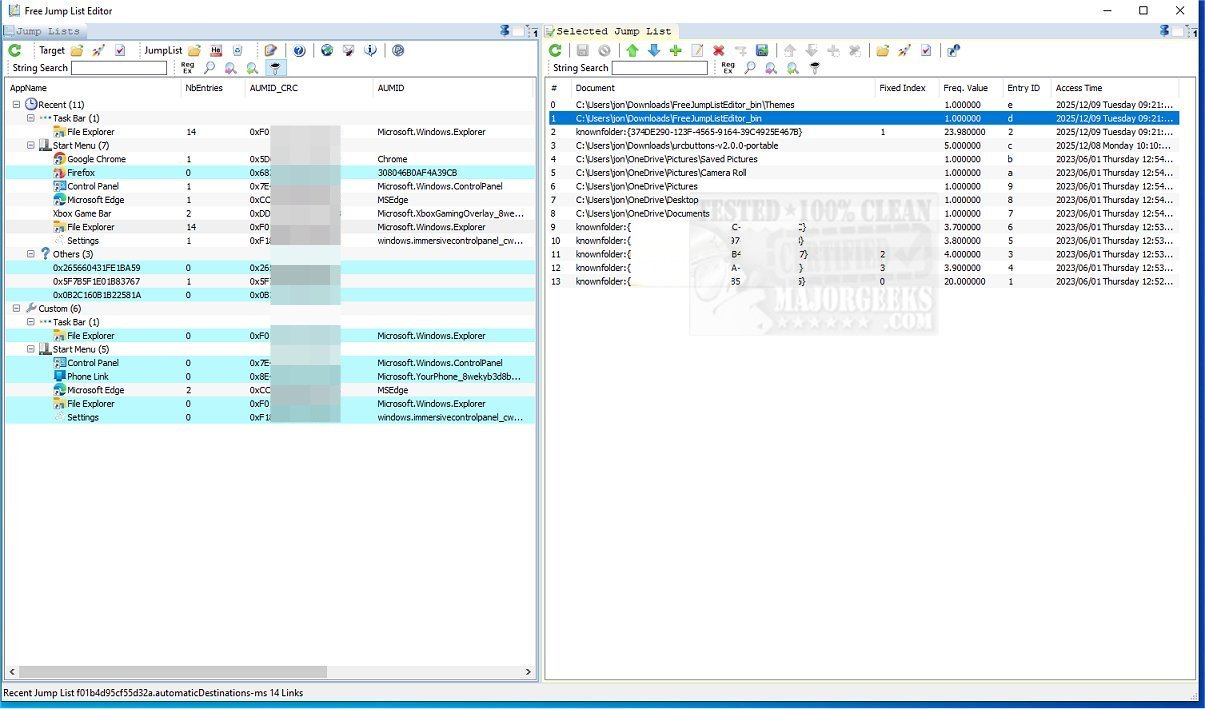
The Free Jump List Editor 1.0.1 has been released, offering a powerful tool for users looking to customize their Windows taskbar jump lists. This application is specifically designed for power users who want to enhance the right-click menus on their taskbar, leading to improved efficiency and organization.
Understanding Jump Lists
Jump lists are a feature in Windows that provide quick access to frequently or recently used files, folders, and web pages. Users can access these lists by right-clicking the icons of applications pinned to the taskbar. The recent files section of a jump list allows for swift navigation back to previously worked-on files, making it easier for users to resume tasks after a break. While most individuals find the default jump list settings adequate, those with advanced needs may prefer customization for better organization.
Capabilities of Free Jump List Editor
Free Jump List Editor empowers advanced users by allowing them to manage and modify jump lists typically restricted by Windows. The tool displays and enables editing of both recent and custom jump lists for all pinned applications on the taskbar and Start menu. Users can add, remove, or rearrange entries as they see fit.
Additionally, the software provides detailed insights into each link within a jump list, going beyond the default capabilities available to standard users. For recent jump lists, users can modify properties like link frequency and access times, which directly affect the order of displayed items. For custom jump lists, the tool offers options for modifying links, viewing detailed information in a hex editor, selecting list types, creating custom groups, and adding separators between entries.
Conclusion and Target Audience
The Free Jump List Editor is an invaluable resource for users with advanced technical skills. Modifying the default jump lists in Windows can be complex, making this software particularly beneficial for those who seek a higher level of customization. Overall, it serves as a comprehensive solution for individuals looking to take control of their Windows jump lists, enhancing their overall user experience.
Future Directions
As technology evolves, future updates to Free Jump List Editor could include additional features such as cloud integration for syncing jump lists across devices, user-friendly templates for common configurations, and enhanced security measures to protect user data. Moreover, a more intuitive interface could be developed to attract a broader audience, potentially bringing in less tech-savvy users who still wish to benefit from jump list customization
Understanding Jump Lists
Jump lists are a feature in Windows that provide quick access to frequently or recently used files, folders, and web pages. Users can access these lists by right-clicking the icons of applications pinned to the taskbar. The recent files section of a jump list allows for swift navigation back to previously worked-on files, making it easier for users to resume tasks after a break. While most individuals find the default jump list settings adequate, those with advanced needs may prefer customization for better organization.
Capabilities of Free Jump List Editor
Free Jump List Editor empowers advanced users by allowing them to manage and modify jump lists typically restricted by Windows. The tool displays and enables editing of both recent and custom jump lists for all pinned applications on the taskbar and Start menu. Users can add, remove, or rearrange entries as they see fit.
Additionally, the software provides detailed insights into each link within a jump list, going beyond the default capabilities available to standard users. For recent jump lists, users can modify properties like link frequency and access times, which directly affect the order of displayed items. For custom jump lists, the tool offers options for modifying links, viewing detailed information in a hex editor, selecting list types, creating custom groups, and adding separators between entries.
Conclusion and Target Audience
The Free Jump List Editor is an invaluable resource for users with advanced technical skills. Modifying the default jump lists in Windows can be complex, making this software particularly beneficial for those who seek a higher level of customization. Overall, it serves as a comprehensive solution for individuals looking to take control of their Windows jump lists, enhancing their overall user experience.
Future Directions
As technology evolves, future updates to Free Jump List Editor could include additional features such as cloud integration for syncing jump lists across devices, user-friendly templates for common configurations, and enhanced security measures to protect user data. Moreover, a more intuitive interface could be developed to attract a broader audience, potentially bringing in less tech-savvy users who still wish to benefit from jump list customization
Free Jump List Editor 1.0.1 released
Free Jump List Editor is a specialized tool that allows you to modify taskbar jump lists. It is particularly beneficial for power users who want to personalize the right-click menus on their computer's taskbar, enhancing overall efficiency and customization.