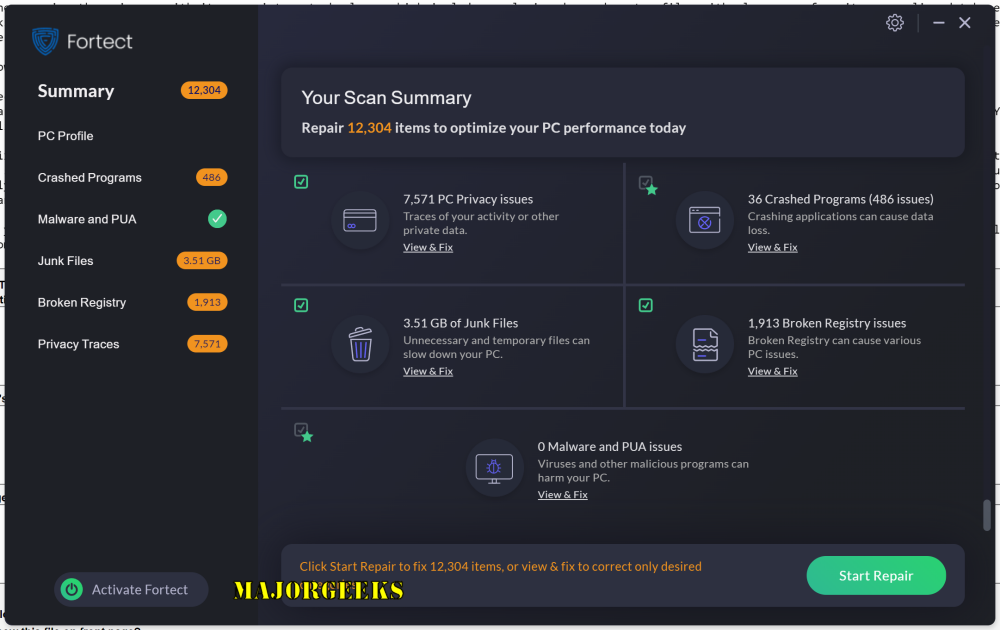
Fortect is a comprehensive PC optimization tool designed to resolve various Windows issues affecting system performance, stability, and security. The latest release, version 7.3.4.2, enhances its capabilities, allowing users to effectively scan, diagnose, and repair problems that may slow down their computers.
Key Features of Fortect:
- Restoration of missing or corrupted system files.
- Driver updates to ensure hardware compatibility and eliminate instability.
- Detection and removal of malware, including antivirus and anti-malware features.
- Cleanup of junk files to free up disk space.
- Fixing registry errors and optimizing the registry structure.
- Improving startup speeds and reducing boot times.
- Enhancing overall system stability to prevent crashes.
- Boosting internet speed and securing online activities.
Fortect utilizes proprietary technology to repair issues by replacing damaged files with clean versions from its extensive online database. It supports a wide range of Windows operating systems, including Windows 11, 10, 8.1, 8, 7, Vista, XP, as well as Android devices.
User Experience:
The user interface of Fortect is designed to be intuitive, allowing users to initiate a scan with a single click. The program categorizes detected issues, offering detailed insights into each problem. A unique Repair & Replace feature automatically addresses damaged or missing operating system files and ensures that drivers are kept up to date for optimal performance and security.
Antivirus Protection:
In addition to its optimization features, Fortect doubles as a full antivirus suite, providing proactive, real-time monitoring to defend against threats such as ransomware and harmful websites. The software offers a 24-hour free trial, a departure from traditional 30-day shareware models, enabling users to assess its effectiveness without long-term commitment.
Pricing and Support:
Once users experience the benefits of Fortect, they can opt for a premium plan, which is available for 1, 3, or 5 PCs. The subscription includes unlimited email support and a 30-day money-back guarantee, making it a low-risk investment for users seeking to maintain their PC’s performance.
Conclusion:
Fortect stands out as a powerful tool for PC optimization and repair, seamlessly integrating performance enhancements, issue resolution, and robust antivirus protection. Its combination of advanced features and user-friendly design makes it suitable for both novice and experienced users. Whether revitalizing an older device or optimizing a newer system, Fortect is positioned as a reliable solution for keeping Windows PCs running smoothly and securely.
Future Outlook:
As technology continues to evolve, Fortect is likely to incorporate even more features, including advanced AI-driven diagnostics and cloud-based optimization services. This could enhance its ability to address emerging threats and performance issues, ensuring that users always have access to the most current and effective tools for maintaining their systems. Additionally, expanding compatibility with other operating systems and devices could broaden its user base and appeal to a wider audience
Key Features of Fortect:
- Restoration of missing or corrupted system files.
- Driver updates to ensure hardware compatibility and eliminate instability.
- Detection and removal of malware, including antivirus and anti-malware features.
- Cleanup of junk files to free up disk space.
- Fixing registry errors and optimizing the registry structure.
- Improving startup speeds and reducing boot times.
- Enhancing overall system stability to prevent crashes.
- Boosting internet speed and securing online activities.
Fortect utilizes proprietary technology to repair issues by replacing damaged files with clean versions from its extensive online database. It supports a wide range of Windows operating systems, including Windows 11, 10, 8.1, 8, 7, Vista, XP, as well as Android devices.
User Experience:
The user interface of Fortect is designed to be intuitive, allowing users to initiate a scan with a single click. The program categorizes detected issues, offering detailed insights into each problem. A unique Repair & Replace feature automatically addresses damaged or missing operating system files and ensures that drivers are kept up to date for optimal performance and security.
Antivirus Protection:
In addition to its optimization features, Fortect doubles as a full antivirus suite, providing proactive, real-time monitoring to defend against threats such as ransomware and harmful websites. The software offers a 24-hour free trial, a departure from traditional 30-day shareware models, enabling users to assess its effectiveness without long-term commitment.
Pricing and Support:
Once users experience the benefits of Fortect, they can opt for a premium plan, which is available for 1, 3, or 5 PCs. The subscription includes unlimited email support and a 30-day money-back guarantee, making it a low-risk investment for users seeking to maintain their PC’s performance.
Conclusion:
Fortect stands out as a powerful tool for PC optimization and repair, seamlessly integrating performance enhancements, issue resolution, and robust antivirus protection. Its combination of advanced features and user-friendly design makes it suitable for both novice and experienced users. Whether revitalizing an older device or optimizing a newer system, Fortect is positioned as a reliable solution for keeping Windows PCs running smoothly and securely.
Future Outlook:
As technology continues to evolve, Fortect is likely to incorporate even more features, including advanced AI-driven diagnostics and cloud-based optimization services. This could enhance its ability to address emerging threats and performance issues, ensuring that users always have access to the most current and effective tools for maintaining their systems. Additionally, expanding compatibility with other operating systems and devices could broaden its user base and appeal to a wider audience
Fortect 7.3.4.2 released
Fortect is an inclusive PC optimizer offering a comprehensive Windows issue solution. It can scan, diagnose, and repair various problems that affect your system's speed, stability, and security. It also provides performance tweaks and updates to keep your system running at its best.