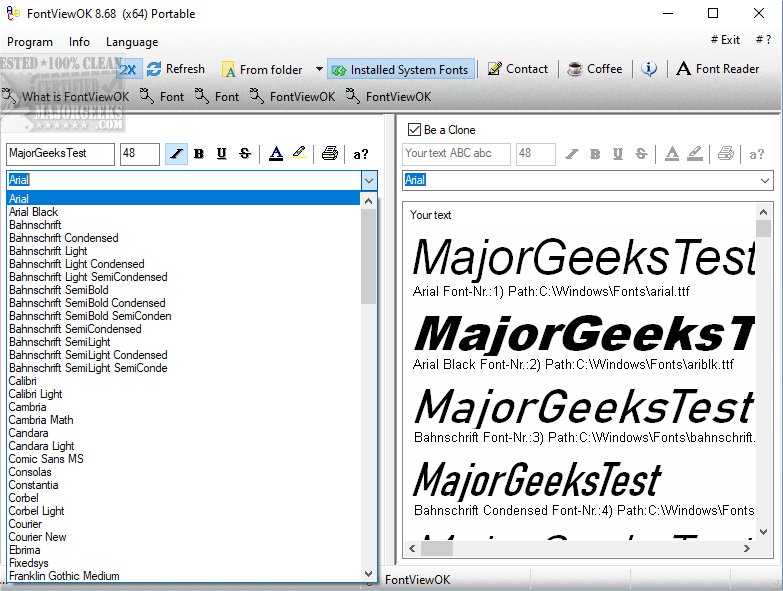
FontViewOK 9.23 has been released, enhancing its reputation as a user-friendly tool that provides a comprehensive visual overview of all fonts installed on a computer system. This software allows users to preview each font in various styles and sizes, facilitating the selection of the perfect typeface for different projects. One of the standout features of FontViewOK is its portability; it can be executed directly from a flash drive, eliminating the need for installation on individual machines. This is particularly advantageous for users who require quick access to font overviews across multiple devices.
The interface of FontViewOK is designed to be straightforward, simplifying the management of fonts. This makes it an ideal solution for graphic designers, typographers, and anyone interested in efficiently exploring and organizing their font collections. Key features include a quick overview of all installed fonts, a printing option with a preview function, and customizable font size, style, and color.
A common challenge many users face is remembering font names, even while recalling the written text. FontViewOK addresses this issue effectively, providing a visual representation of fonts to aid in easy browsing. The deployment process is remarkably simple, requiring no extensive documentation or complicated help files. With just a few clicks, users can access a beautifully organized view of their fonts, transforming the task of choosing the right typeface into an enjoyable experience.
In addition to its core functionalities, users can benefit from related resources, such as guides on installing or uninstalling fonts in Windows, restoring default font settings, and acquiring additional fonts for Windows 10 and 11.
Overall, FontViewOK 9.23 continues to be an essential tool for anyone involved in design or typography, enhancing productivity and creativity by making font management seamless and efficient
The interface of FontViewOK is designed to be straightforward, simplifying the management of fonts. This makes it an ideal solution for graphic designers, typographers, and anyone interested in efficiently exploring and organizing their font collections. Key features include a quick overview of all installed fonts, a printing option with a preview function, and customizable font size, style, and color.
A common challenge many users face is remembering font names, even while recalling the written text. FontViewOK addresses this issue effectively, providing a visual representation of fonts to aid in easy browsing. The deployment process is remarkably simple, requiring no extensive documentation or complicated help files. With just a few clicks, users can access a beautifully organized view of their fonts, transforming the task of choosing the right typeface into an enjoyable experience.
In addition to its core functionalities, users can benefit from related resources, such as guides on installing or uninstalling fonts in Windows, restoring default font settings, and acquiring additional fonts for Windows 10 and 11.
Overall, FontViewOK 9.23 continues to be an essential tool for anyone involved in design or typography, enhancing productivity and creativity by making font management seamless and efficient
FontViewOK 9.23 released
FontViewOK is a user-friendly tool designed to give you a comprehensive visual overview of all the fonts installed on your system. .