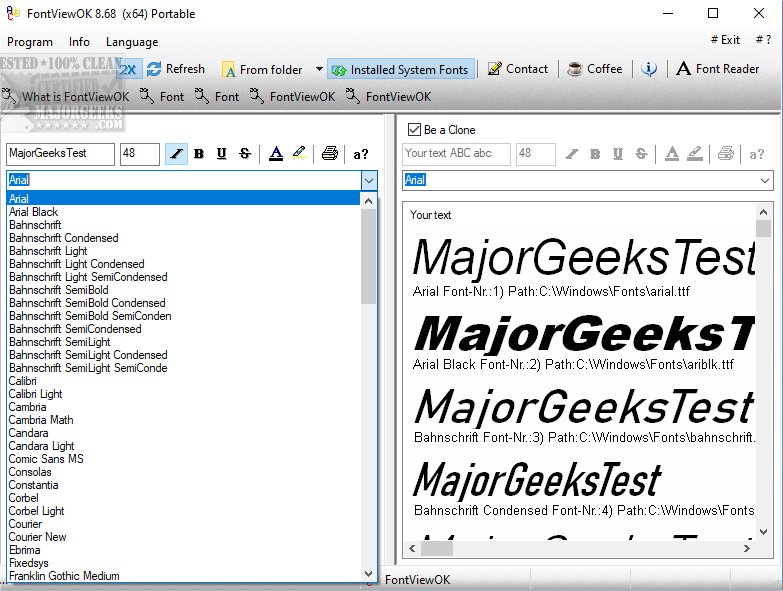
FontViewOK has recently released version 9.19, enhancing its reputation as a user-friendly tool for visualizing all fonts installed on your system. This software is particularly beneficial for graphic designers and typographers by allowing users to preview fonts in various styles and sizes, which aids in selecting the perfect typeface for projects. One of the standout features of FontViewOK is its portability; it can be run directly from a flash drive without installation, making it convenient for users who need a quick font overview on multiple machines.
The interface of FontViewOK is designed to be straightforward, simplifying font management and exploration. Users can easily navigate through their font collections while enjoying features such as quick overviews, a print preview function, and customizable font size, style, and color. This is particularly useful as fonts often elude our memory despite our familiarity with the written text.
The installation process for FontViewOK is uncomplicated, eliminating the need for extensive documentation. In just a few clicks, users can access an organized view of their fonts, making the selection process not only efficient but also enjoyable.
In addition to its core functionalities, FontViewOK complements its usage by addressing common font-related queries. Users can benefit from guidance on installing or uninstalling fonts in Windows, restoring default font settings, and discovering additional fonts for Windows 10 and 11.
Overall, FontViewOK 9.19 continues to be an essential tool for anyone needing to manage and explore their font collections effectively and efficiently
The interface of FontViewOK is designed to be straightforward, simplifying font management and exploration. Users can easily navigate through their font collections while enjoying features such as quick overviews, a print preview function, and customizable font size, style, and color. This is particularly useful as fonts often elude our memory despite our familiarity with the written text.
The installation process for FontViewOK is uncomplicated, eliminating the need for extensive documentation. In just a few clicks, users can access an organized view of their fonts, making the selection process not only efficient but also enjoyable.
In addition to its core functionalities, FontViewOK complements its usage by addressing common font-related queries. Users can benefit from guidance on installing or uninstalling fonts in Windows, restoring default font settings, and discovering additional fonts for Windows 10 and 11.
Overall, FontViewOK 9.19 continues to be an essential tool for anyone needing to manage and explore their font collections effectively and efficiently
FontViewOK 9.19 released
FontViewOK is a user-friendly tool designed to give you a comprehensive visual overview of all the fonts installed on your system. .