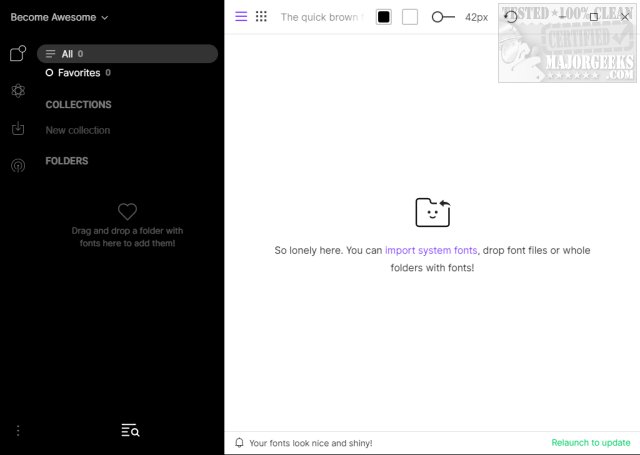
FontBase has announced the release of version 2.25.1, a free font management software tailored for designers and users with large font collections. This software stands out with its user-friendly interface that simplifies the organization, previewing, and management of fonts, making it an essential tool for typography enthusiasts.
FontBase allows users to easily manage their fonts by enabling drag-and-drop functionality for folder imports, thereby facilitating effective organization. Users can create folders named for specific projects or applications, which aids in quickly locating the desired fonts. The software also provides the option to load default Windows fonts, streamlining the initial setup process.
Key features of FontBase include:
- One-click access to any font from Google’s library, functioning as if it were installed locally.
- A Preview tab where users can apply styles to various text elements (H1, H2, etc.) for better visualization.
- A comprehensive view of all font styles on a single page, allowing users to explore combinations and weights.
- The ability to activate fonts without installation, offering a new method for font utilization.
- Creation and management of collections, with easy activation of default collections.
- A display of the file structure as-is, eliminating the need for reorganization.
- Efficient performance in loading and displaying fonts.
- Automatic updates to keep the software current.
The Geek Verdict emphasizes that navigating extensive font collections can be daunting, but FontBase revolutionizes font management, making it easier and more enjoyable for users. This tool is crucial for those looking to streamline their font management and enhance their creative workflow.
In addition to FontBase’s robust features, it can be a valuable companion to resources on installing and uninstalling fonts in Windows, restoring default font settings, acquiring more fonts for Windows 10 and 11, and customizing fonts and colors using PowerShell or Command Prompt. With these capabilities, FontBase not only simplifies font management but also enhances overall design flexibility and creativity
FontBase allows users to easily manage their fonts by enabling drag-and-drop functionality for folder imports, thereby facilitating effective organization. Users can create folders named for specific projects or applications, which aids in quickly locating the desired fonts. The software also provides the option to load default Windows fonts, streamlining the initial setup process.
Key features of FontBase include:
- One-click access to any font from Google’s library, functioning as if it were installed locally.
- A Preview tab where users can apply styles to various text elements (H1, H2, etc.) for better visualization.
- A comprehensive view of all font styles on a single page, allowing users to explore combinations and weights.
- The ability to activate fonts without installation, offering a new method for font utilization.
- Creation and management of collections, with easy activation of default collections.
- A display of the file structure as-is, eliminating the need for reorganization.
- Efficient performance in loading and displaying fonts.
- Automatic updates to keep the software current.
The Geek Verdict emphasizes that navigating extensive font collections can be daunting, but FontBase revolutionizes font management, making it easier and more enjoyable for users. This tool is crucial for those looking to streamline their font management and enhance their creative workflow.
In addition to FontBase’s robust features, it can be a valuable companion to resources on installing and uninstalling fonts in Windows, restoring default font settings, acquiring more fonts for Windows 10 and 11, and customizing fonts and colors using PowerShell or Command Prompt. With these capabilities, FontBase not only simplifies font management but also enhances overall design flexibility and creativity
FontBase 2.25.1 released
FontBase is a free font management software designed specifically for designers and individuals with extensive font collections. It provides a user-friendly interface that helps organize, preview, and manage fonts efficiently, making it an ideal tool for those working with typography.