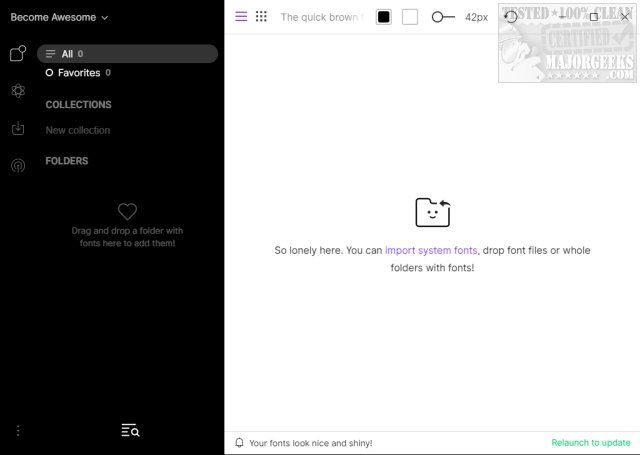
FontBase has recently released version 2.24.0 of its free font management software, tailored specifically for designers and those with large font collections. This software offers an intuitive user interface that simplifies the organization, previewing, and management of fonts, making it an essential tool for anyone involved in typography.
Key Features of FontBase:
- Ease of Use: Users can drag and drop folders or manually import fonts, facilitating organization through customizable folders based on projects or applications.
- Integration with Google Fonts: Access any font from Google's library in a single click, treating it as a local font.
- Preview Functionality: The Preview tab allows users to experiment with different styles on various page elements, helping identify the perfect font for their needs.
- Font Activation: Fonts can be activated without installation, offering a new approach to font usage.
- Collections Management: Users can create and manage their own font collections, as well as explore existing ones, activating them effortlessly.
- File Structure Display: FontBase mirrors the user's file structure, eliminating the need to reorganize files.
- Performance: The software boasts efficient loading and displaying of fonts, ensuring a smooth user experience.
- Automatic Updates: Users benefit from regular updates, keeping the software current with the latest features.
Geek Verdict: Managing a vast array of fonts can be daunting, but FontBase provides a compelling solution that enhances the font management experience. It helps eliminate confusion and promotes creativity, making it an invaluable asset for designers and typographers alike.
Related Resources:
For those looking to further enhance their font management capabilities, resources on installing or uninstalling fonts in Windows, restoring default font settings, acquiring more fonts for Windows 10 and 11, and customizing fonts using PowerShell or Command Prompt are also available.
Conclusion: With its user-friendly features and innovative approach to font management, FontBase 2.24.0 is an essential tool for those who want to streamline their typography work and unleash their creative potential
Key Features of FontBase:
- Ease of Use: Users can drag and drop folders or manually import fonts, facilitating organization through customizable folders based on projects or applications.
- Integration with Google Fonts: Access any font from Google's library in a single click, treating it as a local font.
- Preview Functionality: The Preview tab allows users to experiment with different styles on various page elements, helping identify the perfect font for their needs.
- Font Activation: Fonts can be activated without installation, offering a new approach to font usage.
- Collections Management: Users can create and manage their own font collections, as well as explore existing ones, activating them effortlessly.
- File Structure Display: FontBase mirrors the user's file structure, eliminating the need to reorganize files.
- Performance: The software boasts efficient loading and displaying of fonts, ensuring a smooth user experience.
- Automatic Updates: Users benefit from regular updates, keeping the software current with the latest features.
Geek Verdict: Managing a vast array of fonts can be daunting, but FontBase provides a compelling solution that enhances the font management experience. It helps eliminate confusion and promotes creativity, making it an invaluable asset for designers and typographers alike.
Related Resources:
For those looking to further enhance their font management capabilities, resources on installing or uninstalling fonts in Windows, restoring default font settings, acquiring more fonts for Windows 10 and 11, and customizing fonts using PowerShell or Command Prompt are also available.
Conclusion: With its user-friendly features and innovative approach to font management, FontBase 2.24.0 is an essential tool for those who want to streamline their typography work and unleash their creative potential
FontBase 2.24.0 released
FontBase is a free font management software designed specifically for designers and individuals with extensive font collections. It provides a user-friendly interface that helps organize, preview, and manage fonts efficiently, making it an ideal tool for those working with typography.