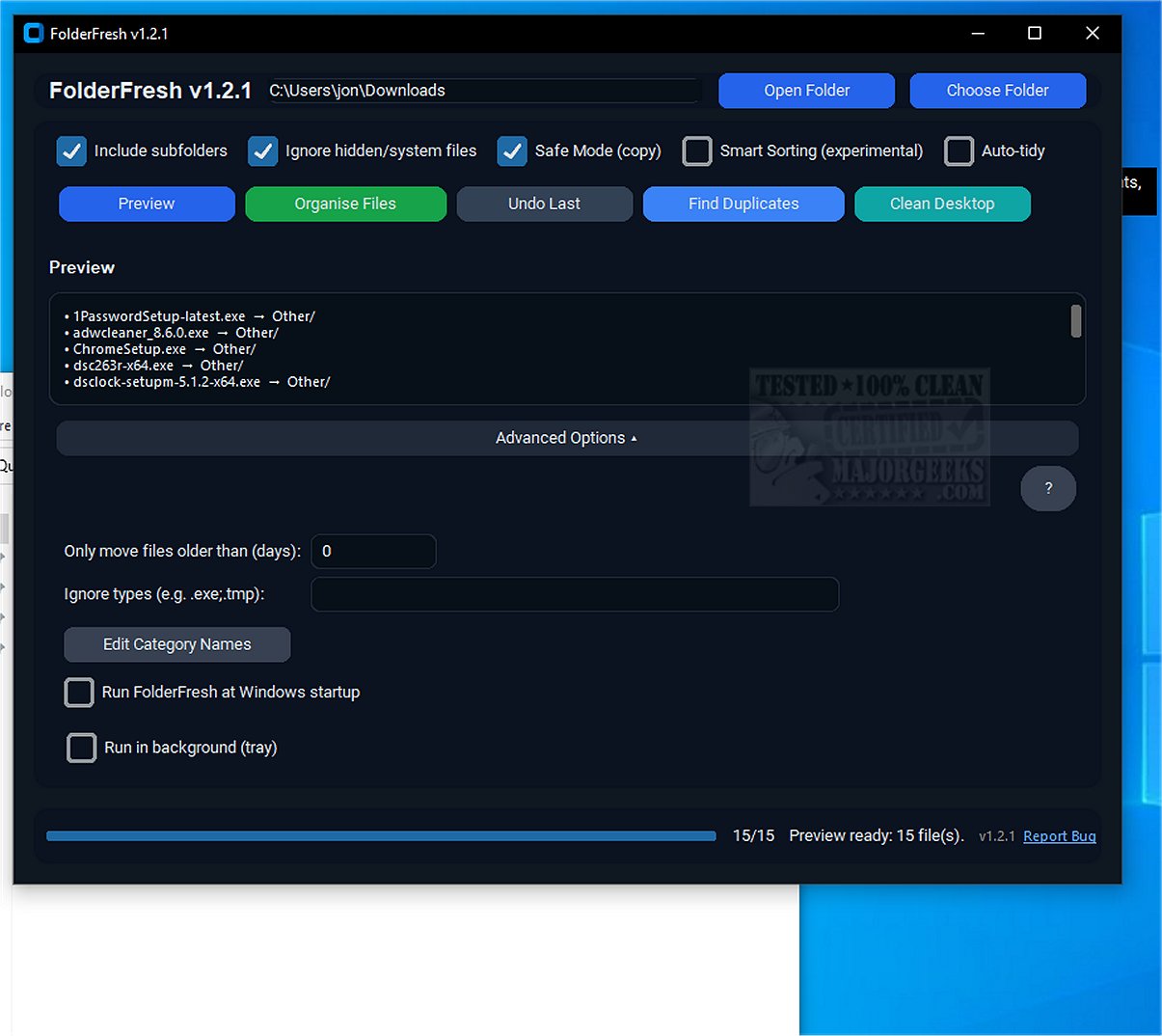
FolderFresh has recently released versions 3.0.1 Beta and 2.0.0, enhancing its capabilities as a cutting-edge application designed to streamline file organization. This tool allows users to effectively manage their files by automatically sorting them into well-defined folders based on their type and category.
What is FolderFresh?
FolderFresh is an innovative tool aimed at helping users declutter their digital environments by organizing files into clearly categorized folders. It offers a range of features such as preview mode, an undo function, Smart Sorting, Auto-tidy, and customizable category names, all while ensuring user data is protected through robust safety controls.
How Does FolderFresh Work?
The application allows users to select a target directory and its sub-folders, providing a preview of the proposed new folder structure before any changes are made. It automatically sorts files by type into designated categories, such as Documents, Images, Videos, Audio, Archives, Code, and Others. For added safety, FolderFresh creates copies of files before moving them, preventing data loss during the organization process.
Key Features of FolderFresh:
- Automatic Sorting: Organizes files into designated category folders.
- Preview Mode: Displays the new folder structure before any changes are confirmed.
- Undo Function: Restores files to their original locations with a single click.
- Safe Mode: Copies files for maximum safety rather than moving them.
- Smart Sorting: Identifies and categorizes various file types, including screenshots and invoices.
- Auto-tidy: Monitors designated folders and automatically sorts incoming files.
- Duplicate Finder: Quickly identifies duplicate files using efficient partial hashing.
- Age & Ignore Filters: Allows for filtering based on file age or specific types to be ignored.
- Startup Options: Users can enable or disable the application’s autostart feature.
- Custom Category Names: Users can rename the built-in category folders for personalized organization.
Why You'd Need FolderFresh
FolderFresh is particularly valuable for individuals who frequently re-download files due to unstable internet connections, as its duplicate finder feature simplifies the identification and removal of redundant files, optimizing disk space and enhancing system performance.
Geek Verdict:
FolderFresh provides an intuitive and effective solution for managing disorganized files, making it a must-have for anyone struggling with desktop clutter or chaotic downloads. By creating sub-folders for different categories and automatically sorting files, FolderFresh enables users to maintain a tidy and efficient digital workspace.
Future Prospects:
As FolderFresh continues to evolve, future updates may include enhanced AI-driven sorting capabilities, integration with cloud storage solutions for seamless access across devices, and improved user customization options to cater to diverse organizational preferences. These advancements could further solidify FolderFresh's position as a leading tool in digital file management
What is FolderFresh?
FolderFresh is an innovative tool aimed at helping users declutter their digital environments by organizing files into clearly categorized folders. It offers a range of features such as preview mode, an undo function, Smart Sorting, Auto-tidy, and customizable category names, all while ensuring user data is protected through robust safety controls.
How Does FolderFresh Work?
The application allows users to select a target directory and its sub-folders, providing a preview of the proposed new folder structure before any changes are made. It automatically sorts files by type into designated categories, such as Documents, Images, Videos, Audio, Archives, Code, and Others. For added safety, FolderFresh creates copies of files before moving them, preventing data loss during the organization process.
Key Features of FolderFresh:
- Automatic Sorting: Organizes files into designated category folders.
- Preview Mode: Displays the new folder structure before any changes are confirmed.
- Undo Function: Restores files to their original locations with a single click.
- Safe Mode: Copies files for maximum safety rather than moving them.
- Smart Sorting: Identifies and categorizes various file types, including screenshots and invoices.
- Auto-tidy: Monitors designated folders and automatically sorts incoming files.
- Duplicate Finder: Quickly identifies duplicate files using efficient partial hashing.
- Age & Ignore Filters: Allows for filtering based on file age or specific types to be ignored.
- Startup Options: Users can enable or disable the application’s autostart feature.
- Custom Category Names: Users can rename the built-in category folders for personalized organization.
Why You'd Need FolderFresh
FolderFresh is particularly valuable for individuals who frequently re-download files due to unstable internet connections, as its duplicate finder feature simplifies the identification and removal of redundant files, optimizing disk space and enhancing system performance.
Geek Verdict:
FolderFresh provides an intuitive and effective solution for managing disorganized files, making it a must-have for anyone struggling with desktop clutter or chaotic downloads. By creating sub-folders for different categories and automatically sorting files, FolderFresh enables users to maintain a tidy and efficient digital workspace.
Future Prospects:
As FolderFresh continues to evolve, future updates may include enhanced AI-driven sorting capabilities, integration with cloud storage solutions for seamless access across devices, and improved user customization options to cater to diverse organizational preferences. These advancements could further solidify FolderFresh's position as a leading tool in digital file management
FolderFresh 3.0.1 Beta / 2.0.0 released
FolderFresh is an innovative application designed to efficiently organize files into neatly categorized folders as they appear.