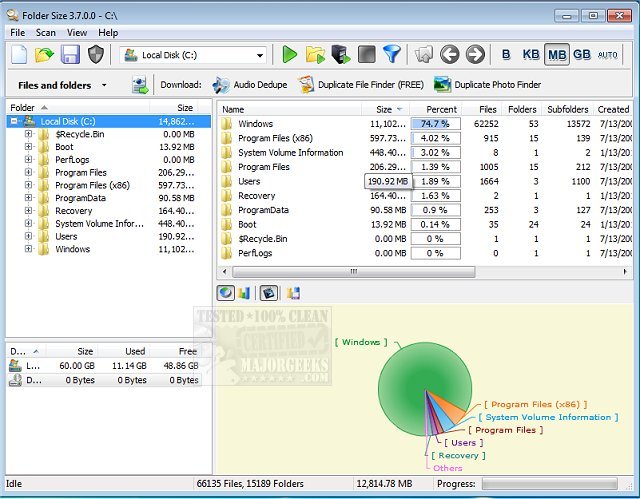
The latest release of Folder Size, version 5.9.0.5, offers enhanced capabilities for analyzing hard drive usage by displaying the sizes of files and folders, making it easier for users to monitor disk space distribution. After selecting a specific target area for analysis, the software presents a detailed report showing the sizes of folders and files, along with the percentage of total disk space they occupy. Users can sort this report to identify the largest files and folders, enabling them to pinpoint which items are consuming the most storage.
Folder Size stands out due to its optimized scanning algorithms that allow it to quickly scan an entire hard drive within minutes. It also supports a progressive scan feature, enabling users to resume scanning from where it was interrupted. Additionally, users have the flexibility to scan individual folders to save time.
Key features of Folder Size include:
- The ability to scan both folders and drives.
- Visualization through charts.
- Detailed information on all files and folders.
- Integration with Windows Explorer for file location and deletion.
- Capability to open images with their associated programs.
- A convenient "Scan with Folder Size" option in the Explorer context menu.
- Support for all types of storage devices.
- Reports focusing on the largest files and folders.
In summary, Folder Size is a robust tool for managing disk space, providing users with insights and control over their storage usage.
To further extend this, users might also find it beneficial to compare Folder Size with other disk management tools available in the market, such as WinDirStat or TreeSize, which offer similar functionalities but may vary in features or user interface. Moreover, integrating Folder Size with regular maintenance routines, like utilizing Windows' Storage Sense to clean up junk files, could enhance overall system performance and storage efficiency
Folder Size stands out due to its optimized scanning algorithms that allow it to quickly scan an entire hard drive within minutes. It also supports a progressive scan feature, enabling users to resume scanning from where it was interrupted. Additionally, users have the flexibility to scan individual folders to save time.
Key features of Folder Size include:
- The ability to scan both folders and drives.
- Visualization through charts.
- Detailed information on all files and folders.
- Integration with Windows Explorer for file location and deletion.
- Capability to open images with their associated programs.
- A convenient "Scan with Folder Size" option in the Explorer context menu.
- Support for all types of storage devices.
- Reports focusing on the largest files and folders.
In summary, Folder Size is a robust tool for managing disk space, providing users with insights and control over their storage usage.
To further extend this, users might also find it beneficial to compare Folder Size with other disk management tools available in the market, such as WinDirStat or TreeSize, which offer similar functionalities but may vary in features or user interface. Moreover, integrating Folder Size with regular maintenance routines, like utilizing Windows' Storage Sense to clean up junk files, could enhance overall system performance and storage efficiency
Folder Size 5.9.0.5 released
Folder Size is designed to analyze your hard drives and then display file/folder sizes for easy checking of disk space distribution.