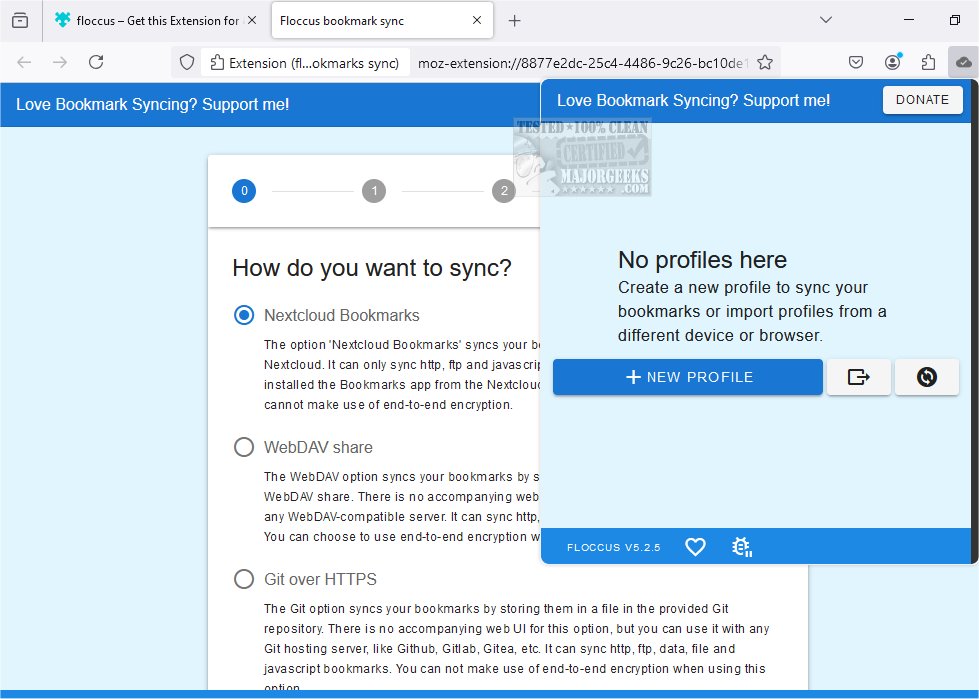
Floccus 5.8.4 has been released, enhancing its capabilities for privately syncing bookmarks across various browsers and devices. This innovative tool allows users to maintain their bookmarks using their browser's native management features, avoiding the need for a separate interface. Floccus serves primarily as a synchronization utility, ensuring a seamless experience by harmonizing bookmarks across multiple platforms.
To facilitate bookmark synchronization, users must connect to a syncing server accessible from all devices. Floccus supports multiple options for this, including Google Drive for convenience, with an option to encrypt bookmarks for privacy. Users can also utilize WebDAV, which is compatible with many cloud storage services. Among the simplest methods for synchronization is through Nextcloud Bookmarks, an open-source collaboration tool that can be self-hosted or accessed as a service. By installing the Bookmarks app on a Nextcloud instance, users can manage their bookmarks remotely, providing flexibility, such as accessing bookmarks from any web browser while in an internet café.
Key features of Floccus include:
- Direct syncing of native browser bookmarks
- Compatibility with Nextcloud Bookmarks, Google Drive, Git servers (like GitHub, GitLab, Gitea), and any WebDAV service
- Support for various web browsers that accept extensions, including Firefox, Chrome, Edge, Opera, Brave, and Vivaldi
- An Android app for mobile access to bookmarks
- The ability to create multiple sync profiles and manage sync strategies, intervals, and folders
- Easy export of configurations and secure credential management through an encryption passphrase
In addition to Floccus, users may find related resources helpful, such as guides for exporting or importing Google Chrome bookmarks to HTML or transitioning Firefox bookmarks to Google Chrome. Overall, Floccus offers a robust and user-friendly solution for bookmark management and synchronization, ensuring accessibility and privacy for users across different devices and browsers.
With this release, Floccus continues to empower users to maintain control over their bookmarks while enhancing accessibility and security in a multi-device environment. Future updates may expand its integration options or improve user interface features to further streamline the bookmarking experience
To facilitate bookmark synchronization, users must connect to a syncing server accessible from all devices. Floccus supports multiple options for this, including Google Drive for convenience, with an option to encrypt bookmarks for privacy. Users can also utilize WebDAV, which is compatible with many cloud storage services. Among the simplest methods for synchronization is through Nextcloud Bookmarks, an open-source collaboration tool that can be self-hosted or accessed as a service. By installing the Bookmarks app on a Nextcloud instance, users can manage their bookmarks remotely, providing flexibility, such as accessing bookmarks from any web browser while in an internet café.
Key features of Floccus include:
- Direct syncing of native browser bookmarks
- Compatibility with Nextcloud Bookmarks, Google Drive, Git servers (like GitHub, GitLab, Gitea), and any WebDAV service
- Support for various web browsers that accept extensions, including Firefox, Chrome, Edge, Opera, Brave, and Vivaldi
- An Android app for mobile access to bookmarks
- The ability to create multiple sync profiles and manage sync strategies, intervals, and folders
- Easy export of configurations and secure credential management through an encryption passphrase
In addition to Floccus, users may find related resources helpful, such as guides for exporting or importing Google Chrome bookmarks to HTML or transitioning Firefox bookmarks to Google Chrome. Overall, Floccus offers a robust and user-friendly solution for bookmark management and synchronization, ensuring accessibility and privacy for users across different devices and browsers.
With this release, Floccus continues to empower users to maintain control over their bookmarks while enhancing accessibility and security in a multi-device environment. Future updates may expand its integration options or improve user interface features to further streamline the bookmarking experience
Floccus 5.8.4 released
Floccus allows you to sync your bookmarks across different browsers and devices privately.