FlashBoot 3.4b has been released, introducing enhanced capabilities for creating bootable USB disks and flash memory keys. One of its standout features is the ability to format USB drives larger than 32 GB with FAT32 filesystems, which is essential for UEFI compatibility. This functionality allows the motherboard's firmware to recognize the USB filesystem effectively. Additionally, FlashBoot can manage thumb drives that lack partitions or drive letters and can recover full capacity even if other tools have previously reduced available space.
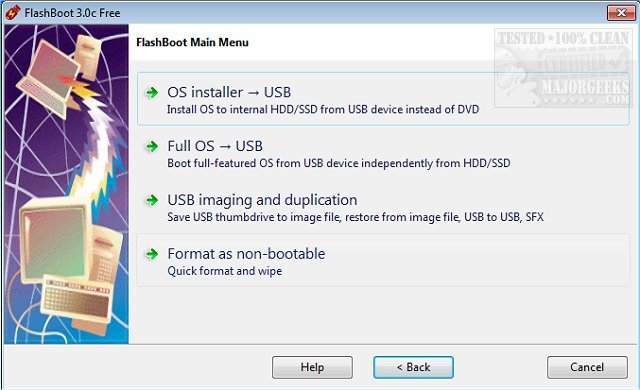
The software supports ESD source formats for Windows installation images, alongside traditional ISO files and DVDs. Key features of FlashBoot include:
- Preparing USB drives for Windows installation on internal HDDs or SSDs.
- Installing a fully-featured Windows operating system onto a USB drive for independent booting.
- Saving and restoring USB drives from image files.
- Copying bootable USB drives while retaining their bootability.
- Installing DOS or a UEFI shell onto USB drives.
- Quickly formatting USB drives and securely wiping their data.
In addition to these features, users may find related topics helpful, such as optimizing USB drives for better performance, troubleshooting USB issues, and understanding USB port functionalities.
To extend the text, one might consider discussing the implications of these features for users, such as how the ability to install a mini-OS on a USB drive can enhance portability and convenience for tech professionals. Additionally, the significance of FAT32 support for larger drives could be elaborated upon, especially in scenarios involving data transfer and system recovery. Users looking for versatile USB management tools would likely benefit from exploring FlashBoot's capabilities in various computing environments, including gaming, software development, and system administration. This positions FlashBoot not only as a utility for creating bootable drives but also as a comprehensive tool for managing USB storage solutions effectively
The software supports ESD source formats for Windows installation images, alongside traditional ISO files and DVDs. Key features of FlashBoot include:
- Preparing USB drives for Windows installation on internal HDDs or SSDs.
- Installing a fully-featured Windows operating system onto a USB drive for independent booting.
- Saving and restoring USB drives from image files.
- Copying bootable USB drives while retaining their bootability.
- Installing DOS or a UEFI shell onto USB drives.
- Quickly formatting USB drives and securely wiping their data.
In addition to these features, users may find related topics helpful, such as optimizing USB drives for better performance, troubleshooting USB issues, and understanding USB port functionalities.
To extend the text, one might consider discussing the implications of these features for users, such as how the ability to install a mini-OS on a USB drive can enhance portability and convenience for tech professionals. Additionally, the significance of FAT32 support for larger drives could be elaborated upon, especially in scenarios involving data transfer and system recovery. Users looking for versatile USB management tools would likely benefit from exploring FlashBoot's capabilities in various computing environments, including gaming, software development, and system administration. This positions FlashBoot not only as a utility for creating bootable drives but also as a comprehensive tool for managing USB storage solutions effectively
FlashBoot 3.4b released
FlashBoot allows you to create bootable USB disks, flash memory keys, and the added ability to install a mini-OS on bootable USB devices.