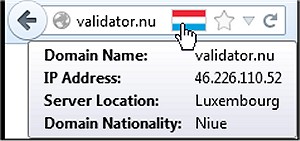
Flagfox, a popular Firefox add-on, has recently released version 6.1.96. This useful tool displays a flag icon that represents the physical location of the webserver you are currently connected to, enhancing user awareness and security during web browsing. Knowing the server's location can provide insights into the native language of the site and the legal jurisdiction that may apply, making it a valuable asset for users concerned about privacy and security.
In addition to the flag icon, users can access a range of features through external lookups. These include custom actions added to the icon's context menu and keyboard shortcuts for quick access. By clicking on the flag icon, users can view a detailed map of the server's city, along with other pertinent information such as local time and Internet Service Provider (ISP) details.
Flagfox boasts numerous features that enhance the browsing experience, including:
- Site safety and malware checks
- Discovery of similar sites and user reviews
- Automatic translation to the user's language
- Tools for SEO and web development research
- Diagnostic tools like pings and traceroutes
- Access to Whois and DNS information
- Page code validation
- Quick URL shortening
- Options to copy server IP addresses or create custom actions
In addition to these features, Flagfox can aid in improving web browsing speed and efficiency, as well as provide guidance on resetting or repairing browsers like Google Chrome, Mozilla Firefox, and Microsoft Edge. Furthermore, users can learn how to mute tabs in these browsers for a more focused browsing experience.
Overall, Flagfox is a comprehensive tool for Firefox users who seek to enhance their browsing security, gain insights into webserver locations, and utilize a variety of helpful web tools. With the latest update, it continues to evolve and cater to the needs of its user base
In addition to the flag icon, users can access a range of features through external lookups. These include custom actions added to the icon's context menu and keyboard shortcuts for quick access. By clicking on the flag icon, users can view a detailed map of the server's city, along with other pertinent information such as local time and Internet Service Provider (ISP) details.
Flagfox boasts numerous features that enhance the browsing experience, including:
- Site safety and malware checks
- Discovery of similar sites and user reviews
- Automatic translation to the user's language
- Tools for SEO and web development research
- Diagnostic tools like pings and traceroutes
- Access to Whois and DNS information
- Page code validation
- Quick URL shortening
- Options to copy server IP addresses or create custom actions
In addition to these features, Flagfox can aid in improving web browsing speed and efficiency, as well as provide guidance on resetting or repairing browsers like Google Chrome, Mozilla Firefox, and Microsoft Edge. Furthermore, users can learn how to mute tabs in these browsers for a more focused browsing experience.
Overall, Flagfox is a comprehensive tool for Firefox users who seek to enhance their browsing security, gain insights into webserver locations, and utilize a variety of helpful web tools. With the latest update, it continues to evolve and cater to the needs of its user base
Flagfox for Firefox 6.1.96 released
Flagfox is a Firefox add-on that displays a flag icon indicating the current webserver's physical location.