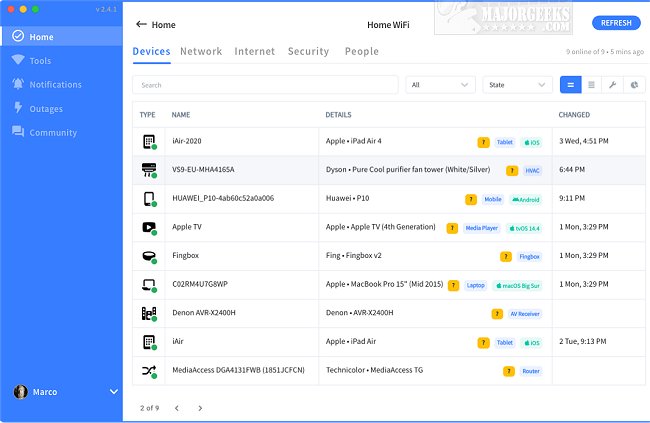
Fing has released version 3.10.0, enhancing its status as a comprehensive toolkit for network management. Fing Desktop offers advanced features such as connectivity health checks, speed tests, and notifications about connectivity issues and internet outages. This powerful tool aids users in various ways, including identifying devices on their WiFi network, detecting unauthorized access, assessing network security, locating hidden cameras in accommodations, troubleshooting streaming issues, and verifying if their internet provider delivers the promised speeds.
Fing excels in discovering all devices connected to a network and offers detailed analysis, including WiFi and cellular internet speed tests, download and upload speed assessments, and latency measurements. Its capabilities extend to network scanning with tools such as WiFi & LAN network scanners, port scanning, device ping, traceroute, and DNS lookup. Fing provides comprehensive device identification, including IP address, MAC address, device name, model, vendor, and manufacturer details. Users can also set up alerts for network security and device changes via phone or email, ensuring they stay informed about their network status.
To enhance user experience further, Fing offers guides on improving wireless network performance, fixing slow internet on Windows 10 & 11, utilizing the ping command, and checking Wi-Fi security settings in Windows.
In summary, Fing 3.10.0 empowers users with robust features for monitoring, analyzing, and securing their networks. As technology continues to evolve, Fing remains committed to providing tools that ensure seamless connectivity and enhanced network security for both personal and professional use
Fing excels in discovering all devices connected to a network and offers detailed analysis, including WiFi and cellular internet speed tests, download and upload speed assessments, and latency measurements. Its capabilities extend to network scanning with tools such as WiFi & LAN network scanners, port scanning, device ping, traceroute, and DNS lookup. Fing provides comprehensive device identification, including IP address, MAC address, device name, model, vendor, and manufacturer details. Users can also set up alerts for network security and device changes via phone or email, ensuring they stay informed about their network status.
To enhance user experience further, Fing offers guides on improving wireless network performance, fixing slow internet on Windows 10 & 11, utilizing the ping command, and checking Wi-Fi security settings in Windows.
In summary, Fing 3.10.0 empowers users with robust features for monitoring, analyzing, and securing their networks. As technology continues to evolve, Fing remains committed to providing tools that ensure seamless connectivity and enhanced network security for both personal and professional use
Fing 3.10.0 released
Fing is the ultimate comprehensive toolkit for network management.