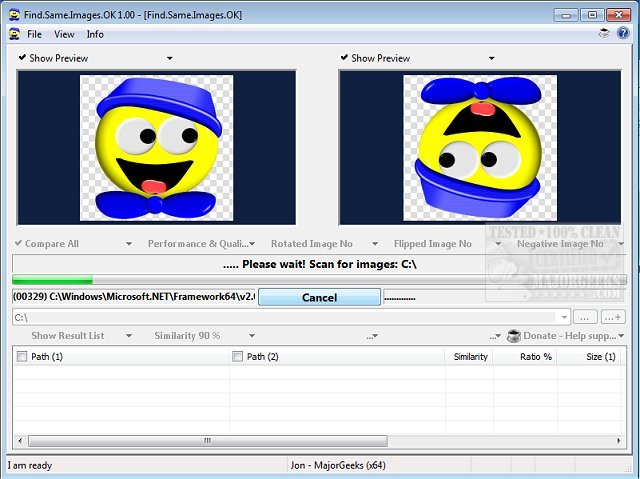
Find.Same.Images.OK version 5.95 has been released, a robust tool specifically designed to identify duplicate images, including those that may be rotated, mirrored, or even negative. Unlike basic duplicate finders, this software employs advanced algorithms to generate graphic signatures and conduct pixel-level comparisons. This feature allows it to detect even the most subtly altered images.
The program is particularly beneficial for users with extensive collections of image files who face the tedious task of sorting through them to reclaim disk space. It offers image previews, enabling users to visually verify the duplicates found during scans. The utility operates efficiently without overloading the CPU, ensuring a smooth user experience.
Key features of Find.Same.Images.OK include:
- Comparison of folders against one another, as well as comprehensive folder comparisons.
- High-quality performance and minimal resource usage.
- Capability to compare images across multiple folders.
- Portable version available alongside installation options.
- Support for a variety of image formats, including JPG, PNG, and WMF.
Find.Same.Images.OK is an essential tool for anyone looking to streamline their image collections and efficiently manage storage space. As digital storage continues to evolve, maintaining organized and duplicate-free image libraries becomes increasingly important.
In addition to its core functionalities, users may also consider related tools and tips, such as using Windows' Storage Sense for automatic junk file deletion or comparing popular drive cleaning software like CCleaner, Wise Disk Cleaner, and PrivaZer. Moreover, for those who miss the classic Windows Photo Viewer, there are guides available to restore it on Windows 10 and 11
The program is particularly beneficial for users with extensive collections of image files who face the tedious task of sorting through them to reclaim disk space. It offers image previews, enabling users to visually verify the duplicates found during scans. The utility operates efficiently without overloading the CPU, ensuring a smooth user experience.
Key features of Find.Same.Images.OK include:
- Comparison of folders against one another, as well as comprehensive folder comparisons.
- High-quality performance and minimal resource usage.
- Capability to compare images across multiple folders.
- Portable version available alongside installation options.
- Support for a variety of image formats, including JPG, PNG, and WMF.
Find.Same.Images.OK is an essential tool for anyone looking to streamline their image collections and efficiently manage storage space. As digital storage continues to evolve, maintaining organized and duplicate-free image libraries becomes increasingly important.
In addition to its core functionalities, users may also consider related tools and tips, such as using Windows' Storage Sense for automatic junk file deletion or comparing popular drive cleaning software like CCleaner, Wise Disk Cleaner, and PrivaZer. Moreover, for those who miss the classic Windows Photo Viewer, there are guides available to restore it on Windows 10 and 11
Find.Same.Images.OK 5.95 released
Find.Same.Images.OK is designed to locate duplicate images as well as any that are rotated or mirrored and more.