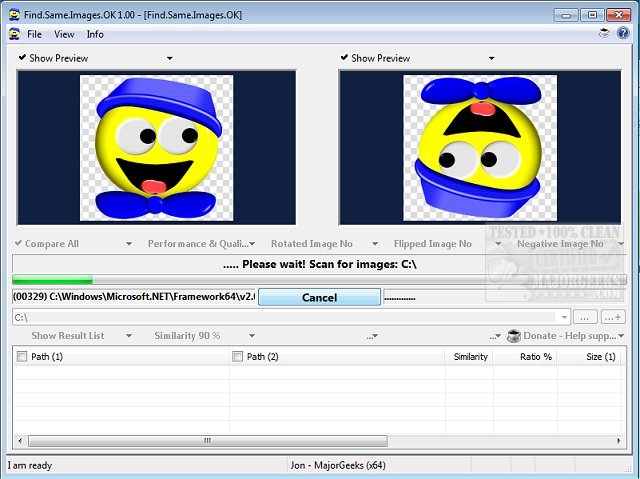
The latest version of Find.Same.Images.OK, version 5.88, has been released, enhancing its capabilities as a robust tool for identifying duplicate images. Unlike basic duplicate image finders, this software generates graphic signatures and performs pixel-level comparisons, allowing it to detect not only exact duplicates but also images that have been rotated, mirrored, or even converted to negative formats.
The utility is particularly beneficial for users with extensive image libraries, as it efficiently scans and identifies redundant files, saving valuable disk space and minimizing the time spent on manual searches and deletions. Users can preview images during the scanning process, providing visual confirmation of the duplicates detected.
Key features of Find.Same.Images.OK include:
- Comparing images across multiple folders
- High-quality performance without straining CPU resources
- Portability with an optional installation process
- Support for various image formats, including JPG, PNG, and WMF
This tool is an excellent solution for anyone looking to streamline their image management and enhance their storage efficiency.
In addition to its primary functions, users may also find related tools useful, such as guides on utilizing Storage Sense to automatically delete junk files in Windows 10 and 11, or comparisons of top drive cleaning software like CCleaner, Wise Disk Cleaner, and PrivaZer. Furthermore, those interested in restoring the Windows Photo Viewer on newer Windows systems may benefit from additional resources. Overall, Find.Same.Images.OK stands out as a powerful utility for image management needs
The utility is particularly beneficial for users with extensive image libraries, as it efficiently scans and identifies redundant files, saving valuable disk space and minimizing the time spent on manual searches and deletions. Users can preview images during the scanning process, providing visual confirmation of the duplicates detected.
Key features of Find.Same.Images.OK include:
- Comparing images across multiple folders
- High-quality performance without straining CPU resources
- Portability with an optional installation process
- Support for various image formats, including JPG, PNG, and WMF
This tool is an excellent solution for anyone looking to streamline their image management and enhance their storage efficiency.
In addition to its primary functions, users may also find related tools useful, such as guides on utilizing Storage Sense to automatically delete junk files in Windows 10 and 11, or comparisons of top drive cleaning software like CCleaner, Wise Disk Cleaner, and PrivaZer. Furthermore, those interested in restoring the Windows Photo Viewer on newer Windows systems may benefit from additional resources. Overall, Find.Same.Images.OK stands out as a powerful utility for image management needs
Find.Same.Images.OK 5.88 released
Find.Same.Images.OK is designed to locate duplicate images as well as any that are rotated or mirrored and more.