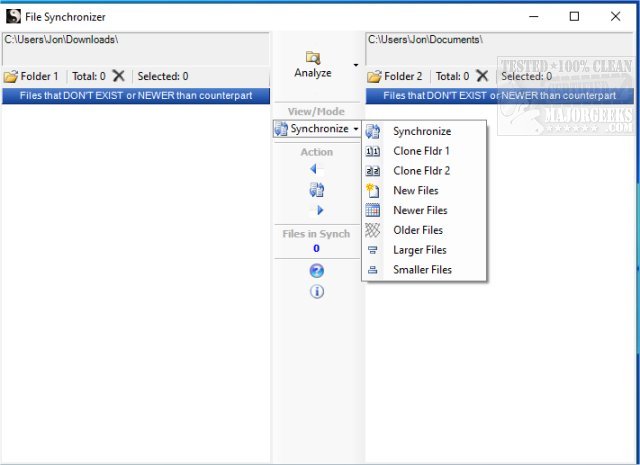
The latest version of File Synchronizer, 5.0.7, has been launched, enhancing users' ability to synchronize file and drive contents seamlessly. The software boasts a user-friendly interface, prominently featuring a central column that outlines all available synchronization options. This design facilitates the easy selection of synchronization preferences, such as moving all files from one folder to another or syncing files between multiple folders.
File Synchronizer stands out with its capabilities to clone folders and perform synchronization based on file size and age, making it an ideal tool for managing extensive media collections like MP3s and videos. By intelligently identifying only new or altered files, it significantly reduces the time required for synchronization compared to traditional methods that would copy every file indiscriminately.
In addition to its core functionalities, File Synchronizer offers a "Clone Mode" that allows users to synchronize a target folder to align perfectly with a master folder. This feature ensures that the contents are consistently updated, providing a reliable backup solution. Furthermore, the software is compatible with external drives and can connect with computers over both wired and wireless networks, enhancing its versatility for various user environments.
Extended Overview:
With the release of File Synchronizer 5.0.7, users can expect not only improved performance but also additional features aimed at enhancing the synchronization experience. The software may include options for scheduling sync tasks, allowing users to set automatic synchronization at preferred intervals. This is particularly useful for users with large file collections who wish to maintain up-to-date backups without manual intervention.
Moreover, future updates could introduce cloud integration capabilities, enabling users to synchronize files between local drives and cloud storage solutions. This would provide an additional layer of security and accessibility for important files, allowing users to access their data from anywhere.
As technology continues to evolve, File Synchronizer may also incorporate advanced algorithms for faster data transfers and better handling of file conflicts, ensuring that users can synchronize efficiently without losing valuable data. Overall, File Synchronizer 5.0.7 positions itself as a robust solution for individuals and businesses seeking reliable file synchronization across multiple platforms and devices
File Synchronizer stands out with its capabilities to clone folders and perform synchronization based on file size and age, making it an ideal tool for managing extensive media collections like MP3s and videos. By intelligently identifying only new or altered files, it significantly reduces the time required for synchronization compared to traditional methods that would copy every file indiscriminately.
In addition to its core functionalities, File Synchronizer offers a "Clone Mode" that allows users to synchronize a target folder to align perfectly with a master folder. This feature ensures that the contents are consistently updated, providing a reliable backup solution. Furthermore, the software is compatible with external drives and can connect with computers over both wired and wireless networks, enhancing its versatility for various user environments.
Extended Overview:
With the release of File Synchronizer 5.0.7, users can expect not only improved performance but also additional features aimed at enhancing the synchronization experience. The software may include options for scheduling sync tasks, allowing users to set automatic synchronization at preferred intervals. This is particularly useful for users with large file collections who wish to maintain up-to-date backups without manual intervention.
Moreover, future updates could introduce cloud integration capabilities, enabling users to synchronize files between local drives and cloud storage solutions. This would provide an additional layer of security and accessibility for important files, allowing users to access their data from anywhere.
As technology continues to evolve, File Synchronizer may also incorporate advanced algorithms for faster data transfers and better handling of file conflicts, ensuring that users can synchronize efficiently without losing valuable data. Overall, File Synchronizer 5.0.7 positions itself as a robust solution for individuals and businesses seeking reliable file synchronization across multiple platforms and devices
File Synchronizer 5.0.7 released
File Synchronizer provides you with the ability to synchronize file and drive contents through a relatively simple process.