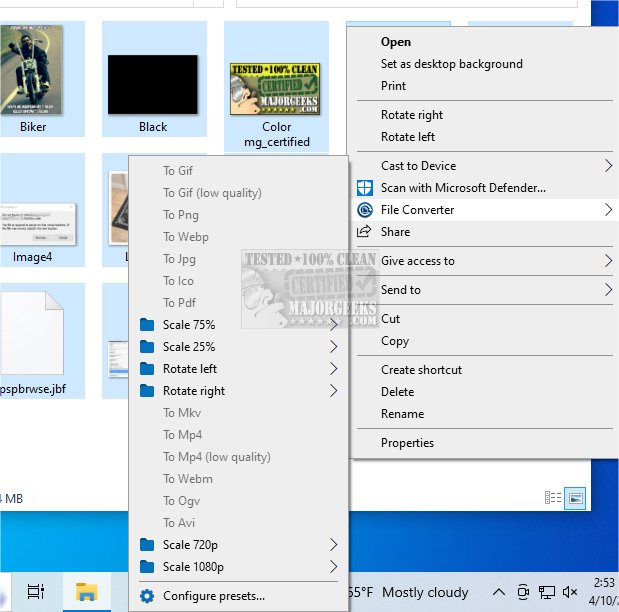
File Converter 2.2 has been launched, offering users a straightforward and effective solution for converting and compressing multiple files through an intuitive software interface. This application is designed to integrate seamlessly with the Windows Explorer context menu, which enables users to quickly convert files between formats or compress large files to optimize disk space.
Wide Range of Supported File Types
The application supports a diverse array of file types, including documents, images, audio, and video files. Notable formats that can be converted include PDF, DOCX, JPG, MP3, and MP4. Users can view a complete list of supported formats on the developer's website, making it easy to verify compatibility with their specific needs.
Compression Without Quality Loss
One of the standout features of File Converter is its ability to compress files without losing quality. This is particularly beneficial for users looking to free up storage space or send large files via email without compromising on the integrity of the content.
User-Friendly Presets and Customization Options
To streamline the conversion process, File Converter comes with a variety of presets that allow for quick file conversions without the need for extensive configuration. Users can also customize these presets, adjusting specific parameters for audio, video, and graphic conversions. The software supports concurrent conversions, enabling multiple operations to be processed simultaneously, which enhances efficiency for users managing numerous files.
Conclusion
Overall, File Converter 2.2 simplifies the processes of file conversion and compression, making it a valuable tool for both casual users and professionals. Its integration with Windows Explorer ensures that it is readily accessible, and its user-friendly design promotes ease of use. As digital file management continues to evolve, tools like File Converter will remain essential for efficient data handling.
Future Enhancements and User Feedback
Looking ahead, the developers of File Converter are open to user feedback for future updates. Users are encouraged to suggest additional features they would like to see, such as support for more file formats or enhanced compression algorithms. Continuous improvements and updates based on user input will ensure that File Converter remains a leading tool in file conversion and compression for years to come
Wide Range of Supported File Types
The application supports a diverse array of file types, including documents, images, audio, and video files. Notable formats that can be converted include PDF, DOCX, JPG, MP3, and MP4. Users can view a complete list of supported formats on the developer's website, making it easy to verify compatibility with their specific needs.
Compression Without Quality Loss
One of the standout features of File Converter is its ability to compress files without losing quality. This is particularly beneficial for users looking to free up storage space or send large files via email without compromising on the integrity of the content.
User-Friendly Presets and Customization Options
To streamline the conversion process, File Converter comes with a variety of presets that allow for quick file conversions without the need for extensive configuration. Users can also customize these presets, adjusting specific parameters for audio, video, and graphic conversions. The software supports concurrent conversions, enabling multiple operations to be processed simultaneously, which enhances efficiency for users managing numerous files.
Conclusion
Overall, File Converter 2.2 simplifies the processes of file conversion and compression, making it a valuable tool for both casual users and professionals. Its integration with Windows Explorer ensures that it is readily accessible, and its user-friendly design promotes ease of use. As digital file management continues to evolve, tools like File Converter will remain essential for efficient data handling.
Future Enhancements and User Feedback
Looking ahead, the developers of File Converter are open to user feedback for future updates. Users are encouraged to suggest additional features they would like to see, such as support for more file formats or enhanced compression algorithms. Continuous improvements and updates based on user input will ensure that File Converter remains a leading tool in file conversion and compression for years to come
File Converter 2.2 released
File Converter provides a simple yet efficient way to convert and compress multiple files through a user-friendly software application.