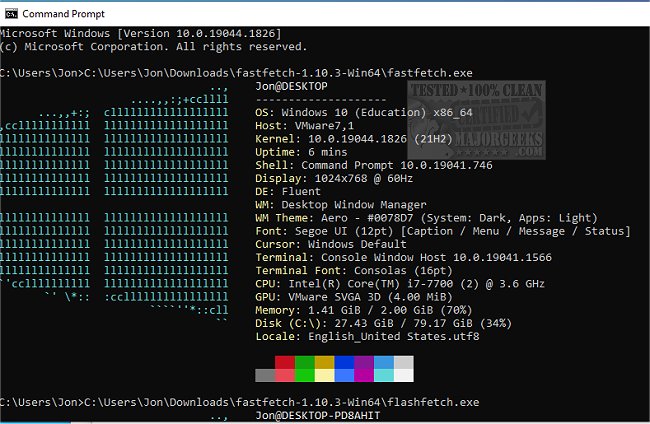
Fastfetch version 2.61.0 has been released, enhancing its capabilities as an open-source, multi-platform application designed to swiftly retrieve and present system information. Written primarily in C, Fastfetch prioritizes performance and customization, allowing users to tailor the display of their system's details in an appealing manner.
The application comprises two executables: the main Fastfetch and flashfetch. Both can be configured using command-line flags, which can be made persistent by saving them in the configuration file located at $XDG_CONFIG_HOME/fastfetch/config.conf. Users can access a list of available options by running the command `fastfetch --help`. The flashfetch executable is particularly optimized, with its configuration handled at compile time to minimize overhead and enhance performance on slower machines.
Fastfetch is under continuous development, incorporating new features and options to improve user experience. For those looking to customize their setup, there are premade configuration files available in the presets directory, which can be loaded with the `--load-config` flag and serve as helpful examples for format arguments. Additionally, the application allows extensive customization of logos, with detailed documentation available in the developer repository for further guidance.
Overall, Fastfetch is a valuable tool for users seeking to efficiently gather and display system information, with a focus on customization and performance.
The application comprises two executables: the main Fastfetch and flashfetch. Both can be configured using command-line flags, which can be made persistent by saving them in the configuration file located at $XDG_CONFIG_HOME/fastfetch/config.conf. Users can access a list of available options by running the command `fastfetch --help`. The flashfetch executable is particularly optimized, with its configuration handled at compile time to minimize overhead and enhance performance on slower machines.
Fastfetch is under continuous development, incorporating new features and options to improve user experience. For those looking to customize their setup, there are premade configuration files available in the presets directory, which can be loaded with the `--load-config` flag and serve as helpful examples for format arguments. Additionally, the application allows extensive customization of logos, with detailed documentation available in the developer repository for further guidance.
Overall, Fastfetch is a valuable tool for users seeking to efficiently gather and display system information, with a focus on customization and performance.
Extension
In addition to its current features, future updates could include enhanced integration with various operating systems, making it easier for users to access system information across different platforms. Moreover, the development team might consider adding a graphical user interface (GUI) for those who prefer a more visual approach to managing system data. Implementing user feedback mechanisms could also provide insights into which features are most desirable, further driving the app's evolution. As it continues to grow, Fastfetch could become not just a tool for displaying system information, but a comprehensive utility for system diagnostics and optimization, appealing to both casual users and advanced tech enthusiastsFastfetch 2.61.0 released
Fastfetch is an Open Source multi-platform app capable of quickly fetching and displaying system info.