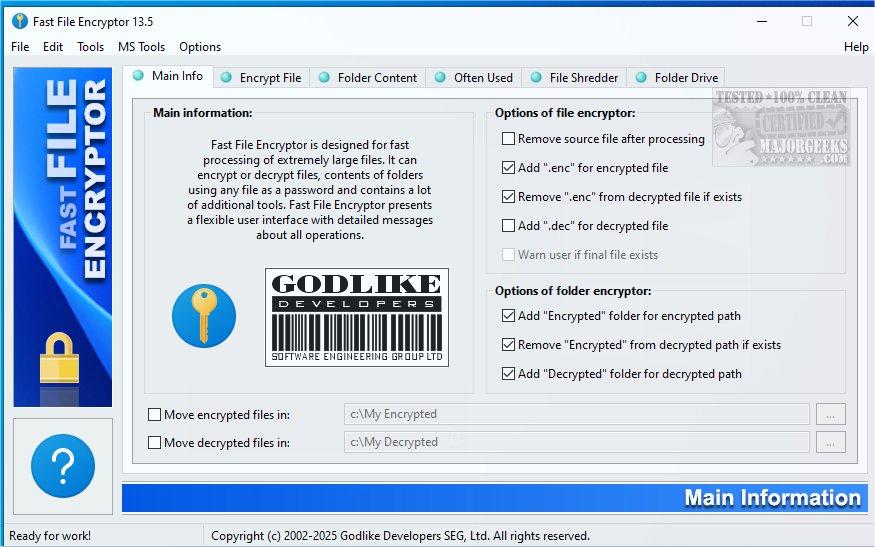
Fast File Encryptor version 25.12.1 has been released, offering users a straightforward and efficient tool for encrypting and decrypting files and folders. The application features a user-friendly interface with several options organized into tabs, including Encrypt File, Encrypt Folder Contents, Often Used Files, File Shredder, and Folder Drive. The Folder Drive option allows users to create, edit, and manage virtual drives linked to frequently used folders without altering physical drives.
In addition to its primary functions, Fast File Encryptor provides quick access to various Microsoft system commands such as MSInfo, MSConfig, MSDefrag, and Regedit, enhancing its utility as a comprehensive tool. Testing revealed that the application operates smoothly without lag, and users can adjust security levels for encryption via a slider that ranges from 0 to 255. A notable feature allows users to load passwords directly from a TXT file, which is particularly helpful for those who may forget their passwords.
While the application performs well, one suggested improvement would be to include a detailed breakdown of the encryption algorithms used for both encryption and file shredding. This would provide users with greater transparency and understanding of the security measures in place.
In summary, Fast File Encryptor 25.12.1 is a robust and efficient file encryption tool suitable for both casual users and professionals. Its intuitive design, combined with useful features such as virtual drive management and direct password loading, makes it a valuable addition to anyone's software toolkit. Future updates could further enhance the app by providing detailed algorithm information, thereby boosting user confidence in its security capabilities
In addition to its primary functions, Fast File Encryptor provides quick access to various Microsoft system commands such as MSInfo, MSConfig, MSDefrag, and Regedit, enhancing its utility as a comprehensive tool. Testing revealed that the application operates smoothly without lag, and users can adjust security levels for encryption via a slider that ranges from 0 to 255. A notable feature allows users to load passwords directly from a TXT file, which is particularly helpful for those who may forget their passwords.
While the application performs well, one suggested improvement would be to include a detailed breakdown of the encryption algorithms used for both encryption and file shredding. This would provide users with greater transparency and understanding of the security measures in place.
In summary, Fast File Encryptor 25.12.1 is a robust and efficient file encryption tool suitable for both casual users and professionals. Its intuitive design, combined with useful features such as virtual drive management and direct password loading, makes it a valuable addition to anyone's software toolkit. Future updates could further enhance the app by providing detailed algorithm information, thereby boosting user confidence in its security capabilities
Fast File Encryptor 25.12.1 released
Fast File Encryptor includes several easy-to-use options for encrypting/decrypting of files, folders as well as some additional system command links.