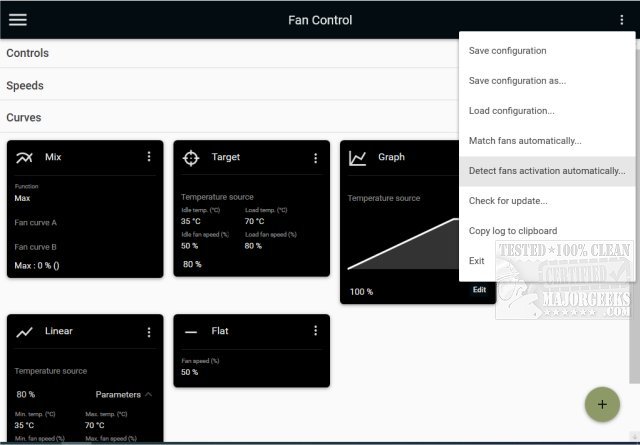
FanControl V265 is a versatile, open-source utility designed for managing GPU and CPU fan speeds, tailored specifically for Windows users. This portable application allows for extensive customization, enabling users to optimize their system's cooling performance and maintain quieter operation—essential for gamers and PC enthusiasts alike.
With FanControl, users can easily configure fan settings through an intuitive interface, gaining access to a range of features aimed at monitoring and controlling fan speeds efficiently. The tool stands out due to its ability to provide real-time performance updates, ensuring that the fans operate at optimal levels based on current system demands.
Key Features of FanControl V265:
- Profile Management: Save, edit, and load multiple fan control profiles to quickly switch settings based on different usage scenarios.
- Temperature Sources: Utilize multiple temperature inputs from CPU, GPU, motherboard, hard drives, or custom ".sensor" files for precise fan speed adjustments.
- Custom Fan Curves: Create tailored fan curves that dictate how fan speeds respond to varying temperatures, allowing for fine-tuning of system cooling.
- Advanced Control Parameters: Adjust settings such as activation percentage, response time, and hysteresis to refine the fan control response.
- User-Friendly Interface: A modern dashboard-style UI enhances usability, making it easy to navigate through settings and monitor performance.
- Background Operation: Run FanControl as a background application with a customizable tray icon for seamless integration into your workflow.
- Graphical Fan Curve Editor: Easily manipulate fan curves with drag-and-drop functionality, as well as copy and paste points between graphs.
Types of Fan Curves:
- Linear: Fan speed adjusts linearly based on temperature.
- Graph: Users can create custom curves based on specific temperature thresholds.
- Target: Maintains fan speed until a predetermined temperature is achieved.
- Mix: Combines two curves using a maximum or summation function.
- Sync: Synchronizes fan speeds with an existing control setting.
- Flat: Sets a fixed fan speed percentage regardless of temperature.
Overall, FanControl is an essential tool for anyone looking to exert greater control over their PC’s cooling systems. Whether you're troubleshooting, optimizing performance, or simply aiming for a quieter computing experience, FanControl V265 offers the flexibility and functionality required to meet your needs.
Additional Resources:
For further guidance and tips, users may find articles on topics such as identifying CPU cores, understanding Intel processor generations, and the safety of operating computers at varying temperatures beneficial
With FanControl, users can easily configure fan settings through an intuitive interface, gaining access to a range of features aimed at monitoring and controlling fan speeds efficiently. The tool stands out due to its ability to provide real-time performance updates, ensuring that the fans operate at optimal levels based on current system demands.
Key Features of FanControl V265:
- Profile Management: Save, edit, and load multiple fan control profiles to quickly switch settings based on different usage scenarios.
- Temperature Sources: Utilize multiple temperature inputs from CPU, GPU, motherboard, hard drives, or custom ".sensor" files for precise fan speed adjustments.
- Custom Fan Curves: Create tailored fan curves that dictate how fan speeds respond to varying temperatures, allowing for fine-tuning of system cooling.
- Advanced Control Parameters: Adjust settings such as activation percentage, response time, and hysteresis to refine the fan control response.
- User-Friendly Interface: A modern dashboard-style UI enhances usability, making it easy to navigate through settings and monitor performance.
- Background Operation: Run FanControl as a background application with a customizable tray icon for seamless integration into your workflow.
- Graphical Fan Curve Editor: Easily manipulate fan curves with drag-and-drop functionality, as well as copy and paste points between graphs.
Types of Fan Curves:
- Linear: Fan speed adjusts linearly based on temperature.
- Graph: Users can create custom curves based on specific temperature thresholds.
- Target: Maintains fan speed until a predetermined temperature is achieved.
- Mix: Combines two curves using a maximum or summation function.
- Sync: Synchronizes fan speeds with an existing control setting.
- Flat: Sets a fixed fan speed percentage regardless of temperature.
Overall, FanControl is an essential tool for anyone looking to exert greater control over their PC’s cooling systems. Whether you're troubleshooting, optimizing performance, or simply aiming for a quieter computing experience, FanControl V265 offers the flexibility and functionality required to meet your needs.
Additional Resources:
For further guidance and tips, users may find articles on topics such as identifying CPU cores, understanding Intel processor generations, and the safety of operating computers at varying temperatures beneficial
FanControl V265 released
FanControl is a highly customizable portable Open Source GPU and CPU fan management utility.