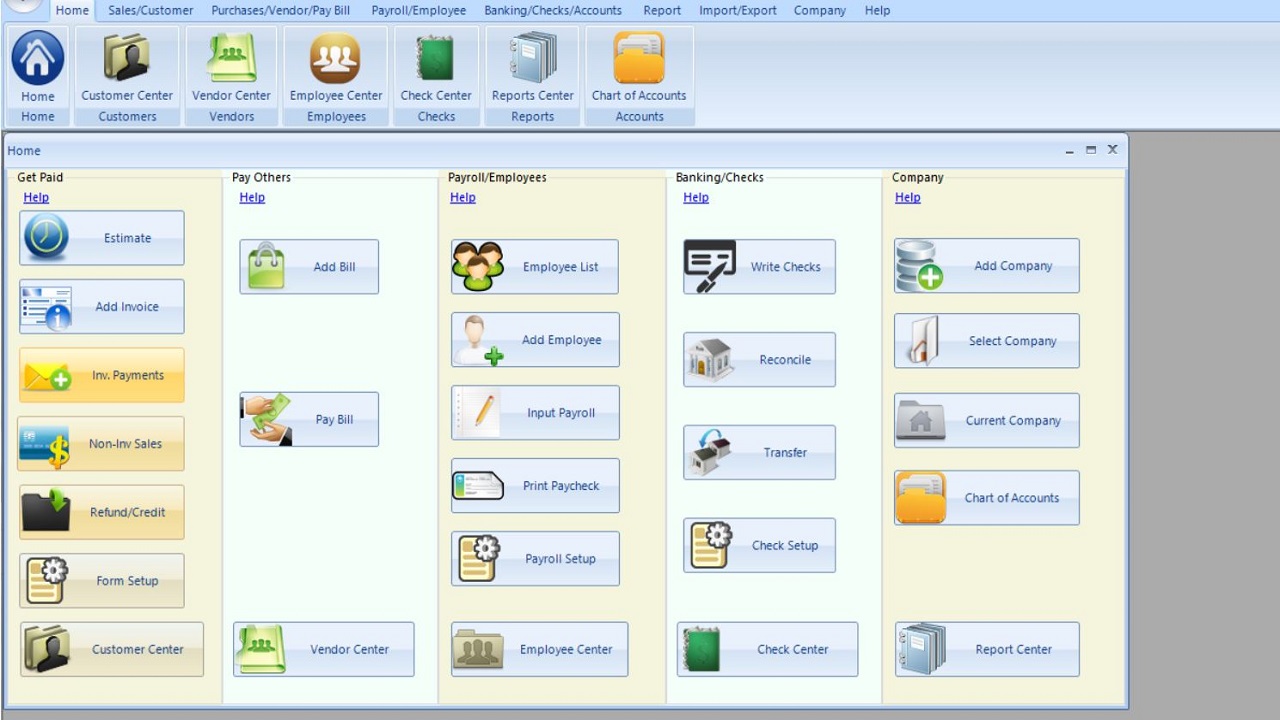
ezAccounting, developed by Halfpricesoft, is a cost-effective accounting and payroll software designed specifically for small businesses using Windows. With its latest release (version 3.16.9), ezAccounting continues to provide essential features that help users manage their finances efficiently. The software allows users to track income and expenses, handle invoicing and payments, process payroll, print checks, and generate necessary tax forms. A notable feature is its 30-day free trial, which allows potential users to explore the software without any initial investment.
User-Friendly Interface and Functionality
The software boasts a button-style interface that simplifies navigation through income, expenses, invoicing, payroll, check printing, and tax forms. While there may be a slight learning curve initially, users often find the layout intuitive over time. Unlike subscription-based services like QuickBooks, ezAccounting is a local desktop program with a straightforward purchasing model; users buy the software outright and have the option to pay for future updates if desired. This eliminates concerns about forced upgrades or unexpected pricing increases.
Key Features and Benefits
ezAccounting excels in providing a simple and efficient way to manage finances. Its strong payroll capabilities allow for in-house processing, check printing, and support for common tax forms such as 941, 940, W-2, and W-3, making it a valuable tool for small businesses that want to save on payroll service costs. It offers comprehensive reporting options, including profit and loss statements, balance sheets, sales reports, and payroll summaries. Job tracking is also integrated, enabling businesses to tie labor and costs to specific projects. Additionally, the software comes preloaded with a chart of accounts for easy setup, and vendor and payroll data can be imported smoothly.
Considerations and Limitations
Despite its advantages, ezAccounting may not be suitable for everyone. The program is limited to Windows operating systems, which restricts its user base. It also has minimal integrations with other software, and some tax forms require preprinted paper. Users transitioning from QuickBooks might find the limited import options challenging and may need to start fresh to fully utilize ezAccounting.
Conclusion: Who Should Try ezAccounting?
ezAccounting is particularly beneficial for businesses that prioritize local data control, built-in payroll processing, job tracking, and predictable costs without the burden of subscriptions. It is easy to learn and significantly cheaper over time compared to cloud-based accounting solutions. However, if users prefer cloud-first solutions or are accustomed to the layout of QuickBooks, they may want to consider other options.
For businesses focused on payroll and job costing, ezAccounting offers a compelling solution worth exploring. With no cost to try the 30-day free trial, users can evaluate its fit for their accounting needs. For additional assistance or to explore alternatives, users are encouraged to visit the MajorGeeks forums.
Extended Features and Future Outlook
Looking ahead, the developers of ezAccounting may consider expanding its features to include more integrations with third-party applications, enhancing user experience on different platforms beyond Windows, and incorporating cloud functionalities to appeal to a broader audience. As small businesses increasingly demand flexibility in their accounting software, such adaptations could position ezAccounting as a more competitive player in the accounting software market
User-Friendly Interface and Functionality
The software boasts a button-style interface that simplifies navigation through income, expenses, invoicing, payroll, check printing, and tax forms. While there may be a slight learning curve initially, users often find the layout intuitive over time. Unlike subscription-based services like QuickBooks, ezAccounting is a local desktop program with a straightforward purchasing model; users buy the software outright and have the option to pay for future updates if desired. This eliminates concerns about forced upgrades or unexpected pricing increases.
Key Features and Benefits
ezAccounting excels in providing a simple and efficient way to manage finances. Its strong payroll capabilities allow for in-house processing, check printing, and support for common tax forms such as 941, 940, W-2, and W-3, making it a valuable tool for small businesses that want to save on payroll service costs. It offers comprehensive reporting options, including profit and loss statements, balance sheets, sales reports, and payroll summaries. Job tracking is also integrated, enabling businesses to tie labor and costs to specific projects. Additionally, the software comes preloaded with a chart of accounts for easy setup, and vendor and payroll data can be imported smoothly.
Considerations and Limitations
Despite its advantages, ezAccounting may not be suitable for everyone. The program is limited to Windows operating systems, which restricts its user base. It also has minimal integrations with other software, and some tax forms require preprinted paper. Users transitioning from QuickBooks might find the limited import options challenging and may need to start fresh to fully utilize ezAccounting.
Conclusion: Who Should Try ezAccounting?
ezAccounting is particularly beneficial for businesses that prioritize local data control, built-in payroll processing, job tracking, and predictable costs without the burden of subscriptions. It is easy to learn and significantly cheaper over time compared to cloud-based accounting solutions. However, if users prefer cloud-first solutions or are accustomed to the layout of QuickBooks, they may want to consider other options.
For businesses focused on payroll and job costing, ezAccounting offers a compelling solution worth exploring. With no cost to try the 30-day free trial, users can evaluate its fit for their accounting needs. For additional assistance or to explore alternatives, users are encouraged to visit the MajorGeeks forums.
Extended Features and Future Outlook
Looking ahead, the developers of ezAccounting may consider expanding its features to include more integrations with third-party applications, enhancing user experience on different platforms beyond Windows, and incorporating cloud functionalities to appeal to a broader audience. As small businesses increasingly demand flexibility in their accounting software, such adaptations could position ezAccounting as a more competitive player in the accounting software market
ezAccounting 3.16.9 released
ezAccounting is affordable small-business accounting and payroll software for Windows that helps you track income and expenses, manage invoicing and payments, process payroll, print checks, and generate essential tax forms, with a 30-day free trial.