The latest version of ezAccounting, version 3.16.10, has been released, offering an affordable solution for small businesses looking for accounting and payroll software specifically designed for Windows. This software allows users to efficiently track income and expenses, manage invoicing and payments, process payroll, print checks, and generate essential tax forms. Users can try it out for free for 30 days without the stress of cloud reliance or ongoing subscription fees.
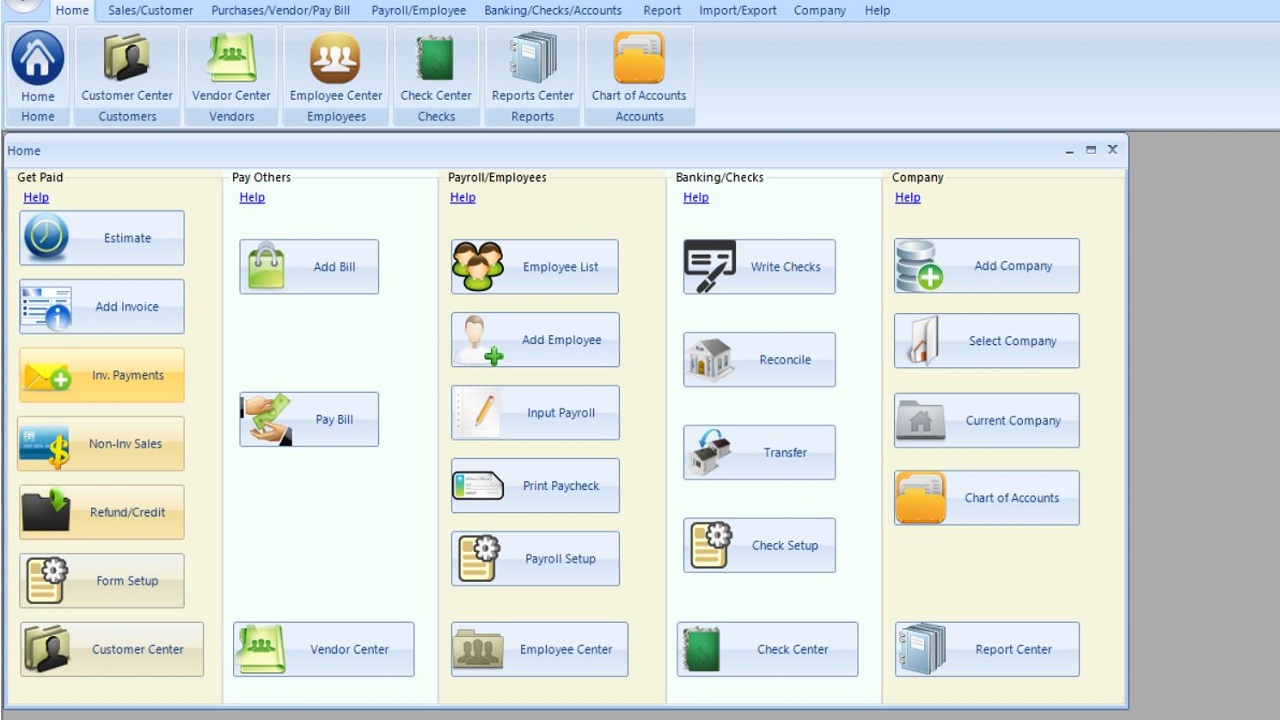
ezAccounting, developed by Halfpricesoft, features a user-friendly button-style interface that encompasses various functions like income tracking, expense management, invoicing, payroll, and tax form generation. While there may be a slight learning curve initially, users generally find the layout intuitive after some use. This software is a local desktop application, which means once purchased, there are no forced upgrades or unexpected costs—users can buy it, update it at their discretion, or simply continue using the version they have without disruption.
In contrast to subscription-based software like QuickBooks, which can become expensive, especially for multiple users, ezAccounting keeps costs predictable. The software excels in payroll management, allowing in-house processing and check printing, along with solid tax reporting capabilities for forms such as 941, 940, W-2, and W-3. It also supports job tracking, which is vital for businesses needing to associate labor and costs with specific projects. Additionally, the chart of accounts is preloaded for new users, and vendor and payroll imports function effectively for data preparation during tax season.
However, ezAccounting may not be suitable for everyone. Being Windows-only limits its accessibility, and there are few integration options available. Some tax forms require preprinted paper, and users transitioning from QuickBooks might find the import capabilities lacking. While the software is beneficial for businesses focused on job costing and payroll, it might not align with companies like MajorGeeks that do not emphasize these areas. For those seeking traditional accounting solutions, alternatives like GnuCash may be worth exploring.
In summary, ezAccounting presents a niche yet valuable option for small businesses in need of payroll management, job tracking, and comprehensive reporting, all without the burden of subscription fees. Its flat pricing and local data control are pros, while its Windows-only format and limited QuickBooks import are cons. For those frustrated with subscription models and who require effective payroll and job costing features, the free trial offers a risk-free opportunity to evaluate its fit for their business needs. Further assistance and alternative suggestions can be found on the MajorGeeks forums
ezAccounting, developed by Halfpricesoft, features a user-friendly button-style interface that encompasses various functions like income tracking, expense management, invoicing, payroll, and tax form generation. While there may be a slight learning curve initially, users generally find the layout intuitive after some use. This software is a local desktop application, which means once purchased, there are no forced upgrades or unexpected costs—users can buy it, update it at their discretion, or simply continue using the version they have without disruption.
In contrast to subscription-based software like QuickBooks, which can become expensive, especially for multiple users, ezAccounting keeps costs predictable. The software excels in payroll management, allowing in-house processing and check printing, along with solid tax reporting capabilities for forms such as 941, 940, W-2, and W-3. It also supports job tracking, which is vital for businesses needing to associate labor and costs with specific projects. Additionally, the chart of accounts is preloaded for new users, and vendor and payroll imports function effectively for data preparation during tax season.
However, ezAccounting may not be suitable for everyone. Being Windows-only limits its accessibility, and there are few integration options available. Some tax forms require preprinted paper, and users transitioning from QuickBooks might find the import capabilities lacking. While the software is beneficial for businesses focused on job costing and payroll, it might not align with companies like MajorGeeks that do not emphasize these areas. For those seeking traditional accounting solutions, alternatives like GnuCash may be worth exploring.
In summary, ezAccounting presents a niche yet valuable option for small businesses in need of payroll management, job tracking, and comprehensive reporting, all without the burden of subscription fees. Its flat pricing and local data control are pros, while its Windows-only format and limited QuickBooks import are cons. For those frustrated with subscription models and who require effective payroll and job costing features, the free trial offers a risk-free opportunity to evaluate its fit for their business needs. Further assistance and alternative suggestions can be found on the MajorGeeks forums
ezAccounting 3.16.10 released
ezAccounting is affordable small-business accounting and payroll software for Windows that helps you track income and expenses, manage invoicing and payments, process payroll, print checks, and generate essential tax forms, with a 30-day free trial.