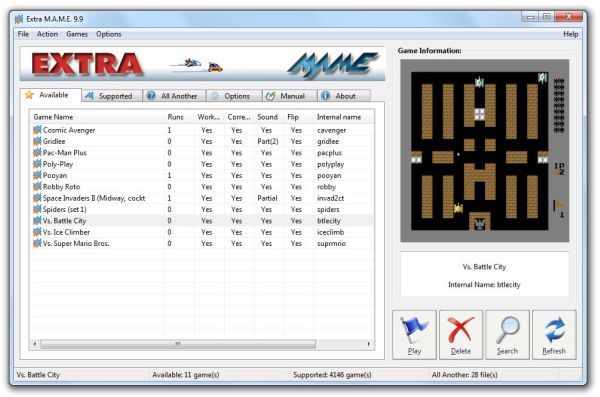
ExtraMAME, a graphical user interface for the Multiple Arcade Machine Emulator (M.A.M.E.), has just launched its latest version, 26.1. This application allows users to enjoy thousands of retro arcade games directly on their computers, providing a nostalgic gaming experience.
To get started with ExtraMAME, follow these simple installation steps:
1. Download the latest version of the Windows command-line binaries of M.A.M.E. from the official website.
2. Install ExtraMAME in your preferred directory; the default location is C:\Games\ExtraMAME.
3. Place the downloaded M.A.M.E. command-line binaries in the folder you created.
4. Launch the ExtraMAME application.
Upon opening ExtraMAME, users will encounter two main lists: "supported" and "available." The "supported" list showcases the games that are compatible with M.A.M.E., while the "available" list will initially be empty until you download the necessary game files. To play games, users need to obtain specific "bios" and "ROM" files corresponding to the games they wish to enjoy.
In addition to these features, ExtraMAME 26.1 may include improvements such as enhanced user interface elements, better game compatibility, and additional customization options for a more tailored gaming experience. The release aims to cater not only to seasoned gamers looking for a trip down memory lane but also to new players interested in exploring the rich history of arcade gaming.
For those eager to dive into this exciting world of classic games, downloading ExtraMAME and the required game files is the first step towards countless hours of nostalgic fun
To get started with ExtraMAME, follow these simple installation steps:
1. Download the latest version of the Windows command-line binaries of M.A.M.E. from the official website.
2. Install ExtraMAME in your preferred directory; the default location is C:\Games\ExtraMAME.
3. Place the downloaded M.A.M.E. command-line binaries in the folder you created.
4. Launch the ExtraMAME application.
Upon opening ExtraMAME, users will encounter two main lists: "supported" and "available." The "supported" list showcases the games that are compatible with M.A.M.E., while the "available" list will initially be empty until you download the necessary game files. To play games, users need to obtain specific "bios" and "ROM" files corresponding to the games they wish to enjoy.
In addition to these features, ExtraMAME 26.1 may include improvements such as enhanced user interface elements, better game compatibility, and additional customization options for a more tailored gaming experience. The release aims to cater not only to seasoned gamers looking for a trip down memory lane but also to new players interested in exploring the rich history of arcade gaming.
For those eager to dive into this exciting world of classic games, downloading ExtraMAME and the required game files is the first step towards countless hours of nostalgic fun
ExtraMAME 26.1 released
ExtraMAME is a GUI wrapper for M.A.M.E., the Multiple Arcade Machine Emulator that allows you to play thousands of old-school arcade games on your computer.