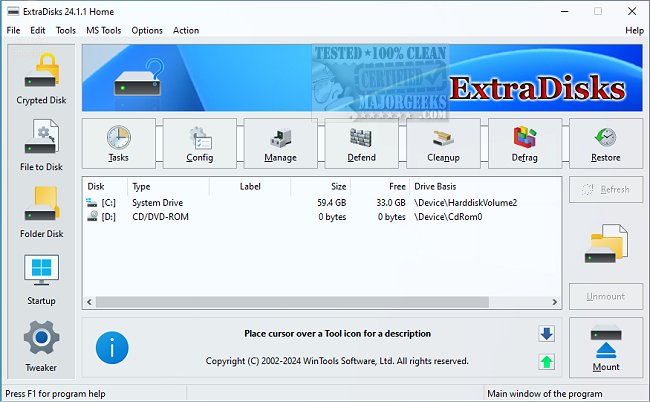
ExtraDisks version 26.3.1 has just been released, offering a versatile suite of tools for creating virtual disks on your computer. This software allows users to create three main types of virtual disks:
1. Encrypted Disks: These disks leverage AES encryption to protect sensitive data, ensuring confidentiality and security.
2. File-Based Virtual Disks: Ideal for those who need to manage numerous small files, this feature simplifies transferring files, such as photos or music, between different machines.
3. Folder-Based Virtual Disks: This option enables users to easily access and navigate through deeply nested subfolders by connecting them as a virtual drive.
ExtraDisks is designed to help users create virtual storage solutions without altering their physical drives, maintaining the integrity of existing data. By using ExtraDisks, individuals can manage their digital storage in a more personalized manner, enhancing convenience and efficiency in data handling.
In addition to these features, ExtraDisks facilitates innovative storage methods that allow users to experience enhanced organization and access to their data. With its user-friendly interface and powerful capabilities, ExtraDisks stands out as a beneficial tool for anyone looking to optimize their data storage and management.
If you're interested in exploring this revolutionary tool, now is the perfect time to give ExtraDisks a try and take advantage of its powerful features.
Additionally, users may find helpful resources related to optimizing computer performance, such as tutorials on updating Windows Experience Index scores, identifying hardware components, checking CPU core counts, and determining whether a hard drive is SSD or HDD
1. Encrypted Disks: These disks leverage AES encryption to protect sensitive data, ensuring confidentiality and security.
2. File-Based Virtual Disks: Ideal for those who need to manage numerous small files, this feature simplifies transferring files, such as photos or music, between different machines.
3. Folder-Based Virtual Disks: This option enables users to easily access and navigate through deeply nested subfolders by connecting them as a virtual drive.
ExtraDisks is designed to help users create virtual storage solutions without altering their physical drives, maintaining the integrity of existing data. By using ExtraDisks, individuals can manage their digital storage in a more personalized manner, enhancing convenience and efficiency in data handling.
In addition to these features, ExtraDisks facilitates innovative storage methods that allow users to experience enhanced organization and access to their data. With its user-friendly interface and powerful capabilities, ExtraDisks stands out as a beneficial tool for anyone looking to optimize their data storage and management.
If you're interested in exploring this revolutionary tool, now is the perfect time to give ExtraDisks a try and take advantage of its powerful features.
Additionally, users may find helpful resources related to optimizing computer performance, such as tutorials on updating Windows Experience Index scores, identifying hardware components, checking CPU core counts, and determining whether a hard drive is SSD or HDD
ExtraDisks 26.3.1 released
ExtraDisks helps create Encrypted disks, Virtual disks based on files, and Virtual disks based on folders.