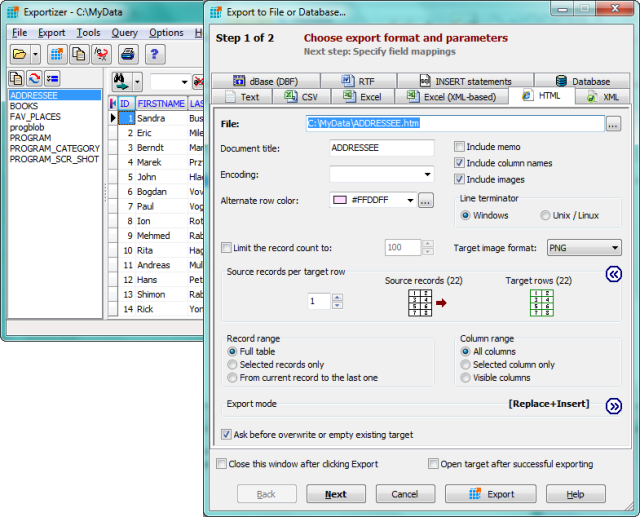
Exportizer version 10.3.1.1339 has been released, enhancing its capabilities as a versatile free database export tool. This software enables users to export data easily to files, the clipboard, or directly to a printer. Utilizing BDE or ADO, Exportizer supports a variety of formats including DB, DBF, text, CSV, XLS, RTF, XML, HTML, and INSERT statements, allowing for comprehensive data conversion options.
Users have full control over their exports with customizable source-to-target field mappings and a range of export options. The program's interface allows for straightforward operations, while advanced users can leverage the Command Line to execute exports with multiple parameters. Additionally, the GUI facilitates quick command line generation.
Key features of Exportizer include:
- The ability to open tables from various multi-table database formats such as XLS, XLSX, XLSM, MDB, ACCDB, and more.
- The option to export data from all files within a folder or all tables from a multi-table data source simultaneously.
- Customizable increment numbers for the Increment Field Value function.
- Support for exporting to Excel and other database formats.
- Advanced Command Line options like /Silent, /LogFile, and /CloseOnError.
- Additional export modes such as Append and Empty+Insert.
In summary, Exportizer 10.3.1.1339 continues to provide users with robust features for efficient data manipulation and export, catering to both casual users and professionals who require advanced functionalities. As data management needs evolve, future updates may focus on enhancing user experience, expanding supported formats, and integrating with more advanced database systems to keep pace with industry demands
Users have full control over their exports with customizable source-to-target field mappings and a range of export options. The program's interface allows for straightforward operations, while advanced users can leverage the Command Line to execute exports with multiple parameters. Additionally, the GUI facilitates quick command line generation.
Key features of Exportizer include:
- The ability to open tables from various multi-table database formats such as XLS, XLSX, XLSM, MDB, ACCDB, and more.
- The option to export data from all files within a folder or all tables from a multi-table data source simultaneously.
- Customizable increment numbers for the Increment Field Value function.
- Support for exporting to Excel and other database formats.
- Advanced Command Line options like /Silent, /LogFile, and /CloseOnError.
- Additional export modes such as Append and Empty+Insert.
In summary, Exportizer 10.3.1.1339 continues to provide users with robust features for efficient data manipulation and export, catering to both casual users and professionals who require advanced functionalities. As data management needs evolve, future updates may focus on enhancing user experience, expanding supported formats, and integrating with more advanced database systems to keep pace with industry demands
Exportizer 10.3.1.1339 released
Exportizer is a free database export tool that allows you to export data to a file, clipboard, or printer.