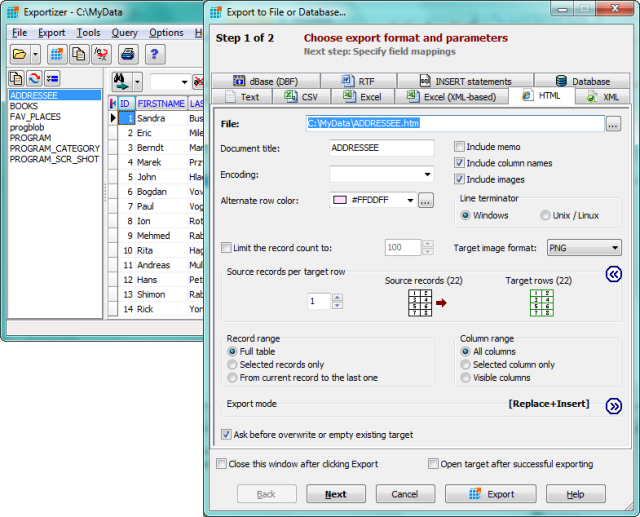
Exportizer 10.3.0.880 has been released, enhancing its capabilities as a free database export tool. This software facilitates the exportation of data to various formats including file systems, clipboard, or directly to printers. It operates through BDE or ADO, enabling conversions from formats such as DB, DBF, and text to several others, including CSV, XLS, RTF, XML, HTML, and SQL INSERT statements.
The tool boasts a comprehensive suite of features that provide users with substantial control over their output. Users can define specific mappings between source and target fields, ensuring that data is exported accurately and efficiently. Operations can be executed through a user-friendly graphical interface or via a Command Line interface, which supports numerous parameters for customization. Notably, the GUI allows for the quick generation of command-line commands, streamlining the export process.
Key features of Exportizer include:
- The ability to open tables from various multi-table database files such as XLS, XLSX, MDB, ACCDB, and HTML, as well as ODBC data sources.
- The option to export data from all files in a folder or from all tables within a multi-table database simultaneously.
- Customization options for incrementing field values during exports.
- Support for exporting data to Excel (XML-based) and DATABASE formats.
- Additional command-line options for enhanced functionality, including silent operation, logging, and error handling.
- Advanced export modes such as Append and Empty+Insert, which provide flexibility for data management.
In summary, Exportizer 10.3.0.880 is a versatile tool designed for users who need to efficiently export data across various formats and sources, ensuring they have the right tools for data manipulation and management at their fingertips. With its extensive features and user-friendly interface, it caters to both beginners and advanced users alike. Future updates may continue to enhance its functionalities, potentially incorporating more export formats and improved user experiences
The tool boasts a comprehensive suite of features that provide users with substantial control over their output. Users can define specific mappings between source and target fields, ensuring that data is exported accurately and efficiently. Operations can be executed through a user-friendly graphical interface or via a Command Line interface, which supports numerous parameters for customization. Notably, the GUI allows for the quick generation of command-line commands, streamlining the export process.
Key features of Exportizer include:
- The ability to open tables from various multi-table database files such as XLS, XLSX, MDB, ACCDB, and HTML, as well as ODBC data sources.
- The option to export data from all files in a folder or from all tables within a multi-table database simultaneously.
- Customization options for incrementing field values during exports.
- Support for exporting data to Excel (XML-based) and DATABASE formats.
- Additional command-line options for enhanced functionality, including silent operation, logging, and error handling.
- Advanced export modes such as Append and Empty+Insert, which provide flexibility for data management.
In summary, Exportizer 10.3.0.880 is a versatile tool designed for users who need to efficiently export data across various formats and sources, ensuring they have the right tools for data manipulation and management at their fingertips. With its extensive features and user-friendly interface, it caters to both beginners and advanced users alike. Future updates may continue to enhance its functionalities, potentially incorporating more export formats and improved user experiences
Exportizer 10.3.0.880 released
Exportizer is a free database export tool that allows you to export data to a file, clipboard, or printer.