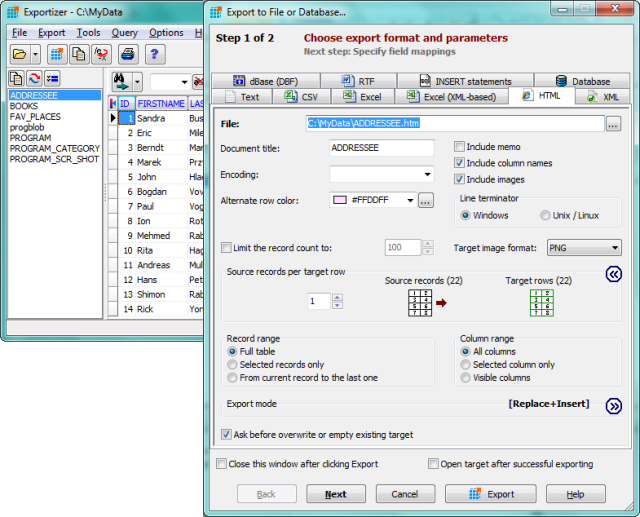
Exportizer 10.2.9.440 has been released, enhancing its capabilities as a free database export tool. Users can easily export data to various formats, including files, clipboard, or printer. The tool operates through BDE or ADO and supports a wide range of file formats, allowing conversion from DB, DBF, text, and CSV to text, CSV, XLS, RTF, XML, HTML, DBF, and INSERT statements.
Key features of Exportizer include:
- Compatibility with multi-table database files such as XLS, MDB, and various ODBC data sources.
- The ability to export data from all tables in a folder or multi-table data source at once, either through the graphical interface or command line.
- Customizable field mappings for precise control over data output.
- Utility functions for data manipulation and bookmarking.
- Additional command line options to streamline operations, such as /Silent and /LogFile.
With the command line functionality, users can generate export commands directly from the GUI, facilitating more complex export operations. The tool also supports multiple export modes, including appending data and empty insertion.
In summary, Exportizer 10.2.9.440 is a powerful and flexible tool for database export needs, catering to users who require efficient solutions for data management and manipulation. Its extensive features make it suitable for both casual users and professionals who handle large databases regularly. With ongoing updates, Exportizer continues to improve its usability, ensuring it meets the evolving needs of its user base
Key features of Exportizer include:
- Compatibility with multi-table database files such as XLS, MDB, and various ODBC data sources.
- The ability to export data from all tables in a folder or multi-table data source at once, either through the graphical interface or command line.
- Customizable field mappings for precise control over data output.
- Utility functions for data manipulation and bookmarking.
- Additional command line options to streamline operations, such as /Silent and /LogFile.
With the command line functionality, users can generate export commands directly from the GUI, facilitating more complex export operations. The tool also supports multiple export modes, including appending data and empty insertion.
In summary, Exportizer 10.2.9.440 is a powerful and flexible tool for database export needs, catering to users who require efficient solutions for data management and manipulation. Its extensive features make it suitable for both casual users and professionals who handle large databases regularly. With ongoing updates, Exportizer continues to improve its usability, ensuring it meets the evolving needs of its user base
Exportizer 10.2.9.440 released
Exportizer is a free database export tool that allows you to export data to a file, clipboard, or printer.