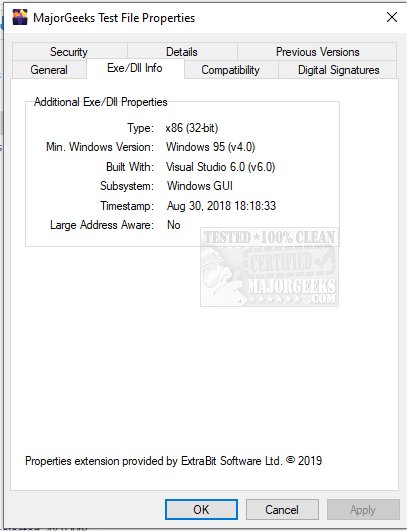
ExeProperties version 1.8.1.0 has been released, offering users an efficient tool to quickly determine if an EXE or DLL file is 32-bit or 64-bit. This functionality addresses a common issue where users download files that are incompatible with their system architecture, leading to wasted time and effort when attempting to run these files.
By integrating an additional tab in the context menu properties, ExeProperties streamlines the verification process, enabling users to confirm file compatibility at a glance. In addition to indicating the file's architecture, the tool also provides information on the minimum Windows version required for the file to run, as well as details about the version of Microsoft Visual Studio that was used to build the EXE or DLL.
This update enhances user experience by reducing the likelihood of downloading incompatible files and offers valuable insights into the software's requirements. With ExeProperties, users can save time and avoid frustration in their software management tasks.
Looking ahead, it would be beneficial for ExeProperties to consider adding features such as support for additional file formats beyond EXE and DLL, or even integrating a user-friendly interface to analyze multiple files simultaneously. Furthermore, providing an option to display compatibility warnings or recommendations based on the user's system specifications could further enhance its functionality and user experience
By integrating an additional tab in the context menu properties, ExeProperties streamlines the verification process, enabling users to confirm file compatibility at a glance. In addition to indicating the file's architecture, the tool also provides information on the minimum Windows version required for the file to run, as well as details about the version of Microsoft Visual Studio that was used to build the EXE or DLL.
This update enhances user experience by reducing the likelihood of downloading incompatible files and offers valuable insights into the software's requirements. With ExeProperties, users can save time and avoid frustration in their software management tasks.
Looking ahead, it would be beneficial for ExeProperties to consider adding features such as support for additional file formats beyond EXE and DLL, or even integrating a user-friendly interface to analyze multiple files simultaneously. Furthermore, providing an option to display compatibility warnings or recommendations based on the user's system specifications could further enhance its functionality and user experience
ExeProperties 1.8.1.0 released
ExeProperties provides you with quick details on whether or not an EXE or DLL file is 32 or 64-Bit.