The recent release of Executor version 2.2.3.0 introduces a highly customizable alternative to the Windows Run feature, aimed at enhancing user productivity. This multi-purpose launcher is designed to streamline the process of launching applications, particularly for those who find it cumbersome to navigate extensive lists in the Start menu. By providing a quick and efficient way to access programs, Executor optimizes daily workflows.
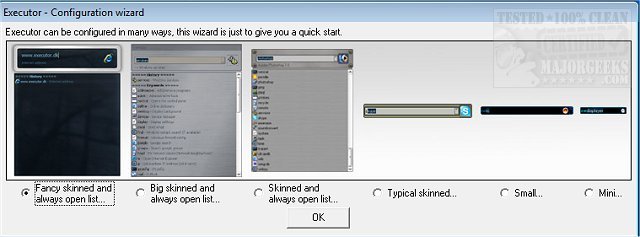
Executor allows users to personalize their experience with various skins, layouts, and operational modes. It features keyword-based suggestions that facilitate rapid searches as users type in the search area, filtering results in real-time. A simple double-click can launch applications, open folders, or copy file paths, and the program minimizes to the system tray when not in use, ensuring easy access.
Key features include:
- Customizable keywords with properties for shortcuts, enabling users to drag and drop files or folders to create keywords.
- Auto-completion for keywords and file system history.
- URL detection, allowing direct entry of web addresses.
- Support for parameters in keywords to enhance search capabilities.
- Dynamic integration of start menu items and control panel items into suggestions.
- User-defined file extension scanning for quick access to specific file types.
- Integration with popular services like Gmail and Twitter.
- Customizable layout options including colors, fonts, and transparency.
- Hotkey assignments for each keyword for efficient access.
- Ability to be launched via user-defined hotkeys.
Overall, once configured, Executor can significantly improve workflow and efficiency, making it an invaluable tool for users looking to streamline their computing experience.
To further extend this functionality, users might explore additional integrations with task management tools or cloud storage services, enabling even more seamless access to frequently used files and applications. Moreover, tutorials and community forums can provide new users with insights into optimizing their setup and discovering hidden features, making Executor not just a tool, but a customizable hub for productivity
Executor allows users to personalize their experience with various skins, layouts, and operational modes. It features keyword-based suggestions that facilitate rapid searches as users type in the search area, filtering results in real-time. A simple double-click can launch applications, open folders, or copy file paths, and the program minimizes to the system tray when not in use, ensuring easy access.
Key features include:
- Customizable keywords with properties for shortcuts, enabling users to drag and drop files or folders to create keywords.
- Auto-completion for keywords and file system history.
- URL detection, allowing direct entry of web addresses.
- Support for parameters in keywords to enhance search capabilities.
- Dynamic integration of start menu items and control panel items into suggestions.
- User-defined file extension scanning for quick access to specific file types.
- Integration with popular services like Gmail and Twitter.
- Customizable layout options including colors, fonts, and transparency.
- Hotkey assignments for each keyword for efficient access.
- Ability to be launched via user-defined hotkeys.
Overall, once configured, Executor can significantly improve workflow and efficiency, making it an invaluable tool for users looking to streamline their computing experience.
To further extend this functionality, users might explore additional integrations with task management tools or cloud storage services, enabling even more seamless access to frequently used files and applications. Moreover, tutorials and community forums can provide new users with insights into optimizing their setup and discovering hidden features, making Executor not just a tool, but a customizable hub for productivity
Executor 2.2.3.0 released
Executor provides a fully customizable alternative to Windows Run that gives you a personalized multi-purpose launcher and more.