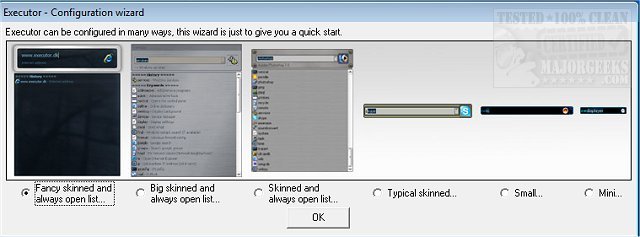
Executor 2.2.11.0 has been released, offering users a customizable alternative to the standard Windows Run feature. This program serves as a multi-purpose launcher designed to streamline the process of launching applications, especially for those who find navigating through a cluttered Start menu time-consuming. Executor enhances productivity by allowing fast access to programs, folders, and files with just a few keystrokes.
The program is highly customizable, featuring various skins, layouts, and operation modes tailored to user preferences. Users can set it up to provide keyword-based suggestions and execute searches that filter results in real-time. A double-click on any suggested entry launches the target app or performs other actions, such as opening a folder or copying a file path. When not in use, Executor resides in the system tray for easy access.
Key features include:
- The ability to create keywords with properties akin to shortcuts, enabling users to drag and drop files, folders, or favorites to add them as keywords.
- Auto-completion for keywords, file systems, and history to enhance efficiency.
- Direct URL detection for easy access to websites.
- Support for parameters in keywords to facilitate specific searches.
- Integration with Start menu items and Control Panel items for quick access.
- User-defined paths for scanning file extensions.
- Integration with popular services like Gmail and Twitter for added functionality.
- Extensive customization options for appearance and behavior, including layout, colors, fonts, and transparency.
- The option to assign hotkeys to keywords for rapid access.
In conclusion, Executor 2.2.11.0 is an invaluable tool for users seeking to optimize their workflow by providing a fast, efficient, and personalized method to launch applications and manage files. Its extensive customization options and features make it a versatile addition to any Windows user's toolkit, significantly enhancing daily productivity and work processes
The program is highly customizable, featuring various skins, layouts, and operation modes tailored to user preferences. Users can set it up to provide keyword-based suggestions and execute searches that filter results in real-time. A double-click on any suggested entry launches the target app or performs other actions, such as opening a folder or copying a file path. When not in use, Executor resides in the system tray for easy access.
Key features include:
- The ability to create keywords with properties akin to shortcuts, enabling users to drag and drop files, folders, or favorites to add them as keywords.
- Auto-completion for keywords, file systems, and history to enhance efficiency.
- Direct URL detection for easy access to websites.
- Support for parameters in keywords to facilitate specific searches.
- Integration with Start menu items and Control Panel items for quick access.
- User-defined paths for scanning file extensions.
- Integration with popular services like Gmail and Twitter for added functionality.
- Extensive customization options for appearance and behavior, including layout, colors, fonts, and transparency.
- The option to assign hotkeys to keywords for rapid access.
In conclusion, Executor 2.2.11.0 is an invaluable tool for users seeking to optimize their workflow by providing a fast, efficient, and personalized method to launch applications and manage files. Its extensive customization options and features make it a versatile addition to any Windows user's toolkit, significantly enhancing daily productivity and work processes
Executor 2.2.11.0 released
Executor provides a fully customizable alternative to Windows Run that gives you a personalized multi-purpose launcher and more.