Executor 2.2.0.0 has been released, offering users a highly customizable alternative to the standard Windows Run feature. This innovative application serves as a multipurpose launcher designed to enhance productivity by providing a more efficient way to access programs without the need to navigate through the often cluttered Start menu. This is particularly beneficial for users who find themselves overwhelmed by an extensive list of applications.
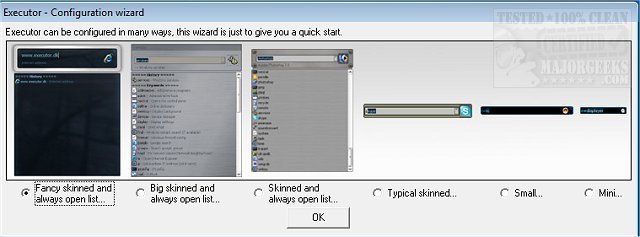
Executor allows users to personalize their experience through various skins, layouts, and operational modes, catering to individual preferences and needs. The program features a quick search function that retrieves results based on keywords entered, providing real-time suggestions that streamline the process of launching apps. Users can quickly execute commands with a double-click, access context menus, or copy file paths, all while the program remains conveniently minimized in the system tray.
Key features of Executor include customizable keyword properties that enable users to drag and drop shortcuts or files, auto-completion for keywords and file histories, and the ability to enter URLs directly. Additionally, it supports dynamic integration of start menu items and control panel options, allowing for a comprehensive search experience. Users can also add their own paths for specific file types and utilize the "find [text]" functionality to leverage Windows Instant Search.
Executor further supports integration with popular services like Gmail and Twitter, enhancing its versatility as a productivity tool. Users can customize the program's appearance with various layout options, including colors, fonts, and transparency effects, and can assign hotkeys to keywords for rapid access.
Overall, Executor is designed to optimize workflows by adapting to users' habits and preferences, making it a valuable tool for anyone looking to improve their efficiency and streamline their daily tasks.
For those interested in maximizing their Windows experience, Executor stands out as a powerful alternative to the traditional Start menu, with extensive customization options that cater to a wide variety of user needs. Whether you are a power user or someone looking to improve your daily computing tasks, Executor can significantly enhance your operational efficiency
Executor allows users to personalize their experience through various skins, layouts, and operational modes, catering to individual preferences and needs. The program features a quick search function that retrieves results based on keywords entered, providing real-time suggestions that streamline the process of launching apps. Users can quickly execute commands with a double-click, access context menus, or copy file paths, all while the program remains conveniently minimized in the system tray.
Key features of Executor include customizable keyword properties that enable users to drag and drop shortcuts or files, auto-completion for keywords and file histories, and the ability to enter URLs directly. Additionally, it supports dynamic integration of start menu items and control panel options, allowing for a comprehensive search experience. Users can also add their own paths for specific file types and utilize the "find [text]" functionality to leverage Windows Instant Search.
Executor further supports integration with popular services like Gmail and Twitter, enhancing its versatility as a productivity tool. Users can customize the program's appearance with various layout options, including colors, fonts, and transparency effects, and can assign hotkeys to keywords for rapid access.
Overall, Executor is designed to optimize workflows by adapting to users' habits and preferences, making it a valuable tool for anyone looking to improve their efficiency and streamline their daily tasks.
For those interested in maximizing their Windows experience, Executor stands out as a powerful alternative to the traditional Start menu, with extensive customization options that cater to a wide variety of user needs. Whether you are a power user or someone looking to improve your daily computing tasks, Executor can significantly enhance your operational efficiency
Executor 2.2.0.0 released
Executor provides a fully customizable alternative to Windows Run that gives you a personalized multi-purpose launcher and more.