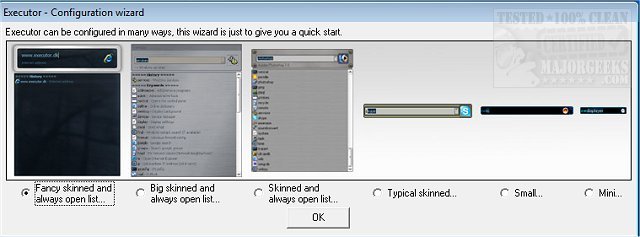
Executor version 2.1.10 has been released, offering a highly customizable alternative to the traditional Windows Run feature. This multi-purpose launcher is specifically designed to enhance user productivity by streamlining the process of searching for applications. For users who find it tedious to scroll through extensive lists in the Start menu, Executor provides an efficient solution by allowing quick access to programs and optimizing daily workflows.
With Executor, users can personalize their experience through various skins, layouts, and operational modes tailored to individual preferences. The application features a dynamic search functionality that instantly filters results as users type in the search area. A double-click on any result launches the selected application or performs functions like opening a folder or copying a file path. Executor runs in the system tray when not in use, ensuring it is readily accessible.
Key features of Executor include:
- Keyword management with properties that allow users to drag and drop shortcuts, files, folders, or favorites for quick access.
- Auto-completion for keywords, file systems, and history.
- URL detection for direct entry of web addresses.
- Support for keyword parameters and dynamic inclusion of related Start menu items and control panel options.
- Integration with popular services like Gmail and Twitter, enhancing functionality with user-defined commands.
- Customizable layouts, including colors, fonts, dimensions, and transparency.
- Support for skinning and alpha blending effects, allowing users to position elements freely.
- The option to assign hotkeys to keywords for quick access, functioning similarly to popular hotkey managers.
In addition to these features, Executor allows for extensive customization options, making it an invaluable tool for users looking to improve their efficiency in managing applications and tasks on their Windows systems.
To learn more about Executor and explore its complete feature set, users are encouraged to visit the author's website
With Executor, users can personalize their experience through various skins, layouts, and operational modes tailored to individual preferences. The application features a dynamic search functionality that instantly filters results as users type in the search area. A double-click on any result launches the selected application or performs functions like opening a folder or copying a file path. Executor runs in the system tray when not in use, ensuring it is readily accessible.
Key features of Executor include:
- Keyword management with properties that allow users to drag and drop shortcuts, files, folders, or favorites for quick access.
- Auto-completion for keywords, file systems, and history.
- URL detection for direct entry of web addresses.
- Support for keyword parameters and dynamic inclusion of related Start menu items and control panel options.
- Integration with popular services like Gmail and Twitter, enhancing functionality with user-defined commands.
- Customizable layouts, including colors, fonts, dimensions, and transparency.
- Support for skinning and alpha blending effects, allowing users to position elements freely.
- The option to assign hotkeys to keywords for quick access, functioning similarly to popular hotkey managers.
In addition to these features, Executor allows for extensive customization options, making it an invaluable tool for users looking to improve their efficiency in managing applications and tasks on their Windows systems.
To learn more about Executor and explore its complete feature set, users are encouraged to visit the author's website
Executor 2.1.10 released
Executor provides a fully customizable alternative to Windows Run that gives you a personalized multi-purpose launcher and more.