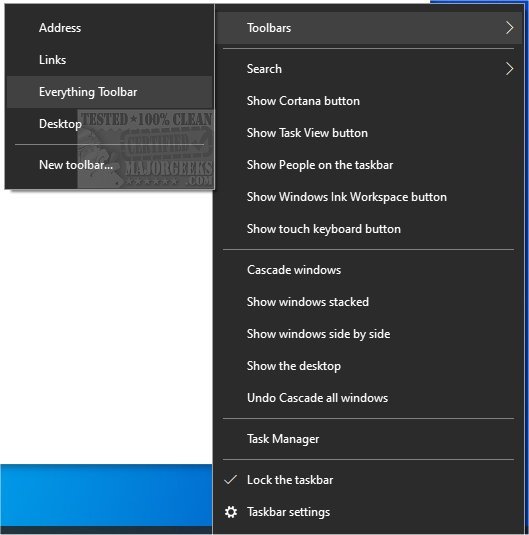
The Everything Toolbar has been updated to version 2.3.0, enhancing its integration with the Windows taskbar. This tool simplifies the process of locating files, folders, and other items by name directly from the taskbar. With its efficient indexing and search capabilities, Everything Toolbar allows users to quickly find files and share them with ease.
To install Everything Toolbar, users should extract the contents of the downloaded file, run the install script as an administrator, and then enable the toolbar through the taskbar's context menu. It’s worth noting that users might need to open the context menu twice for it to appear, based on testing observations.
Additionally, the text references related topics such as managing the search box in Windows 10 and 11, rebuilding the Windows search index, and adjusting settings for enhanced search mode or disabling Bing search in the Start Menu.
In extending this information, users can benefit from exploring the various features offered by Everything Toolbar 2.3.0, such as customizing the toolbar appearance, setting up keyboard shortcuts for faster access, and utilizing advanced search filters to narrow down results. Furthermore, users should keep an eye on future updates to enhance their experience with improved functionalities and bug fixes
To install Everything Toolbar, users should extract the contents of the downloaded file, run the install script as an administrator, and then enable the toolbar through the taskbar's context menu. It’s worth noting that users might need to open the context menu twice for it to appear, based on testing observations.
Additionally, the text references related topics such as managing the search box in Windows 10 and 11, rebuilding the Windows search index, and adjusting settings for enhanced search mode or disabling Bing search in the Start Menu.
In extending this information, users can benefit from exploring the various features offered by Everything Toolbar 2.3.0, such as customizing the toolbar appearance, setting up keyboard shortcuts for faster access, and utilizing advanced search filters to narrow down results. Furthermore, users should keep an eye on future updates to enhance their experience with improved functionalities and bug fixes
Everything Toolbar 2.3.0 released
Everything Toolbar provides you with an easy-to-utilize Everything integration for the Windows toolbar.