The Everything Toolbar has been updated to version 2.1.2, enhancing its integration with the Windows taskbar. This tool allows users to quickly and easily find files and folders by name directly from the taskbar, streamlining the process of file indexing and searching. Additionally, it facilitates easy file sharing among users.
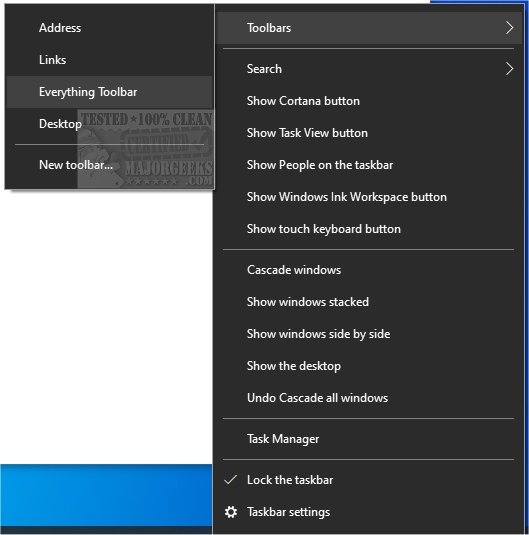
To install Everything Toolbar, follow these steps: extract the contents of the downloaded file, run the install.cmd as an administrator, and enable Everything Toolbar through the taskbar's context menu. Users may need to open the context menu twice for it to appear, as some testing has indicated that the menu may not show the first time.
For those interested in further optimizing their Windows experience, related guides include instructions on managing the search box in Windows 10 & 11, rebuilding the Windows search index, enabling or disabling enhanced search modes, and disabling Bing search in the Start Menu.
To extend the functionality of the Everything Toolbar, users might consider exploring additional customization options or integrating it with other productivity tools to enhance their workflow. Additionally, staying updated with future releases and user feedback can help in maximizing the utility of this tool
To install Everything Toolbar, follow these steps: extract the contents of the downloaded file, run the install.cmd as an administrator, and enable Everything Toolbar through the taskbar's context menu. Users may need to open the context menu twice for it to appear, as some testing has indicated that the menu may not show the first time.
For those interested in further optimizing their Windows experience, related guides include instructions on managing the search box in Windows 10 & 11, rebuilding the Windows search index, enabling or disabling enhanced search modes, and disabling Bing search in the Start Menu.
To extend the functionality of the Everything Toolbar, users might consider exploring additional customization options or integrating it with other productivity tools to enhance their workflow. Additionally, staying updated with future releases and user feedback can help in maximizing the utility of this tool
Everything Toolbar 2.1.2 released
Everything Toolbar provides you with an easy-to-utilize Everything integration for the Windows toolbar.